[Bug Report]: Create-Permission in Shelves #2502

Closed
opened 2026-02-05 04:21:11 +03:00 by OVERLORD · 5 comments
Owner

Originally created by @SammyTV9825 on GitHub (Nov 23, 2021).

Describe the Bug

Create-Permission in Shelves does not show up when permission is granted

Steps to Reproduce

  1. Create Shelve
  2. Create Book
  3. Give permission to create (Book)
  4. Look with user that has that permission

Expected Behaviour

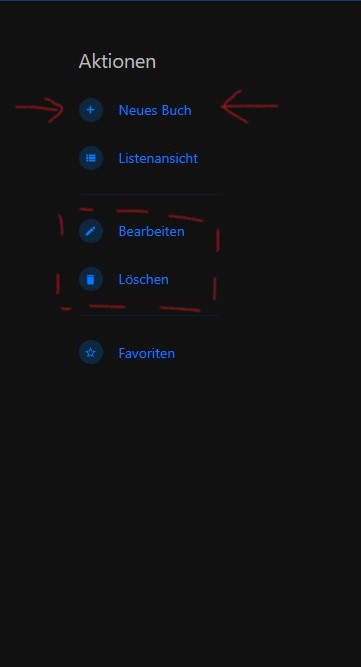
A Create-Button should appear on the right side (actions menu)

Screenshots or Additional Context

Create-Button appears with other buttons (edit, delete) if their permission is granted (sometimes)

Exact BookStack Version

21.11

PHP Version

No response

Hosting Environment

Docker container

Originally created by @SammyTV9825 on GitHub (Nov 23, 2021). ### Describe the Bug Create-Permission in Shelves does not show up when permission is granted ### Steps to Reproduce 1. Create Shelve 2. Create Book 3. Give permission to create (Book) 4. Look with user that has that permission ### Expected Behaviour A Create-Button should appear on the right side (actions menu) ### Screenshots or Additional Context Create-Button appears with other buttons (edit, delete) if their permission is granted (sometimes) ### Exact BookStack Version 21.11 ### PHP Version _No response_ ### Hosting Environment Docker container
OVERLORD added the 🐛 Bug label 2026-02-05 04:21:11 +03:00
Author
Owner

@ssddanbrown commented on GitHub (Nov 23, 2021):

Hi @Sammysamsi,
Could you confirm exactly where you're attempting to set permissions (Step 3) and exactly where you're looking in regards to Step 4?

Both of these steps are somewhat ambiguous and could mean multiple things so just want to nail down the exact flow to re-produce this.

@ssddanbrown commented on GitHub (Nov 23, 2021): Hi @Sammysamsi, Could you confirm exactly where you're attempting to set permissions (Step 3) and exactly where you're looking in regards to Step 4? Both of these steps are somewhat ambiguous and could mean multiple things so just want to nail down the exact flow to re-produce this.
Author
Owner

@SammyTV9825 commented on GitHub (Nov 23, 2021):

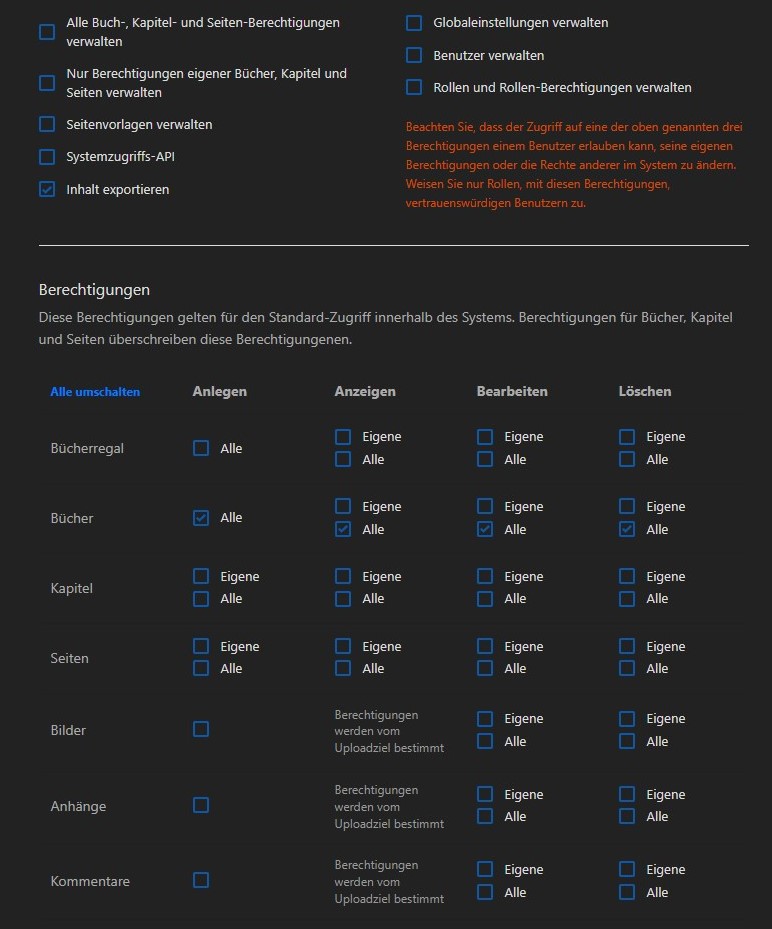
The role itself has no permissions.
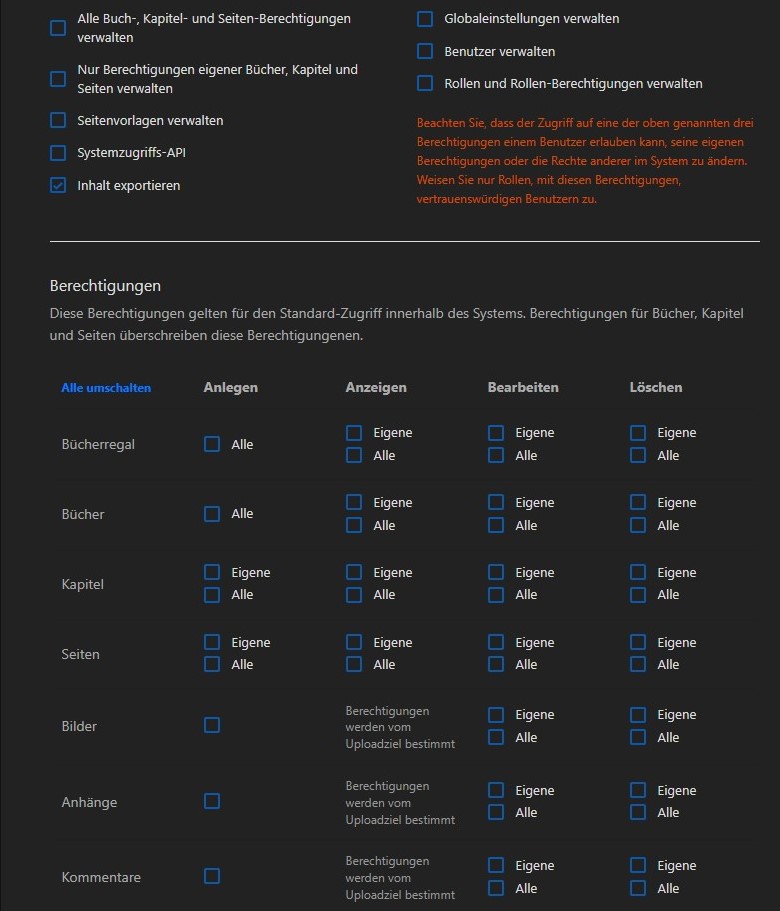
role-perms
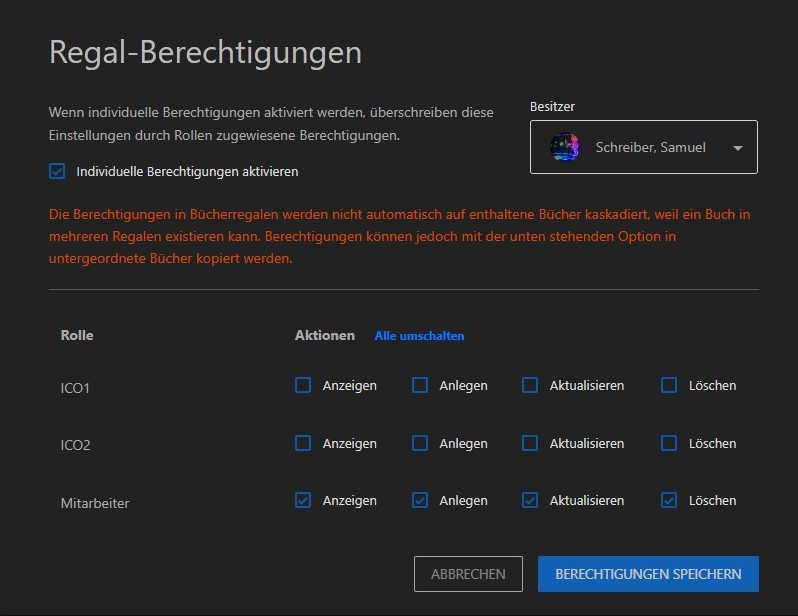
The shelve permissions allows the user to view the shelve, create books, edit the shelve and delete the shelve
shelve-perms
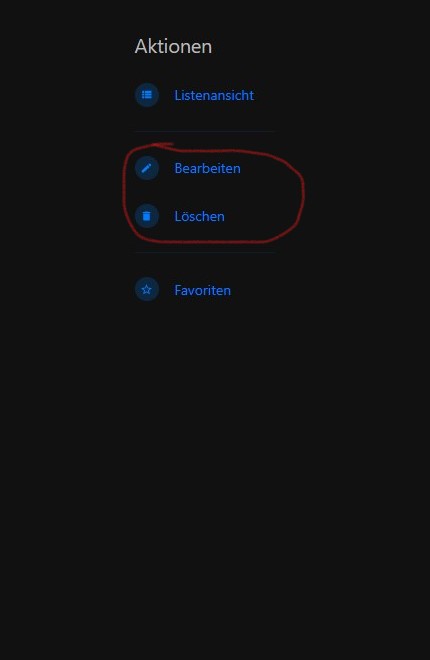
Now I am navigating into the shelve and the actions menu only displays the edit- and delete-button. The add/create-button is missing (Should be the first item)
actions

When I am granting these permissions to the role itself...
granted-role-perms
...its showing all buttons as they should be displayed
actions-with-role-perms

If thats not clear enough let me know. I also might have found another problem. I'll check that first before i open another report.

Edit: I am viewing Bookstack with an user that has only this role (its the default one) and there are no other perms set for the shelve.

Edit2: Just want to say that i cant reproduce the situation of the create-button showing up when the edit- and delete-perms are granted (As mentioned in "Screenshots or Additional Context").

@SammyTV9825 commented on GitHub (Nov 23, 2021): The role itself has no permissions. ![role-perms](https://user-images.githubusercontent.com/63116327/143044371-4c201f5b-a9cc-4c7b-a631-6e3412e8880f.jpg) The shelve permissions allows the user to view the shelve, create books, edit the shelve and delete the shelve ![shelve-perms](https://user-images.githubusercontent.com/63116327/143044527-2477fddb-53e4-4d26-ad37-a84f7ef2a65b.jpg) Now I am navigating into the shelve and the actions menu only displays the edit- and delete-button. The add/create-button is missing (Should be the first item) ![actions](https://user-images.githubusercontent.com/63116327/143044904-d4d2a4ca-a43b-4a6b-9735-f387c75e918d.jpg) -------------------------------------------------------- When I am granting these permissions to the role itself... ![granted-role-perms](https://user-images.githubusercontent.com/63116327/143045767-2f02c393-3a42-4a4d-8e12-c184c94ce914.jpg) ...its showing all buttons as they should be displayed ![actions-with-role-perms](https://user-images.githubusercontent.com/63116327/143045871-65a01446-fb47-48f6-8c58-fc3ab3a3aaf7.jpg) ------------------------------------------------------- If thats not clear enough let me know. I also might have found another problem. I'll check that first before i open another report. Edit: I am viewing Bookstack with an user that has only this role (its the default one) and there are no other perms set for the shelve. Edit2: Just want to say that i cant reproduce the situation of the create-button showing up when the edit- and delete-perms are granted (As mentioned in "Screenshots or Additional Context").
Author
Owner

@ssddanbrown commented on GitHub (Nov 23, 2021):

Thanks @Sammysamsi for the detail.

Is this only apparent for shelves? If so I think this may have already been raised under #2690. The shelf create permission is currently redundant.

@ssddanbrown commented on GitHub (Nov 23, 2021): Thanks @Sammysamsi for the detail. Is this only apparent for shelves? If so I think this may have already been raised under #2690. The shelf create permission is currently redundant.
Author
Owner

@SammyTV9825 commented on GitHub (Nov 23, 2021):

Thats probably the same issue. I am sorry for that. I did not found any more issues with permissions right now.

@SammyTV9825 commented on GitHub (Nov 23, 2021): Thats probably the same issue. I am sorry for that. I did not found any more issues with permissions right now.
Author
Owner

@ssddanbrown commented on GitHub (Nov 23, 2021):

@Sammysamsi No worries, that other issue was pretty hard to track down to be fair, but had it in the back of my mind. Thanks for making the effort to report!

@ssddanbrown commented on GitHub (Nov 23, 2021): @Sammysamsi No worries, that other issue was pretty hard to track down to be fair, but had it in the back of my mind. Thanks for making the effort to report!
Sign in to join this conversation.
1 Participants
Notifications
Due Date
No due date set.
Dependencies

No dependencies set.

Reference: starred/BookStack#2502