WYSIWYG editor overwrites MD pages when visiting in reader mode #2335

Closed
opened 2026-02-05 03:42:48 +03:00 by OVERLORD · 4 comments
Owner

Originally created by @adocampo on GitHub (Jul 29, 2021).

Describe the bug
If I set Markdown editor and create and save a page in MD it shows nice. Then, if I change editor to WYSIWYG and visit that page -no need to edit it-, Bookstack changes internally the code for that page into HTML, so if I change again to Markdown, the code of that page stays in HTML, not MD.

Steps To Reproduce
Steps to reproduce the behavior:

  1. Go to 'Settings'
  2. Click on 'Page Editor' dropdown
  3. Select 'Markdown'
  4. Create a new page in MD code
  5. Save it
  6. Go to 'Settings
  7. Click on 'Page Editor' dropdown
  8. Select 'WYSIWYG'
  9. Go to the page you created in MD, no need to edit, just take a look, it looks right
  10. Go to 'Settings'
  11. Click on 'Page Editor' dropdown
  12. Select 'Markdown'
  13. Go to the same page and edit de code
  14. See how on the MD editor appears HTML code (see screenshot)

Expected behavior
You should see MD code when 'Page Editor' option is set to 'Markdown' and rich text edito when is set to 'WYSIWYG'

Screenshots
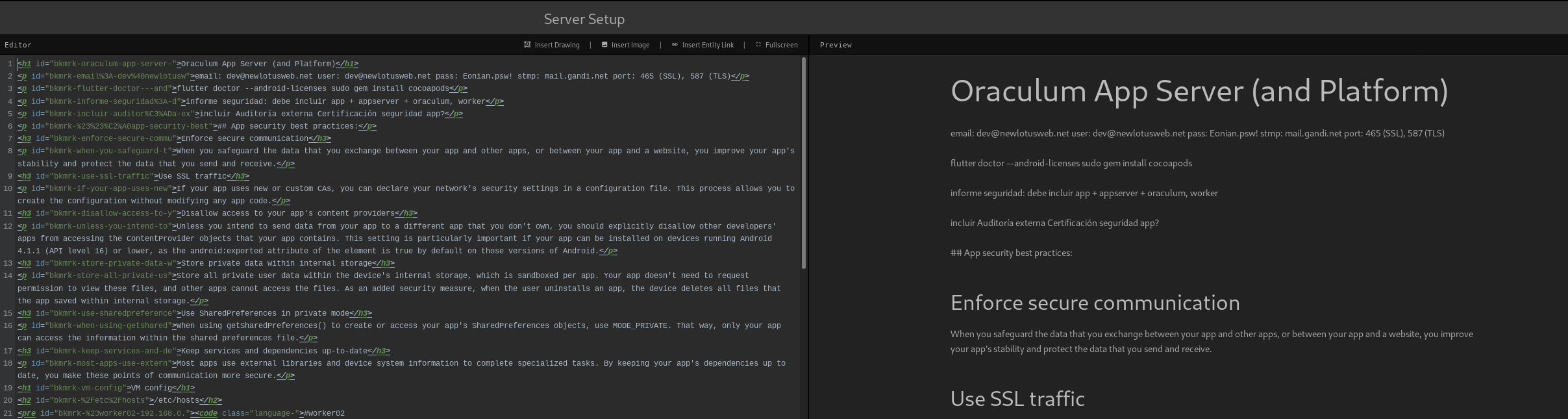
imagen

Your Configuration (please complete the following information):

  • Exact BookStack Version (Found in settings):21.05.3
  • PHP Version: 8.0.8
  • Hosting Method (Nginx/Apache/Docker): Apache

Additional information
Latest gitlab (version 14) has a cool rich markdown editor, you can paste formated pages (from any HTML or word) and it converts into MD just fine, I'm manually converting all my screwed books into MD thought this, but it would be nice if Bookstack could convert back to MD when in settings is selected, or at least letting code untouched, or at least be able to restore an older version from revisions with the proper MD code.

Originally created by @adocampo on GitHub (Jul 29, 2021). **Describe the bug** If I set Markdown editor and create and save a page in MD it shows nice. Then, if I change editor to WYSIWYG and visit that page -no need to edit it-, Bookstack changes internally the code for that page into HTML, so if I change again to Markdown, the code of that page stays in HTML, not MD. **Steps To Reproduce** Steps to reproduce the behavior: 1. Go to 'Settings' 2. Click on 'Page Editor' dropdown 3. Select 'Markdown' 4. Create a new page in MD code 5. Save it 6. Go to 'Settings 7. Click on 'Page Editor' dropdown 8. Select 'WYSIWYG' 9. Go to the page you created in MD, no need to edit, just take a look, it looks right 10. Go to 'Settings' 11. Click on 'Page Editor' dropdown 12. Select 'Markdown' 13. Go to the same page and edit de code 14. See how on the MD editor appears HTML code (see screenshot) **Expected behavior** You should see MD code when 'Page Editor' option is set to 'Markdown' and rich text edito when is set to 'WYSIWYG' **Screenshots** ![imagen](https://user-images.githubusercontent.com/2266612/127447845-795f387a-714e-4bdc-b9f0-9b092a9b3bbc.png) **Your Configuration (please complete the following information):** - Exact BookStack Version (Found in settings):21.05.3 - PHP Version: 8.0.8 - Hosting Method (Nginx/Apache/Docker): Apache **Additional information** Latest gitlab (version 14) has a cool rich markdown editor, you can paste formated pages (from any HTML or word) and it converts into MD just fine, I'm manually converting all my screwed books into MD thought this, but it would be nice if Bookstack could convert back to MD when in settings is selected, or at least letting code untouched, or at _least_ be able to restore an older version from revisions with the proper MD code.
Author
Owner

@ssddanbrown commented on GitHub (Jul 29, 2021):

Hi @adocampo,

What you described should not be the case, and I could not reproduce in a quick test on my development instance.
If you're opening the page in the WYSIWYG editor (But not making a change yourself) there's a chance the editor load causes a change, which gets saved as a draft, which is then restored as HTML on edit after changing the editor back to markdown; but it should notify you that a draft is in use.

Markdown is stored within each saved markdown content revision and should be restored upon revision restore.

For the next feature release we've already merged the functionality to export any page as markdown, including those built in the WYSIWYG editor. This is our first trial of some level of HTML to MD conversion.

@ssddanbrown commented on GitHub (Jul 29, 2021): Hi @adocampo, What you described should not be the case, and I could not reproduce in a quick test on my development instance. If you're opening the page in the WYSIWYG editor (But not making a change yourself) there's a chance the editor load causes a change, which gets saved as a draft, which is then restored as HTML on edit after changing the editor back to markdown; but it should notify you that a draft is in use. Markdown is stored within each saved markdown content revision and should be restored upon revision restore. For the next feature release we've already merged the functionality to export any page as markdown, including those built in the WYSIWYG editor. This is our first trial of some level of HTML to MD conversion.
Author
Owner

@adocampo commented on GitHub (Aug 4, 2021):

What you described should not be the case, and I could not reproduce in a quick test on my development instance.
If you're opening the page in the WYSIWYG editor (But not making a change yourself) there's a chance the editor load causes a change, which gets saved as a draft, which is then restored as HTML on edit after changing the editor back to markdown; but it should notify you that a draft is in use.

The fact is, I don't even need to open the page in the WYSIWYG editor, just plain reading the book... if that page was created with MD, magically just reading it when the WYSIWYG is enabled, changes it to HTML...
I would like to see that converser, I think it could be the first step to configure the editor as per user.

@adocampo commented on GitHub (Aug 4, 2021): > What you described should not be the case, and I could not reproduce in a quick test on my development instance. > If you're opening the page in the WYSIWYG editor (But not making a change yourself) there's a chance the editor load causes a change, which gets saved as a draft, which is then restored as HTML on edit after changing the editor back to markdown; but it should notify you that a draft is in use. The fact is, I don't even need to open the page in the WYSIWYG editor, just plain reading the book... if that page was created with MD, magically _just reading it_ when the WYSIWYG is enabled, changes it to HTML... I would like to see that converser, I think it could be the first step to configure the editor as per user.
Author
Owner

@Panzer1119 commented on GitHub (Nov 7, 2021):

I've just had a similiar problem.

I set the editor to markdown and created a new page.
Then i made some edits to it and saved it as a draft but never set a changelog description nor saved it as a (real/complete) page.

After i closed it and tried to edit it again, it was all html and no markdown, without changing the editor.

(But when i created a new page and set a changelog description there was no problem when closing it and editing it again)

@Panzer1119 commented on GitHub (Nov 7, 2021): I've just had a similiar problem. I set the editor to markdown and created a new page. Then i made some edits to it and saved it as a draft but never set a changelog description nor saved it as a (real/complete) page. After i closed it and tried to edit it again, it was all html and no markdown, without changing the editor. (But when i created a new page and set a changelog description there was no problem when closing it and editing it again)
Author
Owner

@ssddanbrown commented on GitHub (Nov 14, 2021):

Thanks @Panzer1119 for your input. This scenario was also since reported in #3054 and has been patched for the next feature release.


In regards to the original issue here, Attempting again I have still not been able to reproduce this; Nor can I think of how this may even occur. Think I'm just going to have to close this off to be honest although happy to receive further input if it can be verified or if the cause can be found. Otherwise should be a fairly limit case that someone is jumping between editor types at this time.

@ssddanbrown commented on GitHub (Nov 14, 2021): Thanks @Panzer1119 for your input. This scenario was also since reported in #3054 and has been patched for the next feature release. --- In regards to the original issue here, Attempting again I have still not been able to reproduce this; Nor can I think of how this may even occur. Think I'm just going to have to close this off to be honest although happy to receive further input if it can be verified or if the cause can be found. Otherwise should be a fairly limit case that someone is jumping between editor types at this time.
Sign in to join this conversation.
1 Participants
Notifications
Due Date
No due date set.
Dependencies

No dependencies set.

Reference: starred/BookStack#2335