Odd indentation when using checkboxes in markdown #2331

Closed
opened 2026-02-05 03:41:30 +03:00 by OVERLORD · 13 comments
Owner

Originally created by @TobiasDeBruijn on GitHub (Jul 26, 2021).

Describe the bug
When using checkboxes in Markdown:

[ ]
[x]

in an unordered list, indentations in the list are not visible in the result. The following does not produce identation:

- [ ] a
    - [ ] b
    - [ ] c
- [ ] d

However this does, but does not display the numbers:

- [ ] a
    1. [ ] b
    2. [ ] c
- [ ] d

In the unordered list, bullet points are not visible either.

Steps To Reproduce
Steps to reproduce the behavior:

  1. Create a new page in the markdown editor
  2. Create an unordered list with checkboxes
  3. Observe that no bullet points are visible
  4. Add an indentation to the list
  5. Observe that no indentation is visible in the rendered result
  6. Replace the hyphens with numbers in the indented portion of the list
  7. Observe that there is now an indentation, but the numbers aren't rendered

Implementation of checkboxes here: #319

Expected behavior

  1. Indentation is visible
  2. Bulletpoints are visible
  3. Numbers are visible

Screenshots
image

image

Your Configuration (please complete the following information):

  • Exact BookStack Version (Found in settings): v0.31.6 (Going to try updating in a bit)
  • PHP Version: 7.4
  • Hosting Method (Nginx/Apache/Docker): Nginx in a Docker container running on Kubernetes

Additional context
N.A

Originally created by @TobiasDeBruijn on GitHub (Jul 26, 2021). **Describe the bug** When using checkboxes in Markdown: ```md [ ] [x] ``` in an unordered list, indentations in the list are not visible in the result. The following does not produce identation: ```md - [ ] a - [ ] b - [ ] c - [ ] d ``` However this does, but does not display the numbers: ```md - [ ] a 1. [ ] b 2. [ ] c - [ ] d ``` In the unordered list, bullet points are not visible either. **Steps To Reproduce** Steps to reproduce the behavior: 1. Create a new page in the markdown editor 2. Create an unordered list with checkboxes 3. Observe that no bullet points are visible 4. Add an indentation to the list 5. Observe that no indentation is visible in the rendered result 6. Replace the hyphens with numbers in the indented portion of the list 7. Observe that there is now an indentation, but the numbers aren't rendered Implementation of checkboxes here: #319 **Expected behavior** 1. Indentation is visible 2. Bulletpoints are visible 3. Numbers are visible **Screenshots** ![image](https://user-images.githubusercontent.com/28569170/126986914-07a21939-91b4-4b1f-964e-88f0f6357f16.png) ![image](https://user-images.githubusercontent.com/28569170/126987486-00c08788-6fd2-419a-9428-3e06833f8a56.png) **Your Configuration (please complete the following information):** - Exact BookStack Version (Found in settings): v0.31.6 (Going to try updating in a bit) - PHP Version: 7.4 - Hosting Method (Nginx/Apache/Docker): Nginx in a [Docker container](https://github.com/TheDutchMC/Bookstack-Docker) running on Kubernetes **Additional context** N.A
OVERLORD added the 🐛 Bug> Markdown Editor🎨 Design💻 Front-End labels 2026-02-05 03:41:30 +03:00
Author
Owner

@TobiasDeBruijn commented on GitHub (Jul 26, 2021):

Note: I'm not entirely sure if the version is accurate. My CI rebuild the image 11 hours ago from the release branch

@TobiasDeBruijn commented on GitHub (Jul 26, 2021): Note: I'm not entirely sure if the version is accurate. My CI rebuild the image 11 hours ago from the `release` branch
Author
Owner

@ssddanbrown commented on GitHub (Jul 27, 2021):

Thanks for reporting @TheDutchMC,
Before I spend time understanding and investigating this could you just fully confirm that version that you're on? Should be in the settings view on the top right. If you're pulling from the release branch you should be further on from v0.31.6. Just want to make sure on this one since there's been some significant changes to markdown handling over some of the recent releases.

@ssddanbrown commented on GitHub (Jul 27, 2021): Thanks for reporting @TheDutchMC, Before I spend time understanding and investigating this could you just fully confirm that version that you're on? Should be in the settings view on the top right. If you're pulling from the release branch you should be further on from v0.31.6. Just want to make sure on this one since there's been some significant changes to markdown handling over some of the recent releases.
Author
Owner

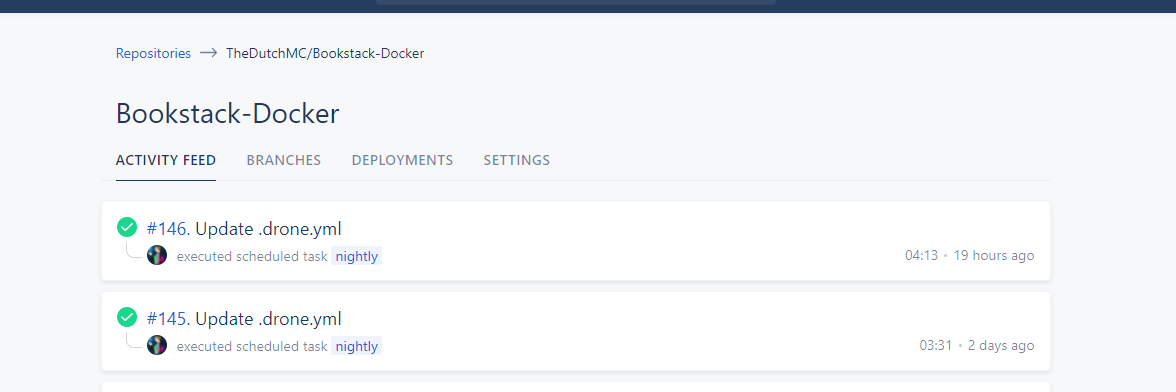
@TobiasDeBruijn commented on GitHub (Jul 27, 2021):

Yep thats what settings says. Not entirely sure why:
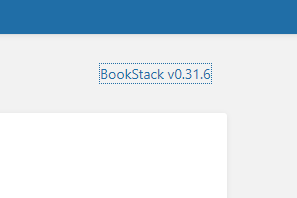
image

CI run:
image

Dockerfile

I've verified that the container gets restarted with the image too, so not entirely sure what's up there

@TobiasDeBruijn commented on GitHub (Jul 27, 2021): Yep thats what settings says. Not entirely sure why: ![image](https://user-images.githubusercontent.com/28569170/127213954-332c99b0-c7cb-4505-8c44-192531def6d7.png) CI run: ![image](https://user-images.githubusercontent.com/28569170/127214018-c1bdcac6-d222-4c66-a36b-f879f27e7fba.png) [Dockerfile](https://github.com/TheDutchMC/Bookstack-Docker/blob/master/Dockerfile) I've verified that the container gets restarted with the image too, so not entirely sure what's up there
Author
Owner

@ssddanbrown commented on GitHub (Jul 27, 2021):

@TheDutchMC Hmm, Wonder if it's just an issue with the version file or if you're actually using an older version.

Worth checking the features of the latest release here and see if your instance has any of the listed added features.

@ssddanbrown commented on GitHub (Jul 27, 2021): @TheDutchMC Hmm, Wonder if it's just an issue with the version file or if you're actually using an older version. Worth checking [the features of the latest release here](https://www.bookstackapp.com/blog/bookstack-release-v21-05/) and see if your instance has any of the listed added features.
Author
Owner

@TobiasDeBruijn commented on GitHub (Jul 27, 2021):

Looking at the first example, the favourites, my instance does not have that. Odd.

I'm looking at redeploying most of my infrastructure anyways, will sort this issue out and report back once I'm on the latest version :D

@TobiasDeBruijn commented on GitHub (Jul 27, 2021): Looking at the first example, the favourites, my instance does not have that. Odd. I'm looking at redeploying most of my infrastructure anyways, will sort this issue out and report back once I'm on the latest version :D
Author
Owner

@techauthoruk commented on GitHub (Jul 29, 2021):

Hi

I am also seeing some odd behaviour with task lists / checkboxes. If I create a task list:

- [ ] Task 1
- [ ] Task 2
- [x] Task 3
- [ ] Task 4

It renders correctly in the preview pane:

image

However, when I save the page and view it in Bookstack, the check boxes have bullets as well:

image

Is this expected behaviour? I'm using Bookstack v21.05.3

@techauthoruk commented on GitHub (Jul 29, 2021): Hi I am also seeing some odd behaviour with task lists / checkboxes. If I create a task list: ``` - [ ] Task 1 - [ ] Task 2 - [x] Task 3 - [ ] Task 4 ``` It renders correctly in the preview pane: ![image](https://user-images.githubusercontent.com/57015243/127459307-f2861691-41b2-46c2-ba89-f6dddf851e99.png) However, when I save the page and view it in Bookstack, the check boxes have bullets as well: ![image](https://user-images.githubusercontent.com/57015243/127459377-ea62b201-27cc-4400-9a97-83be25db5e6b.png) Is this expected behaviour? I'm using Bookstack v21.05.3
Author
Owner

@TobiasDeBruijn commented on GitHub (Jul 29, 2021):

I noticed this too in my version. In the preview pane (while writing the md), no bulletpoints or numbers are shown. But after it is saved and viewed regularly, it is there.

@TobiasDeBruijn commented on GitHub (Jul 29, 2021): I noticed this too in my version. In the preview pane (while writing the md), no bulletpoints or numbers are shown. But after it is saved and viewed regularly, it is there.
Author
Owner

@techauthoruk commented on GitHub (Jul 30, 2021):

I think the task list issue has already been raised in #2837 as well...

@techauthoruk commented on GitHub (Jul 30, 2021): I think the task list issue has already been raised in #2837 as well...
Author
Owner

@ssddanbrown commented on GitHub (Aug 24, 2021):

Just been looking into this, this is due to differences between the system renderer and the preview renderer, In addition to some inconsistent styles for lists.

I'd gone through and reviewed markdown conversion in addition to list styles in general to make things more consistent.
Example of the changes below:

Input Markdown

# Testing

- [ ] Item A
- [ ] Item B
  - [ ] Item C
  - [ ] Item D
     1. [ ] Item E
     2. [ ] Item F
  - [ ] Item G
- [ ] Item H

---

1. Item A
2. Item B

---

- Item A
- Item B

---

1. Item A
2. Item B
   - Item A
   - Item B

---

- Item A
- Item B
   1. Item A
   2. Item B
  
---

- Item A
- Item B
   - Item A
   - Item B
  
---

1. Item A
2. Item B
   1. Item A
   2. Item B

Old Page Rendering

list_rendering_old

New Page Rendering

list_rendering_new

Changes Made

  • Numbered and bullet list margins have been made consistent
    • Numbered lists margins were increase at some point to handle 3-digit numbers, Normal bullet margins updated to match this.
  • Consistent margin for sub-lists.
  • System back-end markdown renderer (For pages) updated with a custom list item renderer to apply class for to align with front-end renderer.
    • This means that task list items will be consistent with the preview and not render a number/bullet.
  • Indentation styles for task list items fixed to be visually indented.

Note, Indentation follows commonmark standards. A sub-list within a parent numbered lists needs 3 spaces to indent into a sub-list (Follows the rule of the nested list being visually intended to the content of the parent).


The changes were made as part of 4fd5dbcfdd, This will be part of the next feature release. Therefore I'll close this off but if there remain issues after that release please feel free to open a new issue.

@ssddanbrown commented on GitHub (Aug 24, 2021): Just been looking into this, this is due to differences between the system renderer and the preview renderer, In addition to some inconsistent styles for lists. I'd gone through and reviewed markdown conversion in addition to list styles in general to make things more consistent. Example of the changes below: ## Input Markdown ```markdown # Testing - [ ] Item A - [ ] Item B - [ ] Item C - [ ] Item D 1. [ ] Item E 2. [ ] Item F - [ ] Item G - [ ] Item H --- 1. Item A 2. Item B --- - Item A - Item B --- 1. Item A 2. Item B - Item A - Item B --- - Item A - Item B 1. Item A 2. Item B --- - Item A - Item B - Item A - Item B --- 1. Item A 2. Item B 1. Item A 2. Item B ``` ## Old Page Rendering ![list_rendering_old](https://user-images.githubusercontent.com/8343178/130521056-e99083e6-fb50-4556-99f4-a9c4e23d46e6.png) ### New Page Rendering ![list_rendering_new](https://user-images.githubusercontent.com/8343178/130521067-9561f7c7-d504-4b5c-b164-994e067b5941.png) ## Changes Made - Numbered and bullet list margins have been made consistent - Numbered lists margins were increase at some point to handle 3-digit numbers, Normal bullet margins updated to match this. - Consistent margin for sub-lists. - System back-end markdown renderer (For pages) updated with a custom list item renderer to apply class for to align with front-end renderer. - This means that task list items will be consistent with the preview and not render a number/bullet. - Indentation styles for task list items fixed to be visually indented. Note, Indentation follows commonmark standards. A sub-list within a parent numbered lists needs 3 spaces to indent into a sub-list (Follows the rule of the nested list being visually intended to the content of the parent). --- The changes were made as part of 4fd5dbcfdd0778afd9423d25042e3f531a5b2c6d, This will be part of the next feature release. Therefore I'll close this off but if there remain issues after that release please feel free to open a new issue.
Author
Owner

@ssddanbrown commented on GitHub (Aug 24, 2021):

Thanks again @TheDutchMC and @techauthoruk for raising the issue and providing detail for this.

@ssddanbrown commented on GitHub (Aug 24, 2021): Thanks again @TheDutchMC and @techauthoruk for raising the issue and providing detail for this.
Author
Owner

@TobiasDeBruijn commented on GitHub (Aug 24, 2021):

Awesome, just in time for the school year's start. Thanks for your efforts!

@TobiasDeBruijn commented on GitHub (Aug 24, 2021): Awesome, just in time for the school year's start. Thanks for your efforts!
Author
Owner

@ssddanbrown commented on GitHub (Aug 24, 2021):

@TheDutchMC Just a warning, I've standardised on not showing bullet points or numbers for task-list-items, Which may seem to contradict some of your original request, but the indentation should now be much more consistent.

I chose not showing the bullets/numbers to align with how GitHub renders their task-lists, and to align with how BookStack has historically rendered task-lists. This seems to be the most common approach. Of course there's no specific standard when it comes to task lists though.

If desperate for numbers/bullets, it would be possible to add a little custom CSS via the "Custom HTML Head" setting in BookStack to override some styles, and restore the bullets & numbers.

@ssddanbrown commented on GitHub (Aug 24, 2021): @TheDutchMC Just a warning, I've standardised on **not** showing bullet points or numbers for task-list-items, Which may seem to contradict some of your original request, but the indentation should now be much more consistent. I chose not showing the bullets/numbers to align with how GitHub renders their task-lists, and to align with how BookStack has historically rendered task-lists. This seems to be the most common approach. Of course there's no specific standard when it comes to task lists though. If desperate for numbers/bullets, it would be possible to add a little custom CSS via the "Custom HTML Head" setting in BookStack to override some styles, and restore the bullets & numbers.
Author
Owner

@TobiasDeBruijn commented on GitHub (Aug 24, 2021):

That should be OK, the indentation is the most important :"D

@TobiasDeBruijn commented on GitHub (Aug 24, 2021): That should be OK, the indentation is the most important :"D
Sign in to join this conversation.
1 Participants
Notifications
Due Date
No due date set.
Dependencies

No dependencies set.

Reference: starred/BookStack#2331