Redirects to public/login leading to 404 Not Found error on Windows 10 #2291

Closed
opened 2026-02-05 03:34:50 +03:00 by OVERLORD · 5 comments
Owner

Originally created by @sivarajkumar237 on GitHub (Jun 12, 2021).

Error Description
Redirects to public/login leading to 404 Not Found error

Steps To Reproduce
Following are the steps I followed to setup bookstack,
a. Extract bookstack package.
b. Execute 'composer install --no-dev' command from bookstack folder.
c. Execute 'npm install' command.
d. Execute 'npm run build' command.
e. Start Wampserver64. Wampserver tray will start and should become green.
f. Click on the Wampserver64 tray and click 'phpMyAdmin'.
g. Login with root user. Create MySQL database. select utf8mb4_unicode_ci as type.
h. Add database details to .env
i. In command prompt, execute 'php artisan key:generate'.
j. In database run the below queries,
use bookstack; # Rename to your own database.
alter table joint_permissions add column id int;
alter table joint_permissions ENGINE=InnoDB;
k. In command prompt execute, 'php artisan migrate'.
l. In wampserver64, click 'Your VirtualHosts' and setup VirtualHost Management.
m. Execute the command 'php artisan serve' to start bookstack.
Expected behavior
The login page for bookstack should have been loaded.

Screenshots
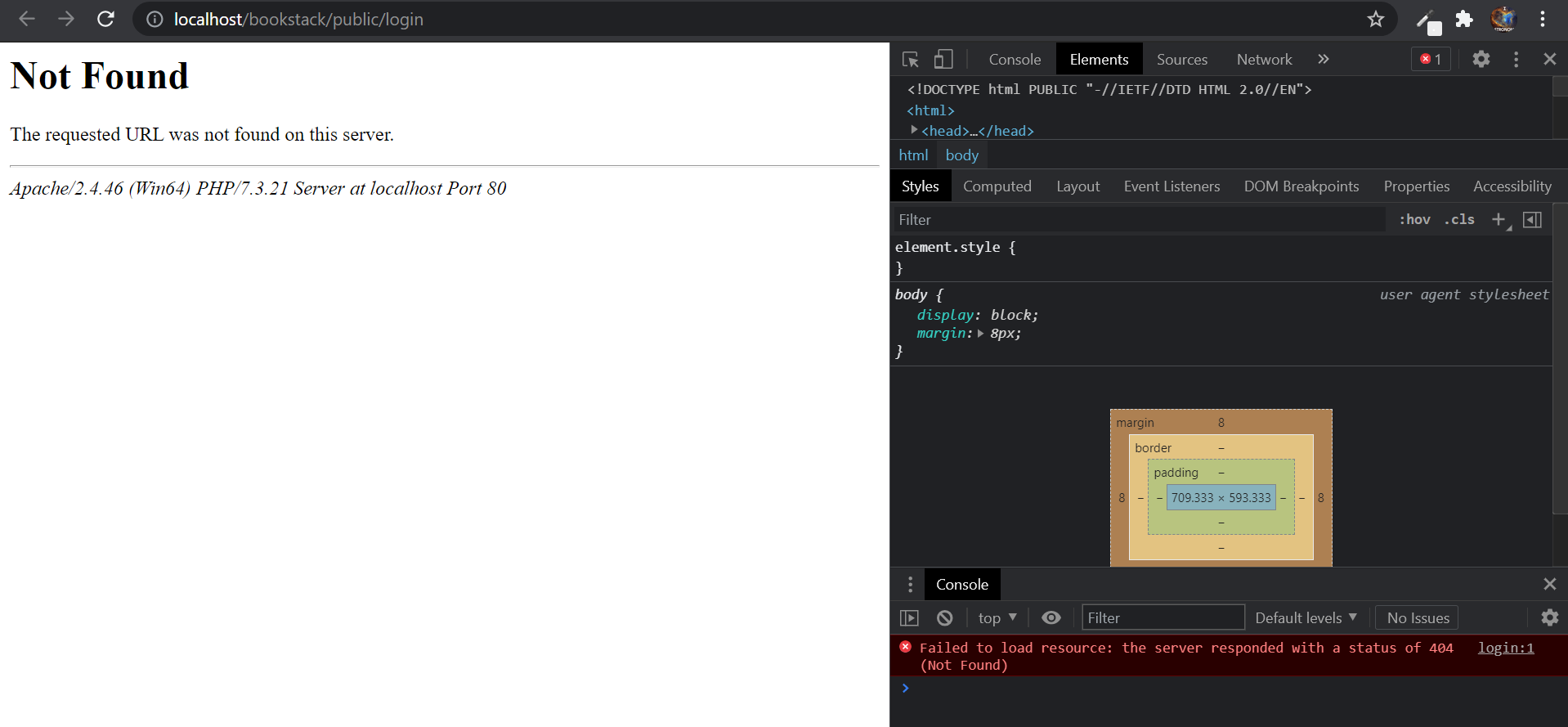
Error 404 screenshot
image

Your Configuration (please complete the following information):

  • Exact BookStack Version (Found in settings): v0.32-dev
  • PHP Version: php7.4.9
  • Hosting Method (Nginx/Apache/Docker): apache2.4.46

Additional context
My virtual host conf file httpd-vhosts.conf,

#
_<VirtualHost *:80>
	ServerName bookstack.local
	DocumentRoot "c:/sivaraj_work/bookstack/bookstack-master/public"
	<Directory  "c:/sivaraj_work/bookstack/bookstack-master/public/">
		Options +Indexes +Includes +FollowSymLinks +MultiViews
		AllowOverride All
		Require all granted
		<IfModule mod_rewrite.c>
            <IfModule mod_negotiation.c>
                Options -MultiViews -Indexes
            </IfModule>

            RewriteEngine On

            # Handle Authorization Header
            RewriteCond %{HTTP:Authorization} .
            RewriteRule .* - [E=HTTP_AUTHORIZATION:%{HTTP:Authorization}]

            # Redirect Trailing Slashes If Not A Folder...
            RewriteCond %{REQUEST_FILENAME} !-d
            RewriteCond %{REQUEST_URI} (.+)/$
            RewriteRule ^ %1 [L,R=301]

            # Handle Front Controller...
            RewriteCond %{REQUEST_FILENAME} !-d
            RewriteCond %{REQUEST_FILENAME} !-f
            RewriteRule ^ index.php [L]
        </IfModule>
	</Directory>
</VirtualHost>_

wampserver access.log,

::1 - - [12/Jun/2021:10:19:04 +0530] "GET /bookstack/public/login HTTP/1.1" 404 281
::1 - - [12/Jun/2021:10:19:04 +0530] "GET /favicon.ico HTTP/1.1" 200 202575

I have tried adding following lines to httpd.conf file in apache,

_<Directory C:/Sivaraj_Work/Bookstack/BookStack-master/public/>
	Options Indexes FollowSymLinks
	AllowOverride All FileInfo
	Require all granted
</Directory>_

My .env file.

image

Could anyone please help me resolve this problem? I really want to try bookstack.

Originally created by @sivarajkumar237 on GitHub (Jun 12, 2021). **Error Description** Redirects to public/login leading to 404 Not Found error **Steps To Reproduce** Following are the steps I followed to setup bookstack, a. Extract bookstack package. b. Execute 'composer install --no-dev' command from bookstack folder. c. Execute 'npm install' command. d. Execute 'npm run build' command. e. Start Wampserver64. Wampserver tray will start and should become green. f. Click on the Wampserver64 tray and click 'phpMyAdmin'. g. Login with root user. Create MySQL database. select utf8mb4_unicode_ci as type. h. Add database details to .env i. In command prompt, execute 'php artisan key:generate'. j. In database run the below queries, use bookstack; # Rename to your own database. alter table joint_permissions add column id int; alter table joint_permissions ENGINE=InnoDB; k. In command prompt execute, 'php artisan migrate'. l. In wampserver64, click 'Your VirtualHosts' and setup VirtualHost Management. m. Execute the command 'php artisan serve' to start bookstack. **Expected behavior** The login page for bookstack should have been loaded. **Screenshots** Error 404 screenshot ![image](https://user-images.githubusercontent.com/51869001/121765235-18054280-cb67-11eb-930b-d3f0cb49e084.png) **Your Configuration (please complete the following information):** - Exact BookStack Version (Found in settings): v0.32-dev - PHP Version: php7.4.9 - Hosting Method (Nginx/Apache/Docker): apache2.4.46 **Additional context** My virtual host conf file httpd-vhosts.conf, ``` # _<VirtualHost *:80> ServerName bookstack.local DocumentRoot "c:/sivaraj_work/bookstack/bookstack-master/public" <Directory "c:/sivaraj_work/bookstack/bookstack-master/public/"> Options +Indexes +Includes +FollowSymLinks +MultiViews AllowOverride All Require all granted <IfModule mod_rewrite.c> <IfModule mod_negotiation.c> Options -MultiViews -Indexes </IfModule> RewriteEngine On # Handle Authorization Header RewriteCond %{HTTP:Authorization} . RewriteRule .* - [E=HTTP_AUTHORIZATION:%{HTTP:Authorization}] # Redirect Trailing Slashes If Not A Folder... RewriteCond %{REQUEST_FILENAME} !-d RewriteCond %{REQUEST_URI} (.+)/$ RewriteRule ^ %1 [L,R=301] # Handle Front Controller... RewriteCond %{REQUEST_FILENAME} !-d RewriteCond %{REQUEST_FILENAME} !-f RewriteRule ^ index.php [L] </IfModule> </Directory> </VirtualHost>_ ``` wampserver access.log, _::1 - - [12/Jun/2021:10:19:04 +0530] "GET /bookstack/public/login HTTP/1.1" 404 281 ::1 - - [12/Jun/2021:10:19:04 +0530] "GET /favicon.ico HTTP/1.1" 200 202575_ I have tried adding following lines to httpd.conf file in apache, ``` _<Directory C:/Sivaraj_Work/Bookstack/BookStack-master/public/> Options Indexes FollowSymLinks AllowOverride All FileInfo Require all granted </Directory>_ ``` My .env file. ![image](https://user-images.githubusercontent.com/51869001/121765454-8e567480-cb68-11eb-8162-867768e945ba.png) Could anyone please help me resolve this problem? I really want to try bookstack.
Author
Owner

@ssddanbrown commented on GitHub (Jun 12, 2021):

Hi @sivarajkumar237,

You've setup a virtual host for bookstack.local but you're not accessing this host at all, you're still accessing your default http://localhost address. To use that bookstack.local address on your local machine you'll likely also need to add that to your windows hosts file if you have not yet already done so.

@ssddanbrown commented on GitHub (Jun 12, 2021): Hi @sivarajkumar237, You've setup a virtual host for `bookstack.local` but you're not accessing this host at all, you're still accessing your default `http://localhost` address. To use that `bookstack.local` address on your local machine you'll likely also need to add that to your [windows hosts file](https://www.howtogeek.com/howto/27350/beginner-geek-how-to-edit-your-hosts-file/) if you have not yet already done so.
Author
Owner

@sivarajkumar237 commented on GitHub (Jun 13, 2021):

Hi @ssddanbrown,

Thanks for your reply. I checked hosts file. bookstack.local is there,

image

@sivarajkumar237 commented on GitHub (Jun 13, 2021): Hi @ssddanbrown, Thanks for your reply. I checked hosts file. bookstack.local is there, ![image](https://user-images.githubusercontent.com/51869001/121795230-71837500-cc2c-11eb-9cac-5f5ae6346928.png)
Author
Owner

@ssddanbrown commented on GitHub (Jun 13, 2021):

@sivarajkumar237 Okay, In that case you should be accessing it at the URL http://bookstack.localin your browser.
The APP_URL value in your .env file should also be http://bookstack.local.

@ssddanbrown commented on GitHub (Jun 13, 2021): @sivarajkumar237 Okay, In that case you should be accessing it at the URL `http://bookstack.local`in your browser. The `APP_URL` value in your `.env` file should also be `http://bookstack.local`.
Author
Owner

@sivarajkumar237 commented on GitHub (Jun 13, 2021):

Wow. Thanks @ssddanbrown. Now I am able to login after setting APP_URL. Thanks again for the quick solution!

@sivarajkumar237 commented on GitHub (Jun 13, 2021): Wow. Thanks @ssddanbrown. Now I am able to login after setting APP_URL. Thanks again for the quick solution!
Author
Owner

@ssddanbrown commented on GitHub (Jun 15, 2021):

@sivarajkumar237 Glad to hear that got things working. Will therefore close this off.

@ssddanbrown commented on GitHub (Jun 15, 2021): @sivarajkumar237 Glad to hear that got things working. Will therefore close this off.
Sign in to join this conversation.
1 Participants
Notifications
Due Date
No due date set.
Dependencies

No dependencies set.

Reference: starred/BookStack#2291