Error with LDAP login #2285

Closed
opened 2026-02-05 03:34:08 +03:00 by OVERLORD · 2 comments
Owner

Originally created by @harmanb on GitHub (Jun 9, 2021).

Describe the bug
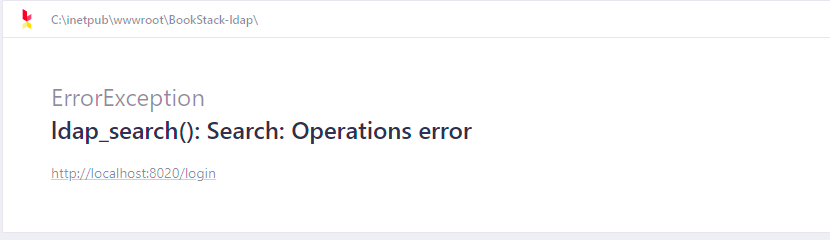
After enabling LDAP authentication I am unable to log in. After entering a username/password I am redirected to the following error message: "ldap_search(): Search: Operations error".

Steps To Reproduce
Steps to reproduce the behavior:

  1. Enable and configure LDAP in .env
  2. attempt to log in

Screenshots
ldap_search error

Your Configuration (please complete the following information):

  • Bookstack Version: BookStack v21.05.1
  • Hosting Method (Nginx/Apache/Docker): IIS
    .env Config:

LDAP_SERVER=MY.PATH:389
LDAP_BASE_DN="DC=,DC=,DC="
LDAP_DN="CN=
,OU=,OU=,DC=,DC=,DC="
LDAP_PASS=

LDAP_USER_FILTER=(&(sAMAccountName=${user}))
LDAP_VERSION=3
LDAP_START_TLS=false
LDAP_TLS_INSECURE=true
LDAP_ID_ATTRIBUTE=BIN;objectGUID
LDAP_EMAIL_ATTRIBUTE=mail
LDAP_DISPLAY_NAME_ATTRIBUTE=displayName
LDAP_FOLLOW_REFERRALS=true
LDAP_DUMP_USER_DETAILS=false

AUTH_METHOD=ldap

Additional context
I've looked through the previously posted issues and tried solutions from other LDAP related issues but haven't had success. I tried changing the filter, the id attribute and also adding OU to the ldap base dn with no luck.

Originally created by @harmanb on GitHub (Jun 9, 2021). **Describe the bug** After enabling LDAP authentication I am unable to log in. After entering a username/password I am redirected to the following error message: "ldap_search(): Search: Operations error". **Steps To Reproduce** Steps to reproduce the behavior: 1. Enable and configure LDAP in .env 2. attempt to log in **Screenshots** ![ldap_search error](https://user-images.githubusercontent.com/28072055/121419770-51a53600-c93a-11eb-86ad-1cb142e85132.PNG) **Your Configuration (please complete the following information):** - Bookstack Version: BookStack v21.05.1 - Hosting Method (Nginx/Apache/Docker): IIS .env Config: LDAP_SERVER=MY.PATH:389 LDAP_BASE_DN="DC=___,DC=___,DC=___" LDAP_DN="CN=___,OU=___,OU=___,DC=___,DC=___,DC=___" LDAP_PASS=___ LDAP_USER_FILTER=(&(sAMAccountName=${user})) LDAP_VERSION=3 LDAP_START_TLS=false LDAP_TLS_INSECURE=true LDAP_ID_ATTRIBUTE=BIN;objectGUID LDAP_EMAIL_ATTRIBUTE=mail LDAP_DISPLAY_NAME_ATTRIBUTE=displayName LDAP_FOLLOW_REFERRALS=true LDAP_DUMP_USER_DETAILS=false AUTH_METHOD=ldap **Additional context** I've looked through the previously posted issues and tried solutions from other LDAP related issues but haven't had success. I tried changing the filter, the id attribute and also adding OU to the ldap base dn with no luck.
Author
Owner

@ssddanbrown commented on GitHub (Jun 15, 2021):

Hi @harmanb,
Can you confirm the LDAP system in place?

Additionally, is there any change in behaviour if you update LDAP_FOLLOW_REFERRALS=false in the .env?

@ssddanbrown commented on GitHub (Jun 15, 2021): Hi @harmanb, Can you confirm the LDAP system in place? Additionally, is there any change in behaviour if you update `LDAP_FOLLOW_REFERRALS=false` in the `.env`?
Author
Owner

@harmanb commented on GitHub (Jun 15, 2021):

Hi @ssddanbrown setting LDAP_FOLLOW_REFERRALS=false fixed the issue. Thank you for the help.

@harmanb commented on GitHub (Jun 15, 2021): Hi @ssddanbrown setting LDAP_FOLLOW_REFERRALS=false fixed the issue. Thank you for the help.
Sign in to join this conversation.
1 Participants
Notifications
Due Date
No due date set.
Dependencies

No dependencies set.

Reference: starred/BookStack#2285