Without permissions it is possible to view a page #2271

Closed
opened 2026-02-05 03:31:10 +03:00 by OVERLORD · 8 comments
Owner

Originally created by @pgarciasoffid on GitHub (May 31, 2021).

Describe the bug

It is possible to view a page without permissions, only need to know the page URL

Steps To Reproduce
Steps to reproduce the behavior:

  1. Create a page inside a book
  2. Book permissions only user administrator
  3. Page permissions only user administrator
  4. If you know the URL of the page, you could access to iti without login to view the content

Expected behavior

Display a message: Page not found.

Screenshots
If applicable, add screenshots to help explain your problem.

Your Configuration (please complete the following information):

  • Exact BookStack Version (Found in settings): v21.04.4
  • PHP Version:
  • Hosting Method (Nginx/Apache/Docker):

Additional context

Originally created by @pgarciasoffid on GitHub (May 31, 2021). **Describe the bug** It is possible to view a page without permissions, only need to know the page URL **Steps To Reproduce** Steps to reproduce the behavior: 1. Create a page inside a book 2. Book permissions only user administrator 3. Page permissions only user administrator 4. If you know the URL of the page, you could access to iti without login to view the content **Expected behavior** Display a message: Page not found. **Screenshots** If applicable, add screenshots to help explain your problem. **Your Configuration (please complete the following information):** - Exact BookStack Version (Found in settings): v21.04.4 - PHP Version: - Hosting Method (Nginx/Apache/Docker): **Additional context**
Author
Owner

@ssddanbrown commented on GitHub (May 31, 2021):

Thanks for reporting @pgarciasoffid.

From my testing following those steps, I cannot reproduce.

Please could you provide screenshots of the following to confirm your scenario:

  • Screenshot of the entire permission view for both the page and book.
  • Screenshot of the roles, shown on the user edit page, for both users you're testing as.
  • Screenshot of the role view for all roles assigned to those two users.
@ssddanbrown commented on GitHub (May 31, 2021): Thanks for reporting @pgarciasoffid. From my testing following those steps, I cannot reproduce. Please could you provide screenshots of the following to confirm your scenario: - Screenshot of the entire permission view for both the page and book. - Screenshot of the roles, shown on the user edit page, for both users you're testing as. - Screenshot of the role view for all roles assigned to those two users.
Author
Owner

@pgarciasoffid commented on GitHub (May 31, 2021):

Screenshot of the entire permission view for both the page and book.
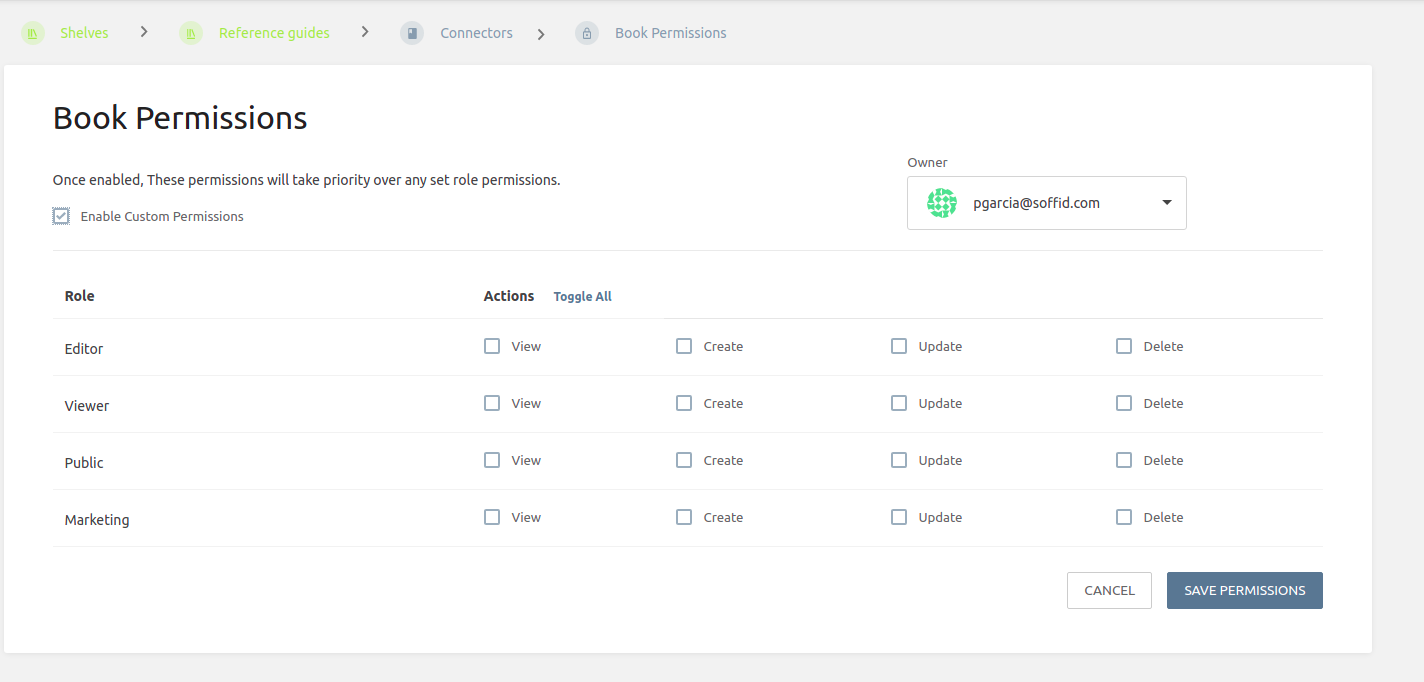
Book-permissions

page-permissions

Screenshot of the roles, for both users you're testing as.
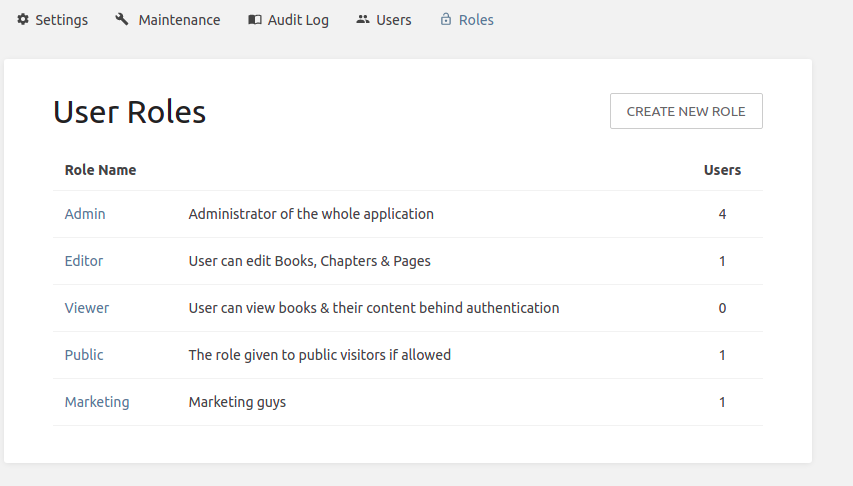
roles

admin user

Screenshot of the role view for all roles assigned to those two users.
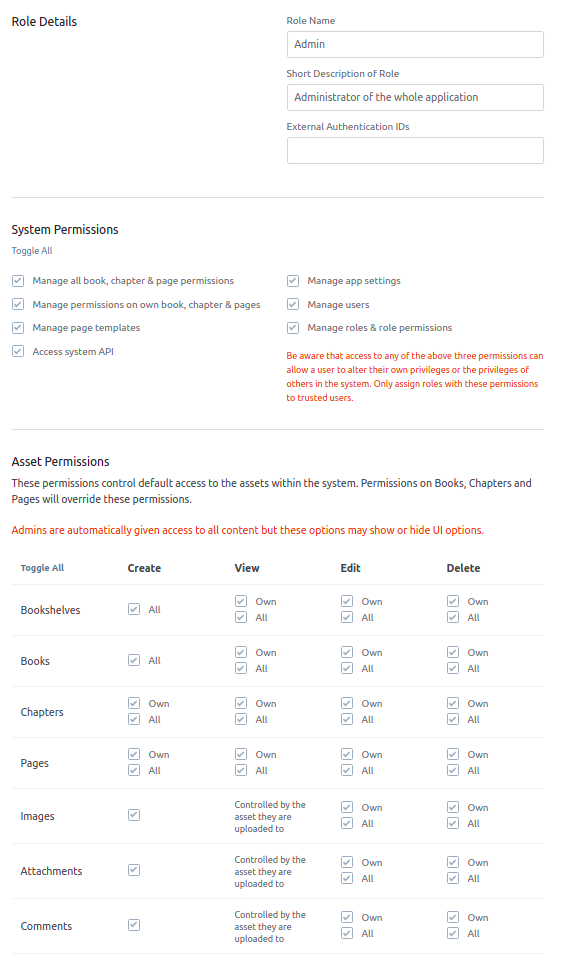
admin role detail

public role detail

It is possible to access to view that page without a user.

Tanks @ssddanbrown

@pgarciasoffid commented on GitHub (May 31, 2021): Screenshot of the entire permission view for both the page and book. ![Book-permissions](https://user-images.githubusercontent.com/85122796/120219489-9bf02e00-c23b-11eb-9d0b-921a7d387da7.png) ![page-permissions](https://user-images.githubusercontent.com/85122796/120219501-9e528800-c23b-11eb-8169-c8271fc2be8d.png) Screenshot of the roles, for both users you're testing as. ![roles](https://user-images.githubusercontent.com/85122796/120219626-ce019000-c23b-11eb-9d92-97f57c6c2ec7.png) ![admin user](https://user-images.githubusercontent.com/85122796/120219791-0dc87780-c23c-11eb-9c07-3e3802f9bd33.png) Screenshot of the role view for all roles assigned to those two users. ![admin role detail](https://user-images.githubusercontent.com/85122796/120219910-3d777f80-c23c-11eb-800c-f50499721362.png) ![public role detail](https://user-images.githubusercontent.com/85122796/120220241-bb3b8b00-c23c-11eb-9bea-2a4d6685375a.png) It is possible to access to view that page without a user. Tanks @ssddanbrown
Author
Owner

@ssddanbrown commented on GitHub (May 31, 2021):

Thanks @pgarciasoffid.

Could you also screenshot the edit page for the "Guest" user account?

@ssddanbrown commented on GitHub (May 31, 2021): Thanks @pgarciasoffid. Could you also screenshot the edit page for the "Guest" user account?
Author
Owner

@pgarciasoffid commented on GitHub (May 31, 2021):

Yeah

user guest

@pgarciasoffid commented on GitHub (May 31, 2021): Yeah ![user guest](https://user-images.githubusercontent.com/85122796/120221468-c1cb0200-c23e-11eb-80f5-926c7a023571.png)
Author
Owner

@ssddanbrown commented on GitHub (May 31, 2021):

@pgarciasoffid Strange, All that looks as expected.

Within your Page/Book permission pages, I noticed in your screenshots that the "Enable custom permissions" checkbox is active/focused which indicates it may have been selected before taking the screenshot. Are you saving permissions after selecting that checkbox? Or is the checkbox unchecked by default and you've checked it before taking the screenshot?

That checkbox should remain checked when you refresh the permissions page if custom permissions are active.

@ssddanbrown commented on GitHub (May 31, 2021): @pgarciasoffid Strange, All that looks as expected. Within your Page/Book permission pages, I noticed in your screenshots that the "Enable custom permissions" checkbox is active/focused which indicates it may have been selected before taking the screenshot. Are you saving permissions after selecting that checkbox? Or is the checkbox unchecked by default and you've checked it before taking the screenshot? That checkbox should remain checked when you refresh the permissions page if custom permissions are active.
Author
Owner

@pgarciasoffid commented on GitHub (May 31, 2021):

@ssddanbrown That is the key :)

I am testing, and if I check "Enable Custom Permissions" without any custom change, the page is not found. But if I save the permission without the check, I can access that page.
Is that a correct behavior?

test
test2

Thanks!!

@pgarciasoffid commented on GitHub (May 31, 2021): @ssddanbrown That is the key :) I am testing, and if I check "Enable Custom Permissions" without any custom change, the page is not found. But if I save the permission without the check, I can access that page. Is that a correct behavior? ![test](https://user-images.githubusercontent.com/85122796/120223022-34d57800-c241-11eb-9d19-70c71522714c.png) ![test2](https://user-images.githubusercontent.com/85122796/120223281-a7deee80-c241-11eb-8004-20eef0811b41.png) Thanks!!
Author
Owner

@ssddanbrown commented on GitHub (May 31, 2021):

@pgarciasoffid Yes, By default the normal role permissions are used but selecting the "Enable custom permissions" overrides those, and instead applies only the permissions selected for that item (In addition to providing the "Admin" role with all permissions by default).

As an added tip: Book and chapter permissions will auto-cascade to child items, No need to set permissions on a page if they're the same as the parent chapter/book.

@ssddanbrown commented on GitHub (May 31, 2021): @pgarciasoffid Yes, By default the normal role permissions are used but selecting the "Enable custom permissions" overrides those, and instead applies only the permissions selected for that item (In addition to providing the "Admin" role with all permissions by default). As an added tip: Book and chapter permissions will auto-cascade to child items, No need to set permissions on a page if they're the same as the parent chapter/book.
Author
Owner

@pgarciasoffid commented on GitHub (May 31, 2021):

Thanks @ssddanbrown :)

@pgarciasoffid commented on GitHub (May 31, 2021): Thanks @ssddanbrown :)
Sign in to join this conversation.
1 Participants
Notifications
Due Date
No due date set.
Dependencies

No dependencies set.

Reference: starred/BookStack#2271