Markdown - Linebreaks II #2262

Closed
opened 2026-02-05 03:29:16 +03:00 by OVERLORD · 4 comments
Owner

Originally created by @dl-lim on GitHub (May 24, 2021).

Describe the feature you'd like
Line breaks respected in Markdown Editor

Describe the benefits this feature would bring to BookStack users
Predictable output based on inputs

Additional context

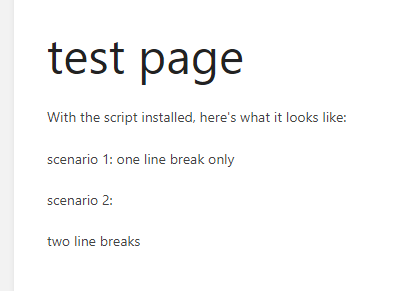
Hi, sorry for reopening a closed issue #928. I've had this question previously too and stumbled upon this fix by @tsacks in the comments. Works wonderfully when you're in the editor and you JUST typed it (Screenshot A), but when you come out of the page, it reverts to the original (Screenshot B). Next, when you click edit again AFTER coming back in, the line break is gone again, until you remove the line break and press enter on it (back to Screenshot A).

Screenshot A:
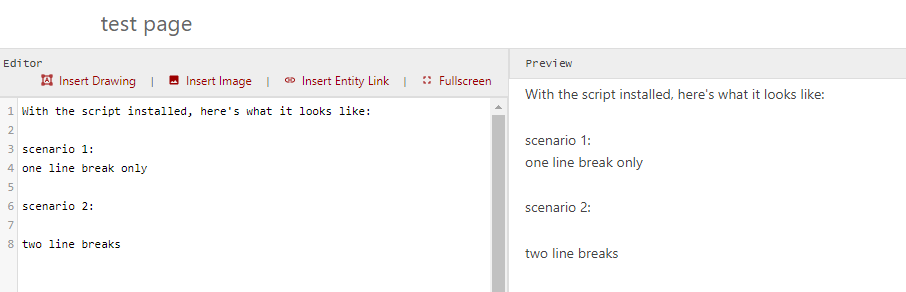
image

Screenshot B:
image

Screenshot C:
image

I suppose the JS added only listens to adding a new line as you press enter?

Originally created by @dl-lim on GitHub (May 24, 2021). **Describe the feature you'd like** Line breaks respected in Markdown Editor **Describe the benefits this feature would bring to BookStack users** Predictable output based on inputs **Additional context** Hi, sorry for reopening a closed issue [#928](https://github.com/BookStackApp/BookStack/issues/928). I've had this question previously too and stumbled upon this fix by @tsacks in the comments. Works wonderfully when you're in the editor and you JUST typed it (Screenshot A), but when you come out of the page, it reverts to the original (Screenshot B). Next, when you click edit again AFTER coming back in, the line break is gone again, until you remove the line break and press enter on it (back to Screenshot A). Screenshot A: ![image](https://user-images.githubusercontent.com/69715968/119330212-8b2e3e00-bcb8-11eb-9485-7c9c7075b159.png) Screenshot B: ![image](https://user-images.githubusercontent.com/69715968/119329581-f4fa1800-bcb7-11eb-9fec-4308e32a5df7.png) Screenshot C: ![image](https://user-images.githubusercontent.com/69715968/119329625-004d4380-bcb8-11eb-9b9a-30da0f681bba.png) I suppose the JS added only listens to adding a new line as you press enter?
Author
Owner

@tsacks commented on GitHub (May 24, 2021):

Hey there!

I think this is actually related to another issue I'm running into in #2761

Specifically, if I'm looking at things correctly, at some point they stopped using the submitted HTML and instead is using the submitted Markdown. And, the markdown processing that they're using server side isn't processing it the same way. This fix that was working was working back when it was using the HTML that the bit of javascript fixed.

Still trying to figure out a good solution to the issue from my end that I might be able to submit, but I'm going to run into security concerns, and I'd like to get some experts weighing in before I even suggest any changes like that.

@tsacks commented on GitHub (May 24, 2021): Hey there! I think this is actually related to another issue I'm running into in #2761 Specifically, if I'm looking at things correctly, at some point they stopped using the submitted HTML and instead is using the submitted Markdown. And, the markdown processing that they're using server side isn't processing it the same way. This fix that was working was working back when it was using the HTML that the bit of javascript fixed. Still trying to figure out a good solution to the issue from my end that I might be able to submit, but I'm going to run into security concerns, and I'd like to get some experts weighing in before I even suggest any changes like that.
Author
Owner

@ssddanbrown commented on GitHub (May 25, 2021):

Hi @alderson59 and thanks @tsacks for your input.

That's correct @tsacks, I moved the final markdown rendering to the backend for greater control and to provide consistency with the API side of BookStack. At the moment, you'll need to configure both the front-end markdown-it library and the back-end League/CommonMark library.

I've recently developed the logical theme system. Within this is a hook to configure the back-end markdown renderer. Here's how you could use this system to enable the expected line breaks:

  1. Add APP_THEME=custom to your .env file.
  2. Within your BookStack directory, create a themes/custom/functions.php file with the below contents. The themes folder should already exist but you'll likely need to create the custom folder.
<?php

use BookStack\Theming\ThemeEvents;
use BookStack\Facades\Theme;
use League\CommonMark\ConfigurableEnvironmentInterface;

Theme::listen(ThemeEvents::COMMONMARK_ENVIRONMENT_CONFIGURE, function (ConfigurableEnvironmentInterface $environment) {
    $environment->mergeConfig([
        'renderer' => [
            'soft_break' => "<br>",
        ]
    ]);
    return $environment;
});

As I said on #928, I only intended to support core commonmark (Plus a certain few additions) within the core project but i'll attempt to provide extension where possible.

@tsacks In regards to you other issue, It can likely be solved in the similar manner but that customization was a little more complex hence why I have not responded yet.

@ssddanbrown commented on GitHub (May 25, 2021): Hi @alderson59 and thanks @tsacks for your input. That's correct @tsacks, I moved the final markdown rendering to the backend for greater control and to provide consistency with the API side of BookStack. At the moment, you'll need to configure both the front-end markdown-it library and the back-end `League/CommonMark` library. I've recently developed [the logical theme system](https://github.com/BookStackApp/BookStack/blob/master/dev/docs/logical-theme-system.md). Within this is a hook to configure the back-end markdown renderer. Here's how you could use this system to enable the expected line breaks: 1. Add `APP_THEME=custom` to your `.env` file. 2. Within your BookStack directory, create a `themes/custom/functions.php` file with the below contents. The `themes` folder should already exist but you'll likely need to create the `custom` folder. ```php <?php use BookStack\Theming\ThemeEvents; use BookStack\Facades\Theme; use League\CommonMark\ConfigurableEnvironmentInterface; Theme::listen(ThemeEvents::COMMONMARK_ENVIRONMENT_CONFIGURE, function (ConfigurableEnvironmentInterface $environment) { $environment->mergeConfig([ 'renderer' => [ 'soft_break' => "<br>", ] ]); return $environment; }); ``` As I said on #928, I only intended to support core commonmark (Plus a certain few additions) within the core project but i'll attempt to provide extension where possible. @tsacks In regards to you other issue, It can likely be solved in the similar manner but that customization was a little more complex hence why I have not responded yet.
Author
Owner

@tsacks commented on GitHub (May 25, 2021):

@ssddanbrown Thanks for this! I'll definitely work on trying to get the custom markup working this way. Just wasn't sure where the hooks would be to implement it. This should be plenty of info to get started. Thanks! :D

@tsacks commented on GitHub (May 25, 2021): @ssddanbrown Thanks for this! I'll definitely work on trying to get the custom markup working this way. Just wasn't sure where the hooks would be to implement it. This should be plenty of info to get started. Thanks! :D
Author
Owner

@ssddanbrown commented on GitHub (Jun 5, 2021):

Since there's been no further discussion required here I'll close this off since I provided a solution for this particular issue in my previous comment.

@ssddanbrown commented on GitHub (Jun 5, 2021): Since there's been no further discussion required here I'll close this off since I provided a solution for this particular issue in my previous comment.
Sign in to join this conversation.
1 Participants
Notifications
Due Date
No due date set.
Dependencies

No dependencies set.

Reference: starred/BookStack#2262