Custom Markdown No Longer Working #2259

Closed
opened 2026-02-05 03:28:51 +03:00 by OVERLORD · 2 comments
Owner

Originally created by @tsacks on GitHub (May 21, 2021).

Describe the bug
Current sandbox settings on the Markdown editor preview iframe no longer allow scripts to interact with it. Since this is the easy way to add plug-ins for Markdown-it that allow custom syntax, those scripts no longer work.

Additionally, when the 'allow-scripts' item is added to the iframe, it appears that even though the correct html is being submitted in the post request, the back end isn't using that html.

Steps To Reproduce
Steps to reproduce the behavior:

  1. Install Bookstack
  2. Add the Custom Container Markdown-it plug in to custom header info in settings
  3. Add in line script to custom header info to configure parsing of custom container
  4. Edit a page to contain a custom container

Expected behavior
Expected the custom container to turn into a div, and then use that div in the page.

Screenshots

Your Configuration (please complete the following information):

  • Exact BookStack Version (Found in settings): v0.31.0+
  • PHP Version: 7.3 and 7.4
  • Hosting Method (Nginx/Apache/Docker): Apache

Additional context
I'm sure there are security reasons why we don't want to enable scripts on iframes as a default. However, this is one of the only ways that an end user can add custom functionality to the site without having to change the code itself. If there's not a way to safely re-enable the behavior, other options for enabling custom Markdown might be needed.

Also, here's the example of the applicable info that I've been putting in the custom header:

<style>
blockquote {
 overflow: visible;
}
blockquote > p:last-child {
 margin-bottom: 0em;
}
.grid-card li {
 font-size: 0.7rem;
 margin: 0;
 line-height: 1.6em;
}
code {
 margin-bottom: 0;
}
.page-content hr {
 clear: none !important;
}
div.top-image {
 width: 100%;
 margin-left: 16px;
}
@media screen and (min-width: 600px) {
 div.top-image {
  width: 45%;
 }
}
@media screen and (min-width: 880px) {
 div.top-image {
  width: 40%;
 }
}
@media screen and (min-width: 1000px) {
 div.top-image {
  width: 35%;
 }
}
@media screen and (min-width: 1400px) {
 div.top-image {
  width: 30%;
 }
}
</style>

<script src="https://cdn.jsdelivr.net/npm/markdown-it-container@2.0.0/dist/markdown-it-container.min.js"></script>

<script>
window.addEventListener('editor-markdown::setup', event => {
  var md = event.detail.markdownIt;
  md.set({breaks: true});
  console.log('MARKDOWN-EDITOR-SETUP', md);
  md.use( window.markdownitContainer, 'sidebar', {
    validate: function(params){
      return params.trim().match(/^sidebar\s*(.*)$/);
    },
    render: function(tokens, idx){
      var m = tokens[idx].info.trim().match(/^sidebar\s*(.*)$/);

      if (tokens[idx].nesting === 1) {
        // opening tag
        return '<div class="grid-card top-image float ' + md.utils.escapeHtml(m[1]) + 
               '"><div class="grid-card-content">\n';
      } else {
        // closing tag
        return '</div></div>\n';
      }
    },
  });
  md.use( window.markdownitContainer, 'card', {
    validate: function(params){
      return params.trim().match(/^card\s*(.*)$/);
    },
    render: function(tokens, idx){
      if (tokens[idx].nesting === 1) {
        // opening tag
        return '<div class="grid-card"><div class="grid-card-content">\n';
      } else {
        // closing tag
        return '</div></div>\n';
      }
    },
  });
});
</script>
Originally created by @tsacks on GitHub (May 21, 2021). **Describe the bug** Current sandbox settings on the Markdown editor preview iframe no longer allow scripts to interact with it. Since this is the easy way to add plug-ins for Markdown-it that allow custom syntax, those scripts no longer work. Additionally, when the 'allow-scripts' item is added to the iframe, it appears that even though the correct html is being submitted in the post request, the back end isn't using that html. **Steps To Reproduce** Steps to reproduce the behavior: 1. Install Bookstack 2. Add the Custom Container Markdown-it plug in to custom header info in settings 3. Add in line script to custom header info to configure parsing of custom container 4. Edit a page to contain a custom container **Expected behavior** Expected the custom container to turn into a div, and then use that div in the page. **Screenshots** **Your Configuration (please complete the following information):** - Exact BookStack Version (Found in settings): v0.31.0+ - PHP Version: 7.3 and 7.4 - Hosting Method (Nginx/Apache/Docker): Apache **Additional context** I'm sure there are security reasons why we don't want to enable scripts on iframes as a default. However, this is one of the only ways that an end user can add custom functionality to the site without having to change the code itself. If there's not a way to safely re-enable the behavior, other options for enabling custom Markdown might be needed. Also, here's the example of the applicable info that I've been putting in the custom header: ``` <style> blockquote { overflow: visible; } blockquote > p:last-child { margin-bottom: 0em; } .grid-card li { font-size: 0.7rem; margin: 0; line-height: 1.6em; } code { margin-bottom: 0; } .page-content hr { clear: none !important; } div.top-image { width: 100%; margin-left: 16px; } @media screen and (min-width: 600px) { div.top-image { width: 45%; } } @media screen and (min-width: 880px) { div.top-image { width: 40%; } } @media screen and (min-width: 1000px) { div.top-image { width: 35%; } } @media screen and (min-width: 1400px) { div.top-image { width: 30%; } } </style> <script src="https://cdn.jsdelivr.net/npm/markdown-it-container@2.0.0/dist/markdown-it-container.min.js"></script> <script> window.addEventListener('editor-markdown::setup', event => { var md = event.detail.markdownIt; md.set({breaks: true}); console.log('MARKDOWN-EDITOR-SETUP', md); md.use( window.markdownitContainer, 'sidebar', { validate: function(params){ return params.trim().match(/^sidebar\s*(.*)$/); }, render: function(tokens, idx){ var m = tokens[idx].info.trim().match(/^sidebar\s*(.*)$/); if (tokens[idx].nesting === 1) { // opening tag return '<div class="grid-card top-image float ' + md.utils.escapeHtml(m[1]) + '"><div class="grid-card-content">\n'; } else { // closing tag return '</div></div>\n'; } }, }); md.use( window.markdownitContainer, 'card', { validate: function(params){ return params.trim().match(/^card\s*(.*)$/); }, render: function(tokens, idx){ if (tokens[idx].nesting === 1) { // opening tag return '<div class="grid-card"><div class="grid-card-content">\n'; } else { // closing tag return '</div></div>\n'; } }, }); }); </script> ```
Author
Owner

@tsacks commented on GitHub (May 21, 2021):

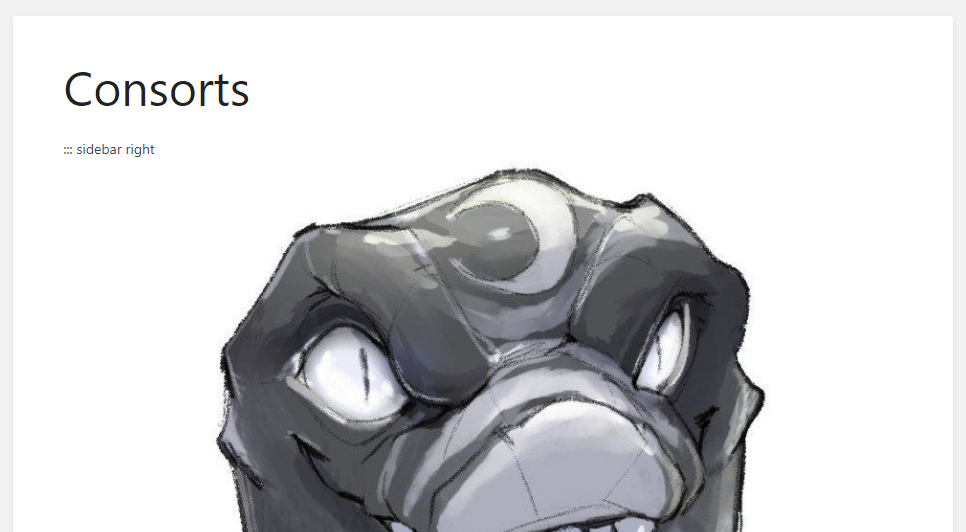
Adding some screenshots to show what's happening, since I wasn't able to when creating the issue.

What it should look like:
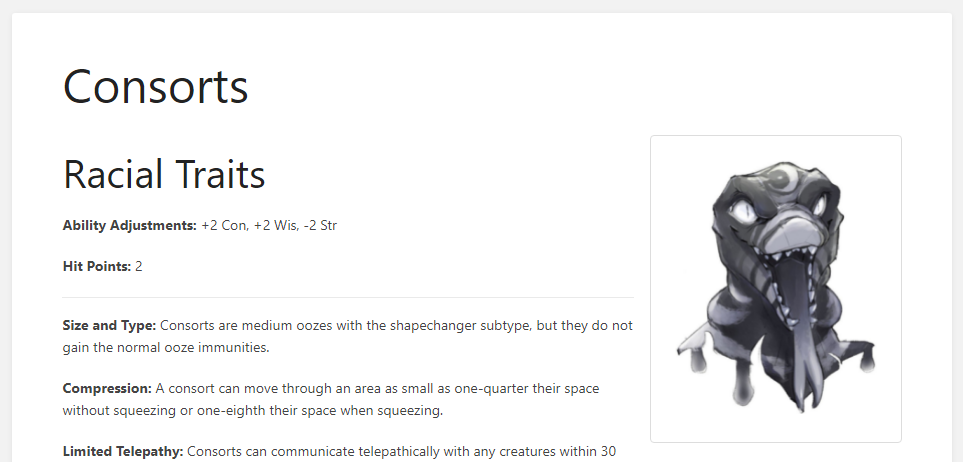
image

What it ends up looking like:
image

@tsacks commented on GitHub (May 21, 2021): Adding some screenshots to show what's happening, since I wasn't able to when creating the issue. What it should look like: ![image](https://user-images.githubusercontent.com/2553898/119079440-1a400b00-b9c6-11eb-946c-c66e185b3ea4.png) What it ends up looking like: ![image](https://user-images.githubusercontent.com/2553898/119079496-3479e900-b9c6-11eb-8652-b5241e3ba333.png)
Author
Owner

@ssddanbrown commented on GitHub (Sep 18, 2021):

As with #2766 I'll close this off but if you need any assistance in applying changes to the back-end render to match your front-end additions feel free to raise via a new issue.

@ssddanbrown commented on GitHub (Sep 18, 2021): As with #2766 I'll close this off but if you need any assistance in applying changes to the back-end render to match your front-end additions feel free to raise via a new issue.
Sign in to join this conversation.
1 Participants
Notifications
Due Date
No due date set.
Dependencies

No dependencies set.

Reference: starred/BookStack#2259