Unable to access Bookstack after upgrade to v21.04 #2189

Closed
opened 2026-02-05 03:15:46 +03:00 by OVERLORD · 9 comments
Owner

Originally created by @techauthoruk on GitHub (Apr 12, 2021).

Describe the bug
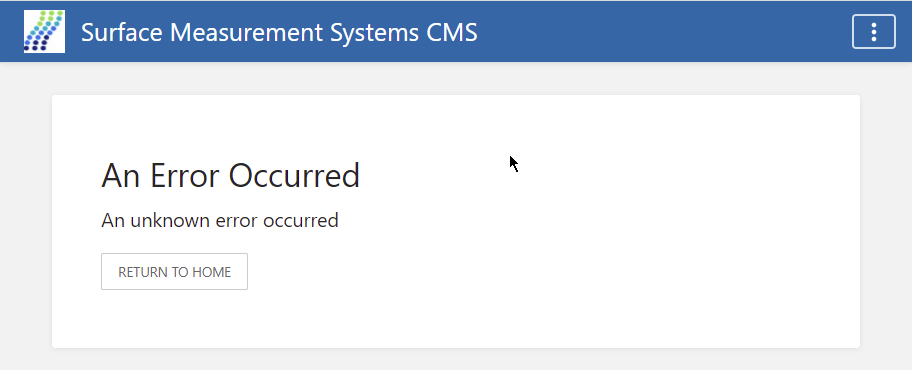
After upgrading to v21.04, I can no longer access my instance of Bookstack - I just get 'An unknown error occured' message

This is the trace log after running git pull origin release && composer install --no-dev && php artisan migrate :

PHP Fatal error:  Uncaught ArgumentCountError: array_merge() does not accept unknown named parameters in /usr/share/php/Composer/DependencyResolver/DefaultPolicy.php:84
Stack trace:
#0 [internal function]: array_merge()
#1 /usr/share/php/Composer/DependencyResolver/DefaultPolicy.php(84): call_user_func_array()
#2 /usr/share/php/Composer/DependencyResolver/Solver.php(387): Composer\DependencyResolver\DefaultPolicy->selectPreferredPackages()
#3 /usr/share/php/Composer/DependencyResolver/Solver.php(740): Composer\DependencyResolver\Solver->selectAndInstall()
#4 /usr/share/php/Composer/DependencyResolver/Solver.php(231): Composer\DependencyResolver\Solver->runSat()
#5 /usr/share/php/Composer/Installer.php(489): Composer\DependencyResolver\Solver->solve()
#6 /usr/share/php/Composer/Installer.php(232): Composer\Installer->doInstall()
#7 /usr/share/php/Composer/Command/InstallCommand.php(122): Composer\Installer->run()
#8 /usr/share/php/Symfony/Component/Console/Command/Command.php(255): Composer\Command\InstallCommand->execute()
#9 /usr/share/php/Symfony/Component/Console/Application.php(934): Symfony\Component\Console\Command\Command->run()
#10 /usr/share/php/Symfony/Component/Console/Application.php(273): Symfony\Component\Console\Application->doRunCommand()
#11 /usr/share/php/Composer/Console/Application.php(281): Symfony\Component\Console\Application->doRun()
#12 /usr/share/php/Symfony/Component/Console/Application.php(149): Composer\Console\Application->doRun()
#13 /usr/share/php/Composer/Console/Application.php(113): Symfony\Component\Console\Application->run()
#14 /usr/bin/composer(62): Composer\Console\Application->run()
#15 {main}
  thrown in /usr/share/php/Composer/DependencyResolver/DefaultPolicy.php on line 84

Fatal error: Uncaught ArgumentCountError: array_merge() does not accept unknown named parameters in /usr/share/php/Composer/DependencyResolver/DefaultPolicy.php:84
Stack trace:
#0 [internal function]: array_merge()
#1 /usr/share/php/Composer/DependencyResolver/DefaultPolicy.php(84): call_user_func_array()
#2 /usr/share/php/Composer/DependencyResolver/Solver.php(387): Composer\DependencyResolver\DefaultPolicy->selectPreferredPackages()
#3 /usr/share/php/Composer/DependencyResolver/Solver.php(740): Composer\DependencyResolver\Solver->selectAndInstall()
#4 /usr/share/php/Composer/DependencyResolver/Solver.php(231): Composer\DependencyResolver\Solver->runSat()
#5 /usr/share/php/Composer/Installer.php(489): Composer\DependencyResolver\Solver->solve()
#6 /usr/share/php/Composer/Installer.php(232): Composer\Installer->doInstall()
#7 /usr/share/php/Composer/Command/InstallCommand.php(122): Composer\Installer->run()
#8 /usr/share/php/Symfony/Component/Console/Command/Command.php(255): Composer\Command\InstallCommand->execute()
#9 /usr/share/php/Symfony/Component/Console/Application.php(934): Symfony\Component\Console\Command\Command->run()
#10 /usr/share/php/Symfony/Component/Console/Application.php(273): Symfony\Component\Console\Application->doRunCommand()
#11 /usr/share/php/Composer/Console/Application.php(281): Symfony\Component\Console\Application->doRun()
#12 /usr/share/php/Symfony/Component/Console/Application.php(149): Composer\Console\Application->doRun()
#13 /usr/share/php/Composer/Console/Application.php(113): Symfony\Component\Console\Application->run()
#14 /usr/bin/composer(62): Composer\Console\Application->run()
#15 {main}
  thrown in /usr/share/php/Composer/DependencyResolver/DefaultPolicy.php on line 84
PHP Fatal error:  Uncaught ArgumentCountError: array_merge() does not accept unknown named parameters in /usr/share/php/Composer/DependencyResolver/DefaultPolicy.php:84
Stack trace:
#0 [internal function]: array_merge()
#1 /usr/share/php/Composer/DependencyResolver/DefaultPolicy.php(84): call_user_func_array()
#2 /usr/share/php/Composer/DependencyResolver/Solver.php(387): Composer\DependencyResolver\DefaultPolicy->selectPreferredPackages()
#3 /usr/share/php/Composer/DependencyResolver/Solver.php(740): Composer\DependencyResolver\Solver->selectAndInstall()
#4 /usr/share/php/Composer/DependencyResolver/Solver.php(231): Composer\DependencyResolver\Solver->runSat()
#5 /usr/share/php/Composer/Installer.php(489): Composer\DependencyResolver\Solver->solve()
#6 /usr/share/php/Composer/Installer.php(232): Composer\Installer->doInstall()
#7 /usr/share/php/Composer/Command/InstallCommand.php(122): Composer\Installer->run()
#8 /usr/share/php/Symfony/Component/Console/Command/Command.php(255): Composer\Command\InstallCommand->execute()
#9 /usr/share/php/Symfony/Component/Console/Application.php(934): Symfony\Component\Console\Command\Command->run()
#10 /usr/share/php/Symfony/Component/Console/Application.php(273): Symfony\Component\Console\Application->doRunCommand()
#11 /usr/share/php/Composer/Console/Application.php(281): Symfony\Component\Console\Application->doRun()
#12 /usr/share/php/Symfony/Component/Console/Application.php(149): Composer\Console\Application->doRun()
#13 /usr/share/php/Composer/Console/Application.php(113): Symfony\Component\Console\Application->run()
#14 /usr/bin/composer(62): Composer\Console\Application->run()
#15 {main}
  thrown in /usr/share/php/Composer/DependencyResolver/DefaultPolicy.php on line 84

Fatal error: Uncaught ArgumentCountError: array_merge() does not accept unknown named parameters in /usr/share/php/Composer/DependencyResolver/DefaultPolicy.php:84
Stack trace:
#0 [internal function]: array_merge()
#1 /usr/share/php/Composer/DependencyResolver/DefaultPolicy.php(84): call_user_func_array()
#2 /usr/share/php/Composer/DependencyResolver/Solver.php(387): Composer\DependencyResolver\DefaultPolicy->selectPreferredPackages()
#3 /usr/share/php/Composer/DependencyResolver/Solver.php(740): Composer\DependencyResolver\Solver->selectAndInstall()
#4 /usr/share/php/Composer/DependencyResolver/Solver.php(231): Composer\DependencyResolver\Solver->runSat()
#5 /usr/share/php/Composer/Installer.php(489): Composer\DependencyResolver\Solver->solve()
#6 /usr/share/php/Composer/Installer.php(232): Composer\Installer->doInstall()
#7 /usr/share/php/Composer/Command/InstallCommand.php(122): Composer\Installer->run()
#8 /usr/share/php/Symfony/Component/Console/Command/Command.php(255): Composer\Command\InstallCommand->execute()
#9 /usr/share/php/Symfony/Component/Console/Application.php(934): Symfony\Component\Console\Command\Command->run()
#10 /usr/share/php/Symfony/Component/Console/Application.php(273): Symfony\Component\Console\Application->doRunCommand()
#11 /usr/share/php/Composer/Console/Application.php(281): Symfony\Component\Console\Application->doRun()
#12 /usr/share/php/Symfony/Component/Console/Application.php(149): Composer\Console\Application->doRun()
#13 /usr/share/php/Composer/Console/Application.php(113): Symfony\Component\Console\Application->run()
#14 /usr/bin/composer(62): Composer\Console\Application->run()
#15 {main}
  thrown in /usr/share/php/Composer/DependencyResolver/DefaultPolicy.php on line 84
PHP Fatal error:  Declaration of Doctrine\DBAL\Driver\PDOConnection::query() must be compatible with PDO::query(string $query, ?int $fetchMode = null, mixed ...$fetchModeArgs) in /var/www/bookstack/vendor/doctrine/dbal/lib/Doctrine/DBAL/Driver/PDOConnection.php on line 81

   Symfony\Component\Debug\Exception\FatalErrorException  : Declaration of Doctrine\DBAL\Driver\PDOConnection::query() must be compatible with PDO::query(string $query, ?int $fetchMode = null, mixed ...$fetchModeArgs)

  at /var/www/bookstack/vendor/doctrine/dbal/lib/Doctrine/DBAL/Driver/PDOConnection.php:81
    77|      * {@inheritdoc}
    78|      *
    79|      * @return \PDOStatement
    80|      */
  > 81|     public function query()
    82|     {
    83|         $args = func_get_args();
    84|
    85|         try {


   Whoops\Exception\ErrorException  : Declaration of Doctrine\DBAL\Driver\PDOConnection::query() must be compatible with PDO::query(string $query, ?int $fetchMode = null, mixed ...$fetchModeArgs)

  at /var/www/bookstack/vendor/doctrine/dbal/lib/Doctrine/DBAL/Driver/PDOConnection.php:81
    77|      * {@inheritdoc}
    78|      *
    79|      * @return \PDOStatement
    80|      */
  > 81|     public function query()
    82|     {
    83|         $args = func_get_args();
    84|
    85|         try {

  Exception trace:

  1   Whoops\Run::handleError()
      /var/www/bookstack/vendor/filp/whoops/src/Whoops/Run.php:454

  2   Whoops\Run::handleShutdown()
      [internal]:0
PHP Fatal error:  Declaration of Doctrine\DBAL\Driver\PDOConnection::query() must be compatible with PDO::query(string $query, ?int $fetchMode = null, mixed ...$fetchModeArgs) in /var/www/bookstack/vendor/doctrine/dbal/lib/Doctrine/DBAL/Driver/PDOConnection.php on line 81

   Symfony\Component\Debug\Exception\FatalErrorException  : Declaration of Doctrine\DBAL\Driver\PDOConnection::query() must be compatible with PDO::query(string $query, ?int $fetchMode = null, mixed ...$fetchModeArgs)

  at /var/www/bookstack/vendor/doctrine/dbal/lib/Doctrine/DBAL/Driver/PDOConnection.php:81
    77|      * {@inheritdoc}
    78|      *
    79|      * @return \PDOStatement
    80|      */
  > 81|     public function query()
    82|     {
    83|         $args = func_get_args();
    84|
    85|         try {


   Whoops\Exception\ErrorException  : Declaration of Doctrine\DBAL\Driver\PDOConnection::query() must be compatible with PDO::query(string $query, ?int $fetchMode = null, mixed ...$fetchModeArgs)

  at /var/www/bookstack/vendor/doctrine/dbal/lib/Doctrine/DBAL/Driver/PDOConnection.php:81
    77|      * {@inheritdoc}
    78|      *
    79|      * @return \PDOStatement
    80|      */
  > 81|     public function query()
    82|     {
    83|         $args = func_get_args();
    84|
    85|         try {

  Exception trace:

  1   Whoops\Run::handleError()
      /var/www/bookstack/vendor/filp/whoops/src/Whoops/Run.php:454

  2   Whoops\Run::handleShutdown()
      [internal]:0
Compiled views cleared!

Steps To Reproduce
Steps to reproduce the behavior:

  1. Update php7.4 to 8.0
  2. Run git pull origin release && composer install --no-dev && php artisan migrate
  3. Restart Apache
  4. Not able to access the application

Expected behavior
That the application would be accessible

Screenshots
If applicable, add screenshots to help explain your problem.
This is the screen I see - I cannot access the home page or log in:
image

Your Configuration (please complete the following information):

  • Exact BookStack Version (Found in settings): 21.04
  • PHP Version: 8.0.3
  • Hosting Method (Nginx/Apache/Docker): Apache 2 on a server running Ubuntu 20.04

Additional context
Reverting to php7.4 allows access to the application, but I do not see any of the new features. I have tried several browsers (Chrome, Firefox and Opera), all with the same result. Clearing the browser cache makes no difference. Although reverting to PHP7.4 allows access, some features now do not work - cannot add a user for instance.

Originally created by @techauthoruk on GitHub (Apr 12, 2021). **Describe the bug** After upgrading to v21.04, I can no longer access my instance of Bookstack - I just get 'An unknown error occured' message This is the trace log after running `git pull origin release && composer install --no-dev && php artisan migrate` : ``` PHP Fatal error: Uncaught ArgumentCountError: array_merge() does not accept unknown named parameters in /usr/share/php/Composer/DependencyResolver/DefaultPolicy.php:84 Stack trace: #0 [internal function]: array_merge() #1 /usr/share/php/Composer/DependencyResolver/DefaultPolicy.php(84): call_user_func_array() #2 /usr/share/php/Composer/DependencyResolver/Solver.php(387): Composer\DependencyResolver\DefaultPolicy->selectPreferredPackages() #3 /usr/share/php/Composer/DependencyResolver/Solver.php(740): Composer\DependencyResolver\Solver->selectAndInstall() #4 /usr/share/php/Composer/DependencyResolver/Solver.php(231): Composer\DependencyResolver\Solver->runSat() #5 /usr/share/php/Composer/Installer.php(489): Composer\DependencyResolver\Solver->solve() #6 /usr/share/php/Composer/Installer.php(232): Composer\Installer->doInstall() #7 /usr/share/php/Composer/Command/InstallCommand.php(122): Composer\Installer->run() #8 /usr/share/php/Symfony/Component/Console/Command/Command.php(255): Composer\Command\InstallCommand->execute() #9 /usr/share/php/Symfony/Component/Console/Application.php(934): Symfony\Component\Console\Command\Command->run() #10 /usr/share/php/Symfony/Component/Console/Application.php(273): Symfony\Component\Console\Application->doRunCommand() #11 /usr/share/php/Composer/Console/Application.php(281): Symfony\Component\Console\Application->doRun() #12 /usr/share/php/Symfony/Component/Console/Application.php(149): Composer\Console\Application->doRun() #13 /usr/share/php/Composer/Console/Application.php(113): Symfony\Component\Console\Application->run() #14 /usr/bin/composer(62): Composer\Console\Application->run() #15 {main} thrown in /usr/share/php/Composer/DependencyResolver/DefaultPolicy.php on line 84 Fatal error: Uncaught ArgumentCountError: array_merge() does not accept unknown named parameters in /usr/share/php/Composer/DependencyResolver/DefaultPolicy.php:84 Stack trace: #0 [internal function]: array_merge() #1 /usr/share/php/Composer/DependencyResolver/DefaultPolicy.php(84): call_user_func_array() #2 /usr/share/php/Composer/DependencyResolver/Solver.php(387): Composer\DependencyResolver\DefaultPolicy->selectPreferredPackages() #3 /usr/share/php/Composer/DependencyResolver/Solver.php(740): Composer\DependencyResolver\Solver->selectAndInstall() #4 /usr/share/php/Composer/DependencyResolver/Solver.php(231): Composer\DependencyResolver\Solver->runSat() #5 /usr/share/php/Composer/Installer.php(489): Composer\DependencyResolver\Solver->solve() #6 /usr/share/php/Composer/Installer.php(232): Composer\Installer->doInstall() #7 /usr/share/php/Composer/Command/InstallCommand.php(122): Composer\Installer->run() #8 /usr/share/php/Symfony/Component/Console/Command/Command.php(255): Composer\Command\InstallCommand->execute() #9 /usr/share/php/Symfony/Component/Console/Application.php(934): Symfony\Component\Console\Command\Command->run() #10 /usr/share/php/Symfony/Component/Console/Application.php(273): Symfony\Component\Console\Application->doRunCommand() #11 /usr/share/php/Composer/Console/Application.php(281): Symfony\Component\Console\Application->doRun() #12 /usr/share/php/Symfony/Component/Console/Application.php(149): Composer\Console\Application->doRun() #13 /usr/share/php/Composer/Console/Application.php(113): Symfony\Component\Console\Application->run() #14 /usr/bin/composer(62): Composer\Console\Application->run() #15 {main} thrown in /usr/share/php/Composer/DependencyResolver/DefaultPolicy.php on line 84 ``` ``` PHP Fatal error: Uncaught ArgumentCountError: array_merge() does not accept unknown named parameters in /usr/share/php/Composer/DependencyResolver/DefaultPolicy.php:84 Stack trace: #0 [internal function]: array_merge() #1 /usr/share/php/Composer/DependencyResolver/DefaultPolicy.php(84): call_user_func_array() #2 /usr/share/php/Composer/DependencyResolver/Solver.php(387): Composer\DependencyResolver\DefaultPolicy->selectPreferredPackages() #3 /usr/share/php/Composer/DependencyResolver/Solver.php(740): Composer\DependencyResolver\Solver->selectAndInstall() #4 /usr/share/php/Composer/DependencyResolver/Solver.php(231): Composer\DependencyResolver\Solver->runSat() #5 /usr/share/php/Composer/Installer.php(489): Composer\DependencyResolver\Solver->solve() #6 /usr/share/php/Composer/Installer.php(232): Composer\Installer->doInstall() #7 /usr/share/php/Composer/Command/InstallCommand.php(122): Composer\Installer->run() #8 /usr/share/php/Symfony/Component/Console/Command/Command.php(255): Composer\Command\InstallCommand->execute() #9 /usr/share/php/Symfony/Component/Console/Application.php(934): Symfony\Component\Console\Command\Command->run() #10 /usr/share/php/Symfony/Component/Console/Application.php(273): Symfony\Component\Console\Application->doRunCommand() #11 /usr/share/php/Composer/Console/Application.php(281): Symfony\Component\Console\Application->doRun() #12 /usr/share/php/Symfony/Component/Console/Application.php(149): Composer\Console\Application->doRun() #13 /usr/share/php/Composer/Console/Application.php(113): Symfony\Component\Console\Application->run() #14 /usr/bin/composer(62): Composer\Console\Application->run() #15 {main} thrown in /usr/share/php/Composer/DependencyResolver/DefaultPolicy.php on line 84 Fatal error: Uncaught ArgumentCountError: array_merge() does not accept unknown named parameters in /usr/share/php/Composer/DependencyResolver/DefaultPolicy.php:84 Stack trace: #0 [internal function]: array_merge() #1 /usr/share/php/Composer/DependencyResolver/DefaultPolicy.php(84): call_user_func_array() #2 /usr/share/php/Composer/DependencyResolver/Solver.php(387): Composer\DependencyResolver\DefaultPolicy->selectPreferredPackages() #3 /usr/share/php/Composer/DependencyResolver/Solver.php(740): Composer\DependencyResolver\Solver->selectAndInstall() #4 /usr/share/php/Composer/DependencyResolver/Solver.php(231): Composer\DependencyResolver\Solver->runSat() #5 /usr/share/php/Composer/Installer.php(489): Composer\DependencyResolver\Solver->solve() #6 /usr/share/php/Composer/Installer.php(232): Composer\Installer->doInstall() #7 /usr/share/php/Composer/Command/InstallCommand.php(122): Composer\Installer->run() #8 /usr/share/php/Symfony/Component/Console/Command/Command.php(255): Composer\Command\InstallCommand->execute() #9 /usr/share/php/Symfony/Component/Console/Application.php(934): Symfony\Component\Console\Command\Command->run() #10 /usr/share/php/Symfony/Component/Console/Application.php(273): Symfony\Component\Console\Application->doRunCommand() #11 /usr/share/php/Composer/Console/Application.php(281): Symfony\Component\Console\Application->doRun() #12 /usr/share/php/Symfony/Component/Console/Application.php(149): Composer\Console\Application->doRun() #13 /usr/share/php/Composer/Console/Application.php(113): Symfony\Component\Console\Application->run() #14 /usr/bin/composer(62): Composer\Console\Application->run() #15 {main} thrown in /usr/share/php/Composer/DependencyResolver/DefaultPolicy.php on line 84 PHP Fatal error: Declaration of Doctrine\DBAL\Driver\PDOConnection::query() must be compatible with PDO::query(string $query, ?int $fetchMode = null, mixed ...$fetchModeArgs) in /var/www/bookstack/vendor/doctrine/dbal/lib/Doctrine/DBAL/Driver/PDOConnection.php on line 81 Symfony\Component\Debug\Exception\FatalErrorException : Declaration of Doctrine\DBAL\Driver\PDOConnection::query() must be compatible with PDO::query(string $query, ?int $fetchMode = null, mixed ...$fetchModeArgs) at /var/www/bookstack/vendor/doctrine/dbal/lib/Doctrine/DBAL/Driver/PDOConnection.php:81 77| * {@inheritdoc} 78| * 79| * @return \PDOStatement 80| */ > 81| public function query() 82| { 83| $args = func_get_args(); 84| 85| try { Whoops\Exception\ErrorException : Declaration of Doctrine\DBAL\Driver\PDOConnection::query() must be compatible with PDO::query(string $query, ?int $fetchMode = null, mixed ...$fetchModeArgs) at /var/www/bookstack/vendor/doctrine/dbal/lib/Doctrine/DBAL/Driver/PDOConnection.php:81 77| * {@inheritdoc} 78| * 79| * @return \PDOStatement 80| */ > 81| public function query() 82| { 83| $args = func_get_args(); 84| 85| try { Exception trace: 1 Whoops\Run::handleError() /var/www/bookstack/vendor/filp/whoops/src/Whoops/Run.php:454 2 Whoops\Run::handleShutdown() [internal]:0 PHP Fatal error: Declaration of Doctrine\DBAL\Driver\PDOConnection::query() must be compatible with PDO::query(string $query, ?int $fetchMode = null, mixed ...$fetchModeArgs) in /var/www/bookstack/vendor/doctrine/dbal/lib/Doctrine/DBAL/Driver/PDOConnection.php on line 81 Symfony\Component\Debug\Exception\FatalErrorException : Declaration of Doctrine\DBAL\Driver\PDOConnection::query() must be compatible with PDO::query(string $query, ?int $fetchMode = null, mixed ...$fetchModeArgs) at /var/www/bookstack/vendor/doctrine/dbal/lib/Doctrine/DBAL/Driver/PDOConnection.php:81 77| * {@inheritdoc} 78| * 79| * @return \PDOStatement 80| */ > 81| public function query() 82| { 83| $args = func_get_args(); 84| 85| try { Whoops\Exception\ErrorException : Declaration of Doctrine\DBAL\Driver\PDOConnection::query() must be compatible with PDO::query(string $query, ?int $fetchMode = null, mixed ...$fetchModeArgs) at /var/www/bookstack/vendor/doctrine/dbal/lib/Doctrine/DBAL/Driver/PDOConnection.php:81 77| * {@inheritdoc} 78| * 79| * @return \PDOStatement 80| */ > 81| public function query() 82| { 83| $args = func_get_args(); 84| 85| try { Exception trace: 1 Whoops\Run::handleError() /var/www/bookstack/vendor/filp/whoops/src/Whoops/Run.php:454 2 Whoops\Run::handleShutdown() [internal]:0 Compiled views cleared! ``` **Steps To Reproduce** Steps to reproduce the behavior: 1. Update php7.4 to 8.0 2. Run `git pull origin release && composer install --no-dev && php artisan migrate` 3. Restart Apache 4. Not able to access the application **Expected behavior** That the application would be accessible **Screenshots** If applicable, add screenshots to help explain your problem. This is the screen I see - I cannot access the home page or log in: ![image](https://user-images.githubusercontent.com/57015243/114346690-c981fa80-9b5b-11eb-8ffa-ebe4de3c63b5.png) **Your Configuration (please complete the following information):** - Exact BookStack Version (Found in settings): 21.04 - PHP Version: 8.0.3 - Hosting Method (Nginx/Apache/Docker): Apache 2 on a server running Ubuntu 20.04 **Additional context** Reverting to php7.4 allows access to the application, but I do not see any of the new features. I have tried several browsers (Chrome, Firefox and Opera), all with the same result. Clearing the browser cache makes no difference. Although reverting to PHP7.4 allows access, some features now do not work - cannot add a user for instance.
Author
Owner

@diegopau commented on GitHub (Apr 12, 2021):

I had the exact same issue.
I am running BookStack in a DigitalOcean droplet with Ubuntu 20.04.

I am rolling back to a previous snapshot of the droplet for now.

@diegopau commented on GitHub (Apr 12, 2021): I had the exact same issue. I am running BookStack in a DigitalOcean droplet with Ubuntu 20.04. - I upgraded PHP from 7.4.3 to 8.0 following the instructions here: https://www.bookstackapp.com/docs/admin/updates/#updating-to-v2004-or-higher - Run git pull origin release && composer install --no-dev && php artisan migrate I am rolling back to a previous snapshot of the droplet for now.
Author
Owner

@ssddanbrown commented on GitHub (Apr 12, 2021):

Hi @diegopau and @techauthoruk,

For now you can remain on php7.4 and attempt the update via php7.4 instead of also updating to php8 at the same time. PHP7.4 will probably still be supported by BookStack for at least another year or so.

My initial guess at the error would be use of an old composer version that does not have PHP8 support.
You can get your composer version by running composer -v. If you've installed composer via your system packages (apt/yum) then it it quite likely to be an old version.

You might be able to get away with running sudo composer self-update but it'll depend on version and what PHP version you have installed. If you do have the system package version you may need to uninstall it and install composer manually by:

  1. Running the download commands from composer
  2. After the above, running sudo mv composer.phar /usr/local/bin/composer to install globally (Assuming a linux based system).
@ssddanbrown commented on GitHub (Apr 12, 2021): Hi @diegopau and @techauthoruk, For now you can remain on php7.4 and attempt the update via php7.4 instead of also updating to php8 at the same time. PHP7.4 will probably still be supported by BookStack for at least another year or so. My initial guess at the error would be use of an old composer version that does not have PHP8 support. You can get your composer version by running `composer -v`. If you've installed composer via your system packages (apt/yum) then it it quite likely to be an old version. You might be able to get away with running `sudo composer self-update` but it'll depend on version and what PHP version you have installed. If you do have the system package version you may need to uninstall it and install composer manually by: 1. Running the [download commands from composer](https://getcomposer.org/download/) 2. After the above, running `sudo mv composer.phar /usr/local/bin/composer` to install globally (Assuming a linux based system).
Author
Owner

@techauthoruk commented on GitHub (Apr 12, 2021):

Hi Dan

Composer version 2.0.12

I have tried the suggestions you made, but it doesn't resolve the issue - any further suggestions? Also how can I revert to the previous release - is there an easy way to do this?

@techauthoruk commented on GitHub (Apr 12, 2021): Hi Dan Composer version 2.0.12 I have tried the suggestions you made, but it doesn't resolve the issue - any further suggestions? Also how can I revert to the previous release - is there an easy way to do this?
Author
Owner

@Mynster9361 commented on GitHub (Apr 12, 2021):

I have the same problem.
If i set my PHP version to 8.0.3 i get the same error,
I have upgraded composer since then from 1.6.3 to 2.0.12

If i set PHP version to use 7.4 everything works fine.

If i run composer check-platform-reqs in the bookstack directory i get the following:
image

Seems to be the random_combat application that has not been updated for php version 8
bookstack/vendor/paragonie/random_compat/composer.json
image

Hope it helps in the troubleshooting unfortunately i am not very well versed in coding so i do not believe am able to resolve it

@Mynster9361 commented on GitHub (Apr 12, 2021): I have the same problem. If i set my PHP version to 8.0.3 i get the same error, I have upgraded composer since then from 1.6.3 to 2.0.12 If i set PHP version to use 7.4 everything works fine. If i run `composer check-platform-reqs` in the bookstack directory i get the following: ![image](https://user-images.githubusercontent.com/66535357/114414234-ec89ca00-9bae-11eb-876d-7435249a9e31.png) Seems to be the random_combat application that has not been updated for php version 8 bookstack/vendor/paragonie/random_compat/composer.json ![image](https://user-images.githubusercontent.com/66535357/114416323-daa92680-9bb0-11eb-91c2-92b06fb8e052.png) Hope it helps in the troubleshooting unfortunately i am not very well versed in coding so i do not believe am able to resolve it
Author
Owner

@ssddanbrown commented on GitHub (Apr 13, 2021):

@Mynster9361 While the random_compat does version does not technically meet requirements, it should not be an issue here unless composer is specifically warning about that library when installing.

I've just ran some tests within a fresh Ubuntu 20.04 VM. I could reproduce the errors shown when using the composer system package via php8, but could install and run fine when directly using the latest version of composer. The error logs provided above come from the system built-in composer, looking at the paths in the error log.

Please ensure the system composer package is completely removed (sudo apt remove composer) before reinstalling composer then re-running the update commands. If this is still erroring, after being sure you're not using the system-package composer, but a fresh new composer download, please provide the error logs you see.


If you do want to migrate back, You'll need to do something like this in your BookStack install (BACKUP FIRST):

# Change code back to v0.31.8
git checkout v0.31.8

#  Install old dependencies and ensure migrations are set
composer install --no-dev && php artisan migrate

I don't think you need to revert the database at all since I don't think you've got to that step.

@ssddanbrown commented on GitHub (Apr 13, 2021): @Mynster9361 While the `random_compat` does version does not technically meet requirements, it should not be an issue here unless composer is specifically warning about that library when installing. I've just ran some tests within a fresh Ubuntu 20.04 VM. I could reproduce the errors shown when using the `composer` system package via php8, but could install and run fine when directly using the latest version of composer. The error logs provided above come from the system built-in composer, looking at the paths in the error log. Please ensure the system composer package is completely removed (`sudo apt remove composer`) before reinstalling composer then re-running the update commands. If this is still erroring, after being sure you're not using the system-package composer, but a fresh new composer download, please provide the error logs you see. --- If you do want to migrate back, You'll need to do something like this in your BookStack install (BACKUP FIRST): ``` # Change code back to v0.31.8 git checkout v0.31.8 # Install old dependencies and ensure migrations are set composer install --no-dev && php artisan migrate ``` I don't think you need to revert the database at all since I don't think you've got to that step.
Author
Owner

@techauthoruk commented on GitHub (Apr 13, 2021):

@ssddanbrown - Thank you for the help Dan. Uninstalling composer and then reinstalling, and re-running the Bookstack update solved the issue (I kept php8.0)

Mark

@techauthoruk commented on GitHub (Apr 13, 2021): @ssddanbrown - Thank you for the help Dan. Uninstalling composer and then reinstalling, and re-running the Bookstack update solved the issue (I kept php8.0) Mark
Author
Owner

@diegopau commented on GitHub (Apr 13, 2021):

Thank you. It worked for me too: Uninstalled composer, then followed the steps to have the latest composer version available, then upgraded to PHP 8 and I could upgrade now Bookstack without issues.

@diegopau commented on GitHub (Apr 13, 2021): Thank you. It worked for me too: Uninstalled composer, then followed the steps to have the latest composer version available, then upgraded to PHP 8 and I could upgrade now Bookstack without issues.
Author
Owner

@Mynster9361 commented on GitHub (Apr 13, 2021):

@ssddanbrown
I seem to have missed the information of the ubuntu version in this issue.
I am/was on version 18.04 and here i was not able to get it resolved by running the following
sudo apt remove composer
composer was still installed unfortunately so i tried to uninstall it by the information here
https://www.itechempires.com/2019/09/how-to-uninstall-and-install-composer-in-ubuntu/

After that i installed composer again with the 4 commands followed by the one you provided
https://getcomposer.org/download/
sudo mv composer.phar /usr/local/bin/composer

Unfortunately the issue was still not resolved

So instead i have installed a fresh version of ubuntu 20.04 and restored my DB and settings from my previous bookstack server.

So for me the issue is resolved by upgrading but i do not know if the issue persist if you try and boot up a new ubuntu 18.04

@Mynster9361 commented on GitHub (Apr 13, 2021): @ssddanbrown I seem to have missed the information of the ubuntu version in this issue. I am/was on version 18.04 and here i was not able to get it resolved by running the following `sudo apt remove composer` composer was still installed unfortunately so i tried to uninstall it by the information here https://www.itechempires.com/2019/09/how-to-uninstall-and-install-composer-in-ubuntu/ After that i installed composer again with the 4 commands followed by the one you provided https://getcomposer.org/download/ `sudo mv composer.phar /usr/local/bin/composer` Unfortunately the issue was still not resolved So instead i have installed a fresh version of ubuntu 20.04 and restored my DB and settings from my previous bookstack server. So for me the issue is resolved by upgrading but i do not know if the issue persist if you try and boot up a new ubuntu 18.04
Author
Owner

@ssddanbrown commented on GitHub (Apr 13, 2021):

Thanks everyone for confirm what fixed their instance, I'll therefore close this off.

@ssddanbrown commented on GitHub (Apr 13, 2021): Thanks everyone for confirm what fixed their instance, I'll therefore close this off.
Sign in to join this conversation.
1 Participants
Notifications
Due Date
No due date set.
Dependencies

No dependencies set.

Reference: starred/BookStack#2189