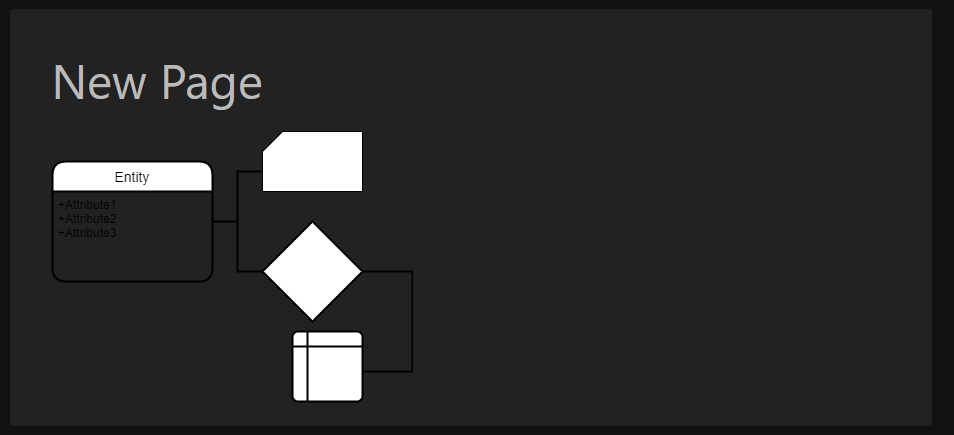
Drawn entities don't work properly with dark mode enabled. #2177

Closed
opened 2026-02-05 03:12:34 +03:00 by OVERLORD · 3 comments
Owner

Originally created by @nickolasdeluca on GitHub (Mar 30, 2021).

Describe the bug
Drawn entities don't work properly with dark mode enabled.

Steps To Reproduce
Steps to reproduce the behavior:

  1. Turn on dark mode.
  2. Create a page.
  3. Edit the page.
  4. Draw any entity on flowchart.
  5. Save drawing.

Expected behavior
I believe all entities should have their colors inverted. Black turns White and White turns black. Fonts, lines and all objects.

Screenshots
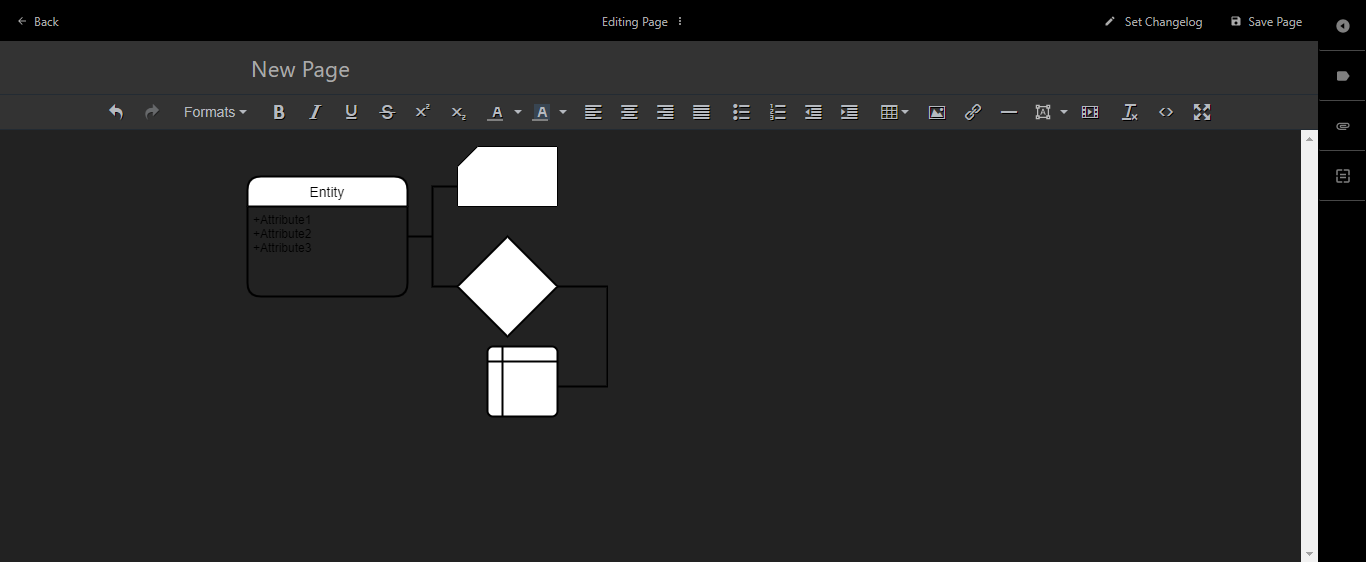
error
error2

Your Configuration (please complete the following information):

  • Exact BookStack Version (Found in settings): v0.31.2
  • PHP Version: 7.4.9 (cli) (built: Aug 7 2020 14:29:10) ( NTS )
  • Hosting Method (Nginx/Apache/Docker): Nginx
Originally created by @nickolasdeluca on GitHub (Mar 30, 2021). **Describe the bug** Drawn entities don't work properly with dark mode enabled. **Steps To Reproduce** Steps to reproduce the behavior: 1. Turn on dark mode. 2. Create a page. 3. Edit the page. 4. Draw any entity on flowchart. 5. Save drawing. **Expected behavior** I believe all entities should have their colors inverted. Black turns White and White turns black. Fonts, lines and all objects. **Screenshots** ![error](https://user-images.githubusercontent.com/17858166/113001225-fccd8e00-9146-11eb-809b-2da38d8eb3f0.png) ![error2](https://user-images.githubusercontent.com/17858166/113001242-ffc87e80-9146-11eb-8db6-9a5e54f19df0.png) **Your Configuration (please complete the following information):** - Exact BookStack Version (Found in settings): v0.31.2 - PHP Version: 7.4.9 (cli) (built: Aug 7 2020 14:29:10) ( NTS ) - Hosting Method (Nginx/Apache/Docker): Nginx
Author
Owner

@ssddanbrown commented on GitHub (May 4, 2021):

Hi @nickolasdeluca,

This is going to be the case for an user images that are on transparent backgrounds. I wouldn't really be comfortable inverting the color of images by default as we'd be altering user content and it's likely to have side-affects. A simple inversion is not always what would be wanted.

If this is a problem on your instance, you could set a default white background to drawings (and a border for padding) using the following in your "Custom HTML Head Content" setting:

<style>
.page-content img[src*="/drawio/"] {
  background-color: #FFF;
  border: 12px solid #FFF;
}
</style>

Or if you did want inversion in dark mode:

<style>
.dark-mode .page-content img[src*="/drawio/"] {
  filter: invert(1);
}
</style>
@ssddanbrown commented on GitHub (May 4, 2021): Hi @nickolasdeluca, This is going to be the case for an user images that are on transparent backgrounds. I wouldn't really be comfortable inverting the color of images by default as we'd be altering user content and it's likely to have side-affects. A simple inversion is not always what would be wanted. If this is a problem on your instance, you could set a default white background to drawings (and a border for padding) using the following in your "Custom HTML Head Content" setting: ```html <style> .page-content img[src*="/drawio/"] { background-color: #FFF; border: 12px solid #FFF; } </style> ``` Or if you did want inversion in dark mode: ```html <style> .dark-mode .page-content img[src*="/drawio/"] { filter: invert(1); } </style> ```
Author
Owner

@TechInterMezzo commented on GitHub (Aug 7, 2022):

Hi @ssddanbrown,
I am a bit late for this issue but I found the "keepTheme" option in the docs of draw.io. It seems to be an optional parameter for the export action and should apply the current draw.io theme when rendering the png. So when you turn on the draw.io dark mode then the appearance of the saved PNG should match.

I think you would only need to add
keepTheme: true
to
https://github.com/BookStackApp/BookStack/blob/development/resources/js/services/drawio.js#L58

But I haven't tested it myself.

@TechInterMezzo commented on GitHub (Aug 7, 2022): Hi @ssddanbrown, I am a bit late for this issue but I found the "keepTheme" option in the [docs of draw.io](https://www.diagrams.net/doc/faq/embed-mode). It seems to be an optional parameter for the export action and should apply the current draw.io theme when rendering the png. So when you turn on the draw.io dark mode then the appearance of the saved PNG should match. I think you would only need to add keepTheme: true to https://github.com/BookStackApp/BookStack/blob/development/resources/js/services/drawio.js#L58 But I haven't tested it myself.
Author
Owner

@EricKotato commented on GitHub (Aug 2, 2025):

Hi @ssddanbrown, I am a bit late for this issue but I found the "keepTheme" option in the docs of draw.io. It seems to be an optional parameter for the export action and should apply the current draw.io theme when rendering the png. So when you turn on the draw.io dark mode then the appearance of the saved PNG should match.

I think you would only need to add keepTheme: true to https://github.com/BookStackApp/BookStack/blob/development/resources/js/services/drawio.js#L58

But I haven't tested it myself.

Can confirm, adding keepTheme:1 (same as keepTheme: true) to export indeed saves with current draw.io theme.

Image

So I'd like to see it introduced too, at least as an option.

@EricKotato commented on GitHub (Aug 2, 2025): > Hi [@ssddanbrown](https://github.com/ssddanbrown), I am a bit late for this issue but I found the "keepTheme" option in the [docs of draw.io](https://www.diagrams.net/doc/faq/embed-mode). It seems to be an optional parameter for the export action and should apply the current draw.io theme when rendering the png. So when you turn on the draw.io dark mode then the appearance of the saved PNG should match. > > I think you would only need to add keepTheme: true to https://github.com/BookStackApp/BookStack/blob/development/resources/js/services/drawio.js#L58 > > But I haven't tested it myself. Can confirm, adding `keepTheme:1` (same as `keepTheme: true`) to export indeed saves with current draw.io theme. <img width="484" height="396" alt="Image" src="https://github.com/user-attachments/assets/27f23b01-35b0-438a-abae-c18ae687d5c7" /> So I'd like to see it introduced too, at least as an option.
Sign in to join this conversation.
1 Participants
Notifications
Due Date
No due date set.
Dependencies

No dependencies set.

Reference: starred/BookStack#2177