Solved: User with email already exist #2117

Closed
opened 2026-02-05 02:58:28 +03:00 by OVERLORD · 9 comments
Owner

Originally created by @rem9000 on GitHub (Feb 24, 2021).

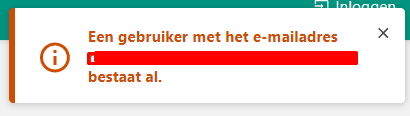
I'm getting this error after logging in:
image

It says: An user with this email address already exists.

I'm using LDAP and changed my password in active directory.

(newest bookstack release)

Originally created by @rem9000 on GitHub (Feb 24, 2021). I'm getting this error after logging in: ![image](https://user-images.githubusercontent.com/62557021/108965608-63114d80-767d-11eb-8288-4009c3631501.png) It says: An user with this email address already exists. I'm using LDAP and changed my password in active directory. (newest bookstack release)
Author
Owner

@jhjacobs81 commented on GitHub (Feb 24, 2021):

i am just now logging in, and i have EXACTLY the same problem.

Unfortunately, on our end nothing changed. it just "stopped working" as far as i can see. the \storage\logs\laravel.log" show exactly the same error.

@jhjacobs81 commented on GitHub (Feb 24, 2021): i am just now logging in, and i have EXACTLY the same problem. Unfortunately, on our end nothing changed. it just "stopped working" as far as i can see. the \storage\logs\laravel.log" show exactly the same error.
Author
Owner

@rem9000 commented on GitHub (Feb 24, 2021):

i am just now logging in, and i have EXACTLY the same problem.

Unfortunately, on our end nothing changed. it just "stopped working" as far as i can see. the \storage\logs\laravel.log" show exactly the same error.

Have you fixed it yet? If so how? 😄

@rem9000 commented on GitHub (Feb 24, 2021): > i am just now logging in, and i have EXACTLY the same problem. > > Unfortunately, on our end nothing changed. it just "stopped working" as far as i can see. the \storage\logs\laravel.log" show exactly the same error. Have you fixed it yet? If so how? 😄
Author
Owner

@ssddanbrown commented on GitHub (Feb 25, 2021):

@remkohoef Did this user, with that email address, already have an BookStack account before LDAP was setup/enabled?

@ssddanbrown commented on GitHub (Feb 25, 2021): @remkohoef Did this user, with that email address, already have an BookStack account before LDAP was setup/enabled?
Author
Owner

@rem9000 commented on GitHub (Feb 25, 2021):

@remkohoef Did this user, with that email address, already have an BookStack account before LDAP was setup/enabled?

No. We have 1 "local" admin account. Then we set-up LDAP a long while ago and all the users were created via LDAP.
My colleague has the same problem as @jhjacobs81 .. He didn't change his password and is not able to logon. This problem occurred the day before yesterday. Nothing has changed in the past days. Yesterday I updated bookstack with no result.

@rem9000 commented on GitHub (Feb 25, 2021): > @remkohoef Did this user, with that email address, already have an BookStack account before LDAP was setup/enabled? No. We have 1 "local" admin account. Then we set-up LDAP a long while ago and all the users were created via LDAP. My colleague has the same problem as @jhjacobs81 .. He didn't change his password and is not able to logon. This problem occurred the day before yesterday. Nothing has changed in the past days. Yesterday I updated bookstack with no result.
Author
Owner

@rem9000 commented on GitHub (Feb 25, 2021):

Seems like bookstack turned all ldap users to bookstack users because when I set login method to standard we can log in with the email address connected to the account.

@rem9000 commented on GitHub (Feb 25, 2021): Seems like bookstack turned all ldap users to bookstack users because when I set login method to standard we can log in with the email address connected to the account.
Author
Owner

@cdrfun commented on GitHub (Feb 25, 2021):

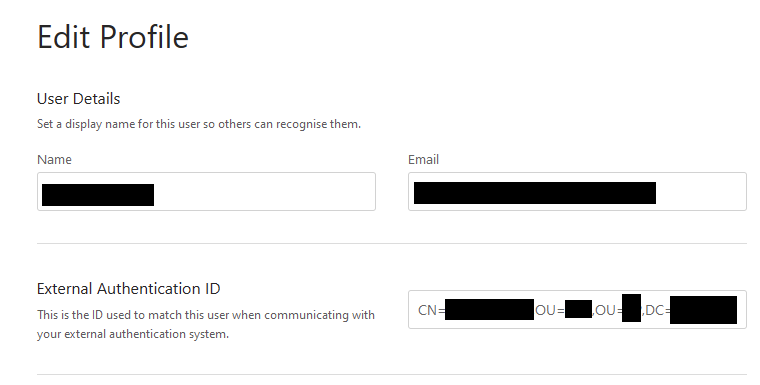
When a user signs in via LDAP a Bookstack user is created which has an external authentication id.
grafik

When a user was created prior to LDAP configuration this user doesn't have an external authentication id. Your problem sounds to me, as if a user was created with a mail address, then LDAP was activated and now Bookstack tries to create a new user upon login with the same mail address - which leads to the error that the mail already exists (for the first user with no external authentication id). This is also explained here: https://www.bookstackapp.com/docs/admin/ldap-auth/

The solution provided in the documentation is:

You may find that you cannot log in with your initial Admin account after changing the AUTH_METHOD to ldap. To get around this set the AUTH_METHOD to standard, login with your admin account then change it back to ldap. You get then edit your profile and add your LDAP uid under the ‘External Authentication ID’ field. You will then be able to login in with that ID.

Another solution would be to change AUTH_METHOD to standard, change the mail address of the first user, set "Default user role after registration" to Admin, change AUTH_METHOD to LDAP, register with new user and change "Default user role after registration" back.

A third way would be to add the external authentication id to the user using a database query.

@cdrfun commented on GitHub (Feb 25, 2021): When a user signs in via LDAP a Bookstack user is created which has an external authentication id. ![grafik](https://user-images.githubusercontent.com/146877/109147487-57995180-7765-11eb-9fe5-0d7cb37823fe.png) When a user was created prior to LDAP configuration this user doesn't have an external authentication id. Your problem sounds to me, as if a user was created with a mail address, then LDAP was activated and now Bookstack tries to create a new user upon login with the same mail address - which leads to the error that the mail already exists (for the first user with no external authentication id). This is also explained here: https://www.bookstackapp.com/docs/admin/ldap-auth/ The solution provided in the documentation is: > You may find that you cannot log in with your initial Admin account after changing the AUTH_METHOD to ldap. To get around this set the AUTH_METHOD to standard, login with your admin account then change it back to ldap. You get then edit your profile and add your LDAP uid under the ‘External Authentication ID’ field. You will then be able to login in with that ID. Another solution would be to change AUTH_METHOD to standard, change the mail address of the first user, set "Default user role after registration" to Admin, change AUTH_METHOD to LDAP, register with new user and change "Default user role after registration" back. A third way would be to add the external authentication id to the user using a database query.
Author
Owner

@rem9000 commented on GitHub (Feb 25, 2021):

When a user signs in via LDAP a Bookstack user is created which has an external authentication id.
grafik

When a user was created prior to LDAP configuration this user doesn't have an external authentication id. Your problem sounds to me, as if a user was created with a mail address, then LDAP was activated and now Bookstack tries to create a new user upon login with the same mail address - which leads to the error that the mail already exists (for the first user with no external authentication id). This is also explained here: https://www.bookstackapp.com/docs/admin/ldap-auth/

The solution provided in the documentation is:

You may find that you cannot log in with your initial Admin account after changing the AUTH_METHOD to ldap. To get around this set the AUTH_METHOD to standard, login with your admin account then change it back to ldap. You get then edit your profile and add your LDAP uid under the ‘External Authentication ID’ field. You will then be able to login in with that ID.

Another solution would be to change AUTH_METHOD to standard, change the mail address of the first user, set "Default user role after registration" to Admin, change AUTH_METHOD to LDAP, register with new user and change "Default user role after registration" back.

A third way would be to add the external authentication id to the user using a database query.

No, all users were created with LDAP. We didn't have any email users (except 1 admin account).

Everything worked fine until a few days ago when we suddenly couldn't log on anymore.

@rem9000 commented on GitHub (Feb 25, 2021): > When a user signs in via LDAP a Bookstack user is created which has an external authentication id. > ![grafik](https://user-images.githubusercontent.com/146877/109147487-57995180-7765-11eb-9fe5-0d7cb37823fe.png) > > When a user was created prior to LDAP configuration this user doesn't have an external authentication id. Your problem sounds to me, as if a user was created with a mail address, then LDAP was activated and now Bookstack tries to create a new user upon login with the same mail address - which leads to the error that the mail already exists (for the first user with no external authentication id). This is also explained here: https://www.bookstackapp.com/docs/admin/ldap-auth/ > > The solution provided in the documentation is: > > > You may find that you cannot log in with your initial Admin account after changing the AUTH_METHOD to ldap. To get around this set the AUTH_METHOD to standard, login with your admin account then change it back to ldap. You get then edit your profile and add your LDAP uid under the ‘External Authentication ID’ field. You will then be able to login in with that ID. > > Another solution would be to change AUTH_METHOD to standard, change the mail address of the first user, set "Default user role after registration" to Admin, change AUTH_METHOD to LDAP, register with new user and change "Default user role after registration" back. > > A third way would be to add the external authentication id to the user using a database query. No, all users were created with LDAP. We didn't have any email users (except 1 admin account). Everything worked fine until a few days ago when we suddenly couldn't log on anymore.
Author
Owner

@rem9000 commented on GitHub (Feb 25, 2021):

Ok, so my problem was that we moved some users in AD, that way the External Authentication ID was not right anymore.

@rem9000 commented on GitHub (Feb 25, 2021): Ok, so my problem was that we moved some users in AD, that way the External Authentication ID was not right anymore.
Author
Owner

@zmweske commented on GitHub (Dec 23, 2024):

When using Authentik with OIDC, I changed the Subject mode from based on the user's hashed ID to based on the user's email. I also copied the email into the "External Authentication ID", and it seems like a bit of a hassle to remove it/change it. Either way, it did the trick for me.

@zmweske commented on GitHub (Dec 23, 2024): When using Authentik with OIDC, I changed the `Subject mode` from `based on the user's hashed ID` to `based on the user's email`. I also copied the email into the "External Authentication ID", and it seems like a bit of a hassle to remove it/change it. Either way, it did the trick for me.
Sign in to join this conversation.
1 Participants
Notifications
Due Date
No due date set.
Dependencies

No dependencies set.

Reference: starred/BookStack#2117