mirror of
https://github.com/BookStackApp/BookStack.git
synced 2026-07-16 05:33:49 +03:00
Failed to (auto) save draft #2107

Reference in New Issue
Block a user
Delete Branch "%!s()"
Deleting a branch is permanent. Although the deleted branch may continue to exist for a short time before it actually gets removed, it CANNOT be undone in most cases. Continue?
Originally created by @kevinblackdesk on GitHub (Feb 19, 2021).
Describe the bug
Getting a popup saying "Failed to save draft. Ensure you have internet connection before saving this page" while editing a page. Manually saving does work.
Steps To Reproduce
Steps to reproduce the behavior:
Expected behavior
To save the draft successfully.
Screenshots


Your Configuration (please complete the following information):
Additional context
None.
@ssddanbrown commented on GitHub (Feb 20, 2021):
Hi @kevinblackdesk,
Can you confirm if you have the
APP_URLoption set in your.envfile, reflecting the base path that you have BookStack installed on?@kevinblackdesk commented on GitHub (Feb 22, 2021):
Hey @ssddanbrown, my
APP_URLis set to the domain the BookStack application is installed on (ex:APP_URL=https://docs.domain.nl)@ssddanbrown commented on GitHub (Feb 23, 2021):
@kevinblackdesk Thanks for confirming.
Can you report any errors shown on draft save within the browser console? In the network tab screenshot you've shared i see failed in there, Clicking on the request may also provide more info. Just also want to ensure that the request is going to your domain.
@kevinblackdesk commented on GitHub (Feb 23, 2021):
@ssddanbrown I'm seeing this in the console tab
Website is served over HTTP2 (h2):
@ssddanbrown commented on GitHub (Feb 26, 2021):
@kevinblackdesk This would generally point to a an issue on the webserver configuration side.
Are you able to share any details on that? Any headers or gzip configuration set at a webserver level could affect this, especially if in a proxy setup.
@kevinblackdesk commented on GitHub (Feb 26, 2021):
@ssddanbrown Yeah, I'm just running a standard DirectAdmin server running on CentOS. I have Apache for handling PHP and Nginx for handling static content (images, scripts, etc). Both Apache&Nginx are serving content over HTTP2 (H2) and SSL. Standard Apache / Nginx configuration files except for the fact I had to create a rewrite for the
public/folder to make Bookstack work.@ssddanbrown commented on GitHub (Feb 26, 2021):
@kevinblackdesk Okay, I don't think I've seen a setup like that before. I've seen proxying to apache servers but not using both depending on dynamic/static. It might be simpler just to use nginx+php-fpm.
I'd suspect there's some dual https/gzipping going on in that setup causing headers to become invalid.
@kevinblackdesk commented on GitHub (Mar 1, 2021):
@ssddanbrown Using an 'Nginx reverse proxy' is quite a common thing to do 😄
@cdrfun commented on GitHub (Mar 1, 2021):
@kevinblackdesk Dan was referring to splitting dynamic and static content. I've used a Nginx reverse proxy using Nginx proxy manager with bookstack successfully in the past. Your setup is kinda special, I'd recommend simplifying things (in your case don't split dynamic and static content) to check if that works.
@ssddanbrown commented on GitHub (Mar 2, 2021):
Thanks @cdrfun, You're spot-on here. I've seen & hosted a lot of nginx proxied apps before, but don't think I've ever seen two webservers serve the content for a single app, at least on the same protocol.
@kevinblackdesk commented on GitHub (Mar 10, 2021):
Hey @ssddanbrown, It's just a simple nginx proxied app. One webserver serving the content for a single app, on the same protocol.
@ssddanbrown commented on GitHub (Mar 11, 2021):
Okay, Have you tried disabling the https and/or gzip on the server you're proxying to at all?
@rednaxLamington commented on GitHub (Apr 6, 2021):
I have the exact same problem, but running on IIS. Also
save as a draftfails (as the message already implies)Save page is working.
Configuration:
(Sorry for the large picture)

@rednaxLamington commented on GitHub (Apr 6, 2021):
After a lot of googling and checking parameters, I found the solution...
In IIS, you have to assign a module mapping, so it knows what to do when you request for example a .php file.
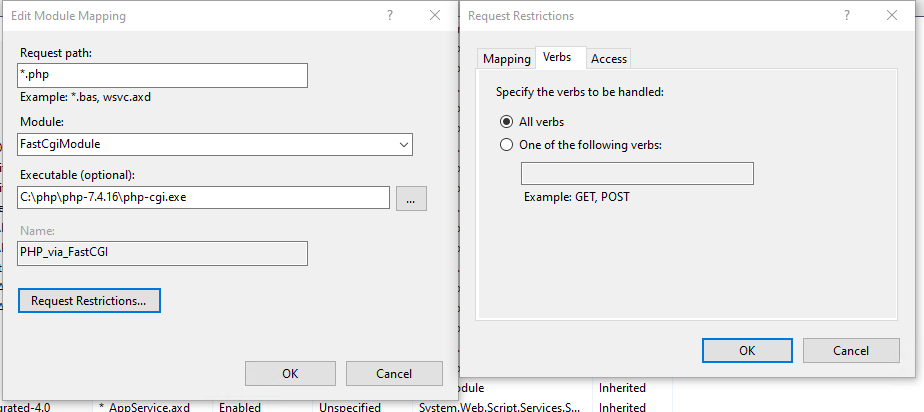
The problem was that verbs for this module only was: GET,HEAD,POST. Changing this to All verbs resolved my issue.
@ssddanbrown commented on GitHub (Apr 6, 2021):
Thanks for confirming your solution @rednaxLamington, Have seen other IIS users run into the same thing.
Since the original issue creator has not responded to the chain in a while I'll close this off.