Tables not rendering (Markdown editor) #2011

Closed
opened 2026-02-05 02:27:32 +03:00 by OVERLORD · 4 comments
Owner

Originally created by @fklappan on GitHub (Jan 6, 2021).

Describe the bug
After saving a page with version 0.31.1 using the Markdown editor, the tables are not longer rendered in the page view. Instead the raw text is displayed. The preview works as expected.

Steps To Reproduce
Steps to reproduce the behavior:

  1. Configure BookStack to use the Markdown editor
  2. Create a new page anywhere and create a table with the table syntax. The preview will look just fine
  3. Save the page
  4. The page view no longer displays the table as expected

Expected behavior
The table should be rendered like in older versions or the preview

Screenshots
Preview rendered correct (on the right side) while editing:
image

Page rendering after save (shows raw text):
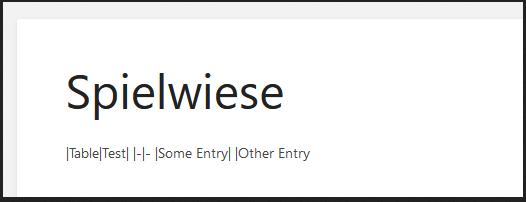
image

Your Configuration (please complete the following information):

  • Exact BookStack Version (Found in settings): 0.31.1
  • PHP Version: PHP 7.2.24-0ubuntu0.18.04.7 (cli) (built: Oct 7 2020 15:24:25) ( NTS )
  • Hosting Method (Nginx/Apache/Docker): Apache

Additional context
I already wrote in Discord and @ssddanbrown answered:

That's totally possible as an issue (Have not tested yet).
I switched the final Markdown rendering from front-end to server-side in v0.31 for consistency with the API and better security. It's very likely that back-end rendered does not currently render tables.
Feel free to raise

Originally created by @fklappan on GitHub (Jan 6, 2021). **Describe the bug** After saving a page with version 0.31.1 using the Markdown editor, the tables are not longer rendered in the page view. Instead the raw text is displayed. The preview works as expected. **Steps To Reproduce** Steps to reproduce the behavior: 1. Configure BookStack to use the Markdown editor 2. Create a new page anywhere and create a table with the table syntax. The preview will look just fine 3. Save the page 4. The page view no longer displays the table as expected **Expected behavior** The table should be rendered like in older versions or the preview **Screenshots** Preview rendered correct (on the right side) while editing: ![image](https://user-images.githubusercontent.com/5860600/103744691-7d746680-4ffe-11eb-90b0-9dda160d22a2.png) Page rendering after save (shows raw text): ![image](https://user-images.githubusercontent.com/5860600/103744738-8ebd7300-4ffe-11eb-8f0f-39d3ac533c7e.png) **Your Configuration (please complete the following information):** - Exact BookStack Version (Found in settings): 0.31.1 - PHP Version: PHP 7.2.24-0ubuntu0.18.04.7 (cli) (built: Oct 7 2020 15:24:25) ( NTS ) - Hosting Method (Nginx/Apache/Docker): Apache **Additional context** I already wrote in Discord and @ssddanbrown answered: > That's totally possible as an issue (Have not tested yet). I switched the final Markdown rendering from front-end to server-side in v0.31 for consistency with the API and better security. It's very likely that back-end rendered does not currently render tables. Feel free to raise
OVERLORD added the 🚀 Priority label 2026-02-05 02:27:32 +03:00
Author
Owner

@ssddanbrown commented on GitHub (Jan 10, 2021):

Thanks for reporting @fklappan.

This was patched in 831f441879 with added testing to cover. This also applied to markdown task-lists. These fixes will be part of v0.31.2 which should be released sometime today. Therefore I'll close this off.

@ssddanbrown commented on GitHub (Jan 10, 2021): Thanks for reporting @fklappan. This was patched in 831f441879d20ac99645c242e81ae3d25bc96559 with added testing to cover. This also applied to markdown task-lists. These fixes will be part of v0.31.2 which should be released sometime today. Therefore I'll close this off.
Author
Owner

@badsmoke commented on GitHub (Jan 11, 2021):

with version v0.31.3, the problem still exists for me

@badsmoke commented on GitHub (Jan 11, 2021): with version v0.31.3, the problem still exists for me
Author
Owner

@fklappan commented on GitHub (Jan 11, 2021):

With Version v0.31.2 it is fixed for me.

You need to edit/save the affected pages before the update will take effect

@fklappan commented on GitHub (Jan 11, 2021): With Version **v0.31.2** it is fixed for me. You need to edit/save the affected pages before the update will take effect
Author
Owner

@badsmoke commented on GitHub (Jan 12, 2021):

thanks, that has fixed it

@badsmoke commented on GitHub (Jan 12, 2021): thanks, that has fixed it
Sign in to join this conversation.
1 Participants
Notifications
Due Date
No due date set.
Dependencies

No dependencies set.

Reference: starred/BookStack#2011