Resuing Content on Home/Main Page #1868

Closed
opened 2026-02-05 02:05:38 +03:00 by OVERLORD · 5 comments
Owner

Originally created by @MaxG-Git on GitHub (Sep 25, 2020).

Describe the bug
I am trying to create a "front page" for my bookstack app. My front page uses "resued content" from other pages. When accesing the page in the book I can see the used conent showing up. But if I go to the homepage (main url of my bookstack instance rather than the page specific URL) the "reused conent" does not show up.

Steps To Reproduce
Steps to reproduce the behavior:

  1. Create New Page & insert content from another page
  2. Set new page as Front page of bookstack Instance
  3. Go to main URL of instance (ie. htttps://localhost/)
  4. Reused content not visible

Expected behavior
Front page should look the same as the page when viewing it with the explisit URL (ie htttps://localhost/books/book-name/page/page-name)

Screenshots
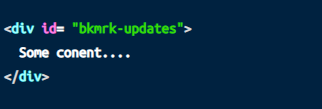
In Editor on content page
Screenshot 2020-09-25 141836

In Editor on Main Page:
Screenshot 2020-09-25 142127

On Page Spesific URL (ie htttps://localhost/books/book-name/page/page-name)
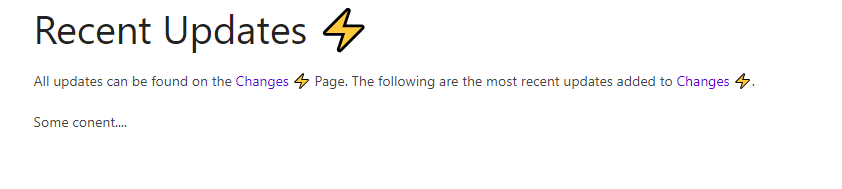
Screenshot 2020-09-25 141934

On Front Page: (ie. htttps://localhost/)
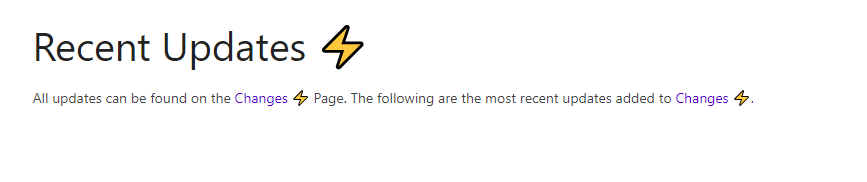
Screenshot 2020-09-25 141955

Your Configuration (please complete the following information):

  • Exact BookStack Version (Found in settings): BookStack v0.30.0
  • PHP Version: PHP 7.3.22 (cli)
  • Hosting Method (Nginx/Apache/Docker): Docker
  • Editor: Markdown

Additional context
I have looked for an open issue that describes this but I was unable to find one, I may have missed it. It is also possible I am making these bookmarks incorrectly, am I missing something?

Originally created by @MaxG-Git on GitHub (Sep 25, 2020). **Describe the bug** I am trying to create a "front page" for my bookstack app. My front page uses "resued content" from other pages. When accesing the page in the book I can see the used conent showing up. But if I go to the homepage (main url of my bookstack instance rather than the page specific URL) the "reused conent" does not show up. **Steps To Reproduce** Steps to reproduce the behavior: 1. Create New Page & insert content from another page 2. Set new page as Front page of bookstack Instance 3. Go to main URL of instance (ie. htttps://localhost/) 4. Reused content not visible **Expected behavior** Front page should look the same as the page when viewing it with the explisit URL (ie htttps://localhost/books/book-name/page/page-name) **Screenshots** In Editor on content page ![Screenshot 2020-09-25 141836](https://user-images.githubusercontent.com/35358779/94310795-34fdd500-ff48-11ea-8ab4-eba2f5af4e14.png) In Editor on Main Page: ![Screenshot 2020-09-25 142127](https://user-images.githubusercontent.com/35358779/94310714-13045280-ff48-11ea-8596-954a78db2cb5.png) On Page Spesific URL (ie htttps://localhost/books/book-name/page/page-name) ![Screenshot 2020-09-25 141934](https://user-images.githubusercontent.com/35358779/94311035-932ab800-ff48-11ea-9cd5-89d29e399b5a.png) On Front Page: (ie. htttps://localhost/) ![Screenshot 2020-09-25 141955](https://user-images.githubusercontent.com/35358779/94311049-9b82f300-ff48-11ea-8d13-147cfaf243e4.png) **Your Configuration (please complete the following information):** - Exact BookStack Version (Found in settings): BookStack v0.30.0 - PHP Version: PHP 7.3.22 (cli) - Hosting Method (Nginx/Apache/Docker): Docker - Editor: Markdown **Additional context** I have looked for an open issue that describes this but I was unable to find one, I may have missed it. It is also possible I am making these bookmarks incorrectly, am I missing something?
OVERLORD added the 🔍 Pending Validation label 2026-02-05 02:05:38 +03:00
Author
Owner

@ssddanbrown commented on GitHub (Sep 26, 2020):

Thanks for posting @MaxG-Git,
Yeah, Looks like I specifically blank them out for the homepage. Can't remember if I've done that for performance or security reasons or something else. Will need to dive through history to find if there's actually a reason.

@ssddanbrown commented on GitHub (Sep 26, 2020): Thanks for posting @MaxG-Git, Yeah, Looks like I specifically blank them out for the homepage. Can't remember if I've done that for performance or security reasons or something else. Will need to dive through history to find if there's actually a reason.
Author
Owner

@C0rn3j commented on GitHub (Jun 29, 2021):

Same issue here, I ended up working around it in nginx by doing a 302 redirect:

        server {
                listen 443 ssl http2;
                listen [::]:443 ssl http2;
                server_name rys.pw;

                root /usr/share/webapps/bookstack/public;
                index index.php;

                location / {
                        try_files $uri $uri/ /index.php?$query_string;
                }
                location = / {
                        return 302 https://$host/books/wiki/page/start;
                }
                location ~ \.php$ {
                        try_files $uri =404;
                        fastcgi_pass unix:/run/php-fpm/php-fpm.sock;
                        fastcgi_index index.php;
                        include fastcgi.conf;
                }
        }
@C0rn3j commented on GitHub (Jun 29, 2021): Same issue here, I ended up working around it in nginx by doing a 302 redirect: ```nginx server { listen 443 ssl http2; listen [::]:443 ssl http2; server_name rys.pw; root /usr/share/webapps/bookstack/public; index index.php; location / { try_files $uri $uri/ /index.php?$query_string; } location = / { return 302 https://$host/books/wiki/page/start; } location ~ \.php$ { try_files $uri =404; fastcgi_pass unix:/run/php-fpm/php-fpm.sock; fastcgi_index index.php; include fastcgi.conf; } } ```
Author
Owner

@geins commented on GitHub (Sep 20, 2021):

Hi! Is there an update to this?
(Performance, security, something else?)

Thank You!

@geins commented on GitHub (Sep 20, 2021): Hi! Is there an update to this? (Performance, security, something else?) Thank You!
Author
Owner

@ssddanbrown commented on GitHub (Sep 23, 2021):

@geins Don't think I ever looked into this further. Have assigned to the next patch release as a reminder to at least check upon.

@ssddanbrown commented on GitHub (Sep 23, 2021): @geins Don't think I ever looked into this further. Have assigned to the next patch release as a reminder to at least check upon.
Author
Owner

@ssddanbrown commented on GitHub (Oct 4, 2021):

Blanking of content seemed to be due to legacy reasons when include permissions were handled in a simpler manner.
Has been addressed in d3a9645161 with test added to cover. Will be part of the next patch release.

@ssddanbrown commented on GitHub (Oct 4, 2021): Blanking of content seemed to be due to legacy reasons when include permissions were handled in a simpler manner. Has been addressed in d3a96451614201ca1b92bd3dffa9726d0b48a203 with test added to cover. Will be part of the next patch release.
Sign in to join this conversation.
1 Participants
Notifications
Due Date
No due date set.
Dependencies

No dependencies set.

Reference: starred/BookStack#1868