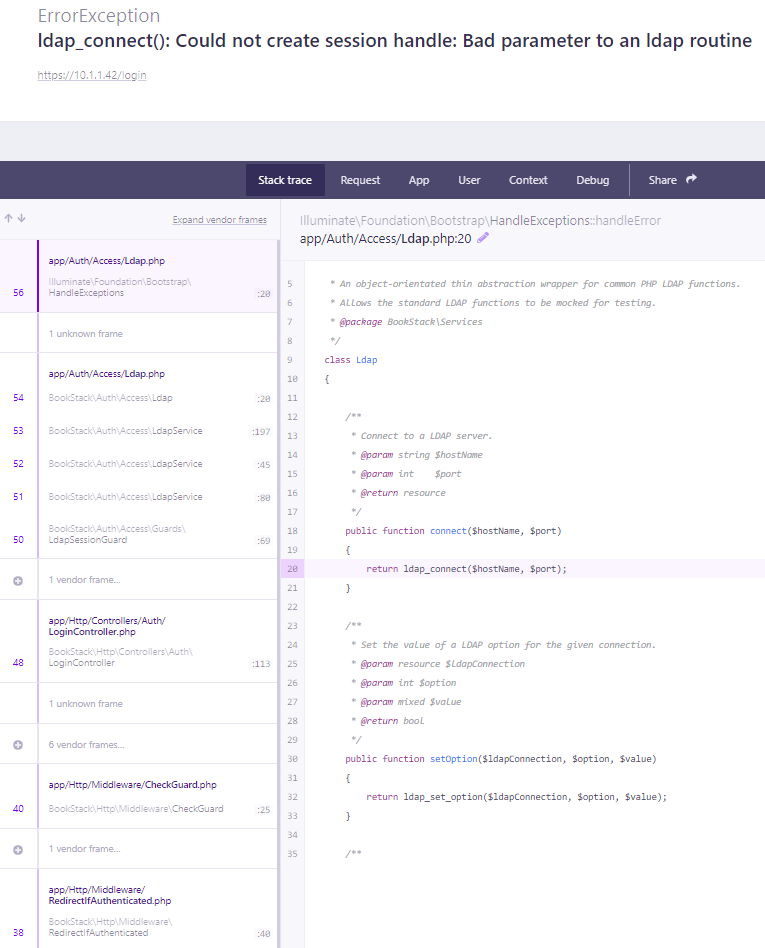
ldap_connect(): Could not create session handle: Bad parameter to an ldap routine #1763

Closed
opened 2026-02-05 01:48:50 +03:00 by OVERLORD · 5 comments
Owner

Originally created by @baumber13 on GitHub (Jun 9, 2020).

Describe the bug
Clean install of BookStack via linuxserver/bookstack docker containers. Setting up LDAP connectivity via www/.env file as below causes error while attempting to login.

Steps To Reproduce
Steps to reproduce the behavior:

  1. Using standard docker-compose file and removed SQL settings for the docker app
  2. Populated SQL and LDAP settings in the .env file
  3. Restarted containers
  4. See error

Expected behavior
Being able to login using LDAP authentication

Screenshots
Untitled-1
Untitled-2

Your Configuration (please complete the following information):

  • Exact BookStack Version: linuxserver/bookstack (
  • Hosting Method: Docker

Additional context
Have tried multiple settings getting this to work however none are working

Originally created by @baumber13 on GitHub (Jun 9, 2020). **Describe the bug** Clean install of BookStack via linuxserver/bookstack docker containers. Setting up LDAP connectivity via www/.env file as below causes error while attempting to login. **Steps To Reproduce** Steps to reproduce the behavior: 1. Using standard docker-compose file and removed SQL settings for the docker app 2. Populated SQL and LDAP settings in the .env file 3. Restarted containers 4. See error **Expected behavior** Being able to login using LDAP authentication **Screenshots** ![Untitled-1](https://user-images.githubusercontent.com/32908294/84139594-1252b980-aa48-11ea-83b5-55c07b2618ad.png) ![Untitled-2](https://user-images.githubusercontent.com/32908294/84139611-18489a80-aa48-11ea-8a94-6007acfb106a.png) **Your Configuration (please complete the following information):** - Exact BookStack Version: linuxserver/bookstack ( - Hosting Method: Docker **Additional context** Have tried multiple settings getting this to work however none are working
OVERLORD added the 🐕 Support🚪 Authentication labels 2026-02-05 01:48:50 +03:00
Author
Owner

@ssddanbrown commented on GitHub (Jun 21, 2020):

Hi @baumber13,
Apologies for my late response.

If I had to guess, I'd say it's the $${user} part of the config that's causing issues. Is the double $ purposeful? I know that's sometimes used in docker-compose configs, as an escape to mean a single literal dollar.

@ssddanbrown commented on GitHub (Jun 21, 2020): Hi @baumber13, Apologies for my late response. If I had to guess, I'd say it's the `$${user}` part of the config that's causing issues. Is the double `$` purposeful? I know that's sometimes used in docker-compose configs, as an escape to mean a single literal dollar.
Author
Owner

@baumber13 commented on GitHub (Jun 22, 2020):

Hi,

Yeah you are correct, I did that for when I was trying to do wit via docker-compose however I am now trying to get it to work via the .env file. I have now removed the double $ but still getting the same error.

Thanks

@baumber13 commented on GitHub (Jun 22, 2020): Hi, Yeah you are correct, I did that for when I was trying to do wit via docker-compose however I am now trying to get it to work via the .env file. I have now removed the double $ but still getting the same error. Thanks
Author
Owner

@ssddanbrown commented on GitHub (Jun 30, 2020):

Looking again at where this is erroring, I'd imagine it could only imagine it's something in the LDAP_SERVER value.

Any special characters in there?
Are you defining the protocol in the string? If so, which one?

@ssddanbrown commented on GitHub (Jun 30, 2020): Looking again at where this is erroring, I'd imagine it could only imagine it's something in the `LDAP_SERVER` value. Any special characters in there? Are you defining the protocol in the string? If so, which one?
Author
Owner

@baumber13 commented on GitHub (Jun 30, 2020):

There was hyphens but I did try with just IP and no luck. I used ldapsearch and connected successfully over 389 so used a value like;

192.168.1.1:389
VM-SRV-DC:389

Thanks

@baumber13 commented on GitHub (Jun 30, 2020): There was hyphens but I did try with just IP and no luck. I used ldapsearch and connected successfully over 389 so used a value like; 192.168.1.1:389 VM-SRV-DC:389 Thanks
Author
Owner

@baumber13 commented on GitHub (Jul 7, 2020):

Issue was resolved via removing and reinstalling php ldap as I tested on another fresh install and worked first time.

Thanks for the help!!

@baumber13 commented on GitHub (Jul 7, 2020): Issue was resolved via removing and reinstalling php ldap as I tested on another fresh install and worked first time. Thanks for the help!!
Sign in to join this conversation.
1 Participants
Notifications
Due Date
No due date set.
Dependencies

No dependencies set.

Reference: starred/BookStack#1763