Deleting within CodeBlocks results in not saving the whole edit #1751

Closed
opened 2026-02-05 01:46:46 +03:00 by OVERLORD · 1 comment
Owner

Originally created by @Biepa on GitHub (May 29, 2020).

Describe the bug
(With CodeBlock I mean the selectable format.)
When selecting page content in editing mode and the selection is ending in aCodeBlock and you try to delete the selected content, the deletion works. But If you then try to click on the codeblock to maybe delete or edit it, the Codeblock can't be edited or deleted and when you try to save the page then, all changes you've made to the site, since you clicked "edit page" are gone.
I often get this bug also, when selecting the whole CodeBlock (but it was much harder to reproduce), because I wanted to remove a lot of text, including CodeBlocks.

Steps To Reproduce
Steps to reproduce the behavior:

  1. Click Edit Page (Page must have Code Blocks)
  2. Select content and stop selecting in a Code Block (and sometimes at the end).
  3. Press "del"
  4. the Code Block still stays. Click on it. Editing isn't possible then.
  5. Save the page
  6. Page looks exactly the same as before "editing".

Expected behavior
Being able to remove content with CodeBlock at the end.

Screenshots
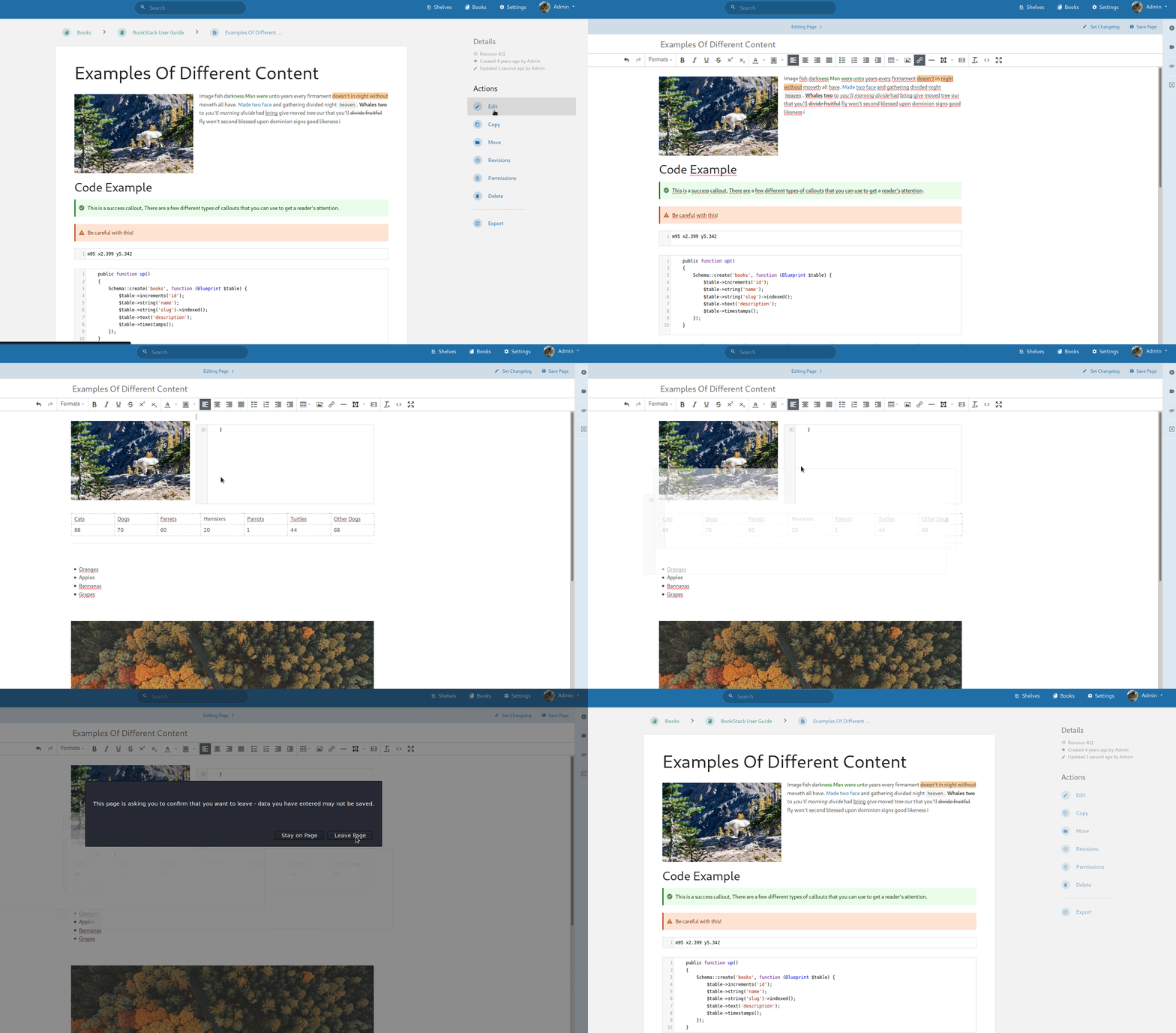
After deleting the content, the first click on the CodeBlock isn't registered. On the second you get, what you see below.
delete_and_save

Your Configuration (please complete the following information):

  • Linuxserver Docker Container on latest version

Additional context
As you can see in the GIF, its reproducable on the demo page

Originally created by @Biepa on GitHub (May 29, 2020). **Describe the bug** (With CodeBlock I mean the selectable format.) When selecting page content in editing mode and the selection is ending in aCodeBlock and you try to delete the selected content, the deletion works. But If you then try to click on the codeblock to maybe delete or edit it, the Codeblock can't be edited or deleted and when you try to save the page then, all changes you've made to the site, since you clicked "edit page" are gone. I often get this bug also, when selecting the whole CodeBlock (but it was much harder to reproduce), because I wanted to remove a lot of text, including CodeBlocks. **Steps To Reproduce** Steps to reproduce the behavior: 1. Click Edit Page (Page must have Code Blocks) 2. Select content and stop selecting in a Code Block (and sometimes at the end). 3. Press "del" 4. the Code Block still stays. Click on it. Editing isn't possible then. 5. Save the page 6. Page looks exactly the same as before "editing". **Expected behavior** Being able to remove content with CodeBlock at the end. **Screenshots** After deleting the content, the first click on the CodeBlock isn't registered. On the second you get, what you see below. ![delete_and_save](https://user-images.githubusercontent.com/25102748/83288323-745b2580-a1e3-11ea-8e70-a6121f49867e.gif) **Your Configuration (please complete the following information):** - Linuxserver Docker Container on latest version **Additional context** As you can see in the GIF, its reproducable on the demo page
OVERLORD added the 🐛 Bug📝 WYSIWYG Editor🔍 Pending Validation labels 2026-02-05 01:46:46 +03:00
Author
Owner

@ssddanbrown commented on GitHub (Nov 10, 2022):

Thanks for reporting @Biepa and sorry for my very delayed response.
We've since changed how code blocks are handled in the editor and, from my testing, this no longer seems to be an issue since you can no longer select mid-way through a code block as described/shown. Will therefore close this off.

@ssddanbrown commented on GitHub (Nov 10, 2022): Thanks for reporting @Biepa and sorry for my very delayed response. We've since changed how code blocks are handled in the editor and, from my testing, this no longer seems to be an issue since you can no longer select mid-way through a code block as described/shown. Will therefore close this off.
Sign in to join this conversation.
1 Participants
Notifications
Due Date
No due date set.
Dependencies

No dependencies set.

Reference: starred/BookStack#1751