formatting does not work as intended #1746

Closed
opened 2026-02-05 01:45:54 +03:00 by OVERLORD · 1 comment
Owner

Originally created by @pavlexander on GitHub (May 24, 2020).

Describe the bug

When I use the clear formatting tool in the editor, then either it is not working as intended or not working at all. In fact, I will describe 3 issues with formatting.

Issue 1: headings are not cleared
In all applications when you are clearing the formatting you are essentially removing all non-default style values. In BookStack, however, Headings are not cleared.

Issue 2: fails to format - case 1,
From the non-pro user perspective the text looks OK. In the source, however, we see some HTML tags. This text will not be cleared.

Issue 3: formats all text instead of 1 line
From the non-pro user perspective the text looks OK. In the source, however, we see that all text is written in line, wish some line breaks code tags.. Formatting will be applied to the whole text instead of 1 line.

Steps To Reproduce:

all issues are reproduced by creating a new page and then following the guide

Issue 1


  1. Paste the text source:
<p id="bkmrk-i-am-writing-some-te">i am writing some test stuff</p>
<h2 id="bkmrk-this-is-my-heading">this is my heading</h2>
<p id="bkmrk-this-is-a-text-in-bo"><strong>this is a text in bold</strong></p>
<p id="bkmrk-some-more-text">some more text</p>
<p id="bkmrk-%C2%A0">&nbsp;</p>
<p id="bkmrk-%C2%A0-0">&nbsp;</p>
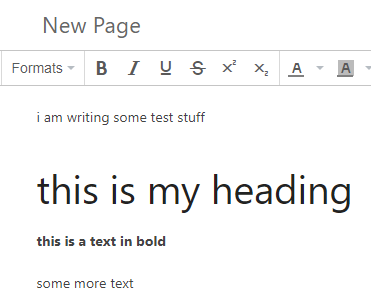
  1. Verify result:
    image

  2. Select all text in user-friendly mode and clean clean formatting button.

Expected behavior
all text is defaulted to paragraph, bolds cleared etc.

Actual behavior
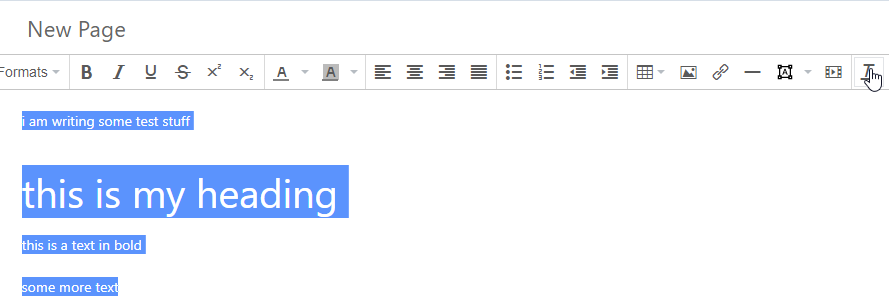
Heading formatting is not cleared
image

Issue 2


  1. Paste the text source:
<div>
<div>Your product</div>
<div>Microsoft Office Pro Plus 2019</div>
<div>Your product key</div>
<div>xxxxxxxxxxxxx</div>
</div>
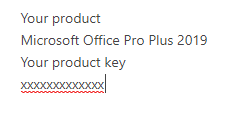
  1. Verify result:
    image

  2. Select all text in user-friendly mode and clean clean formatting button.

Expected behavior
all text is defaulted to paragraph. Each line is a separate paragraph.

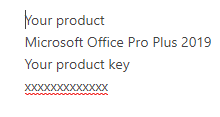
Actual behavior
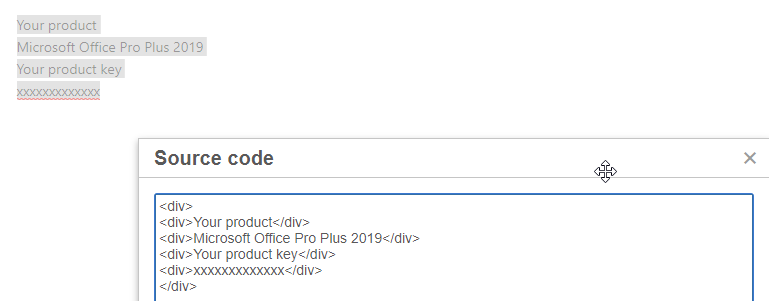
nothing changed. Check the source
image

  1. select line 1 or line 2 and apply Paragraph/heading
    image

Expected behavior
selected line changed to the target style

Actual behavior
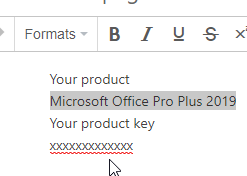
nothing changed. Check the source.
You can not apply the Paragraph to any line that has html tags.
Nor you can apply the Heading.
Nor you can clear the formatting (default line to paragraph).
image

Issue 3


  1. Paste the text source:
<p id="bkmrk-your-productmicrosof">Your product<br />Microsoft Office Pro Plus 2019<br />Your product key<br />xxxxxxxxxxxxx</p>
  1. Verify result:
    image

  2. Select second line and apply heading.
    image

Expected behavior
only second line has heading applied

Actual behavior
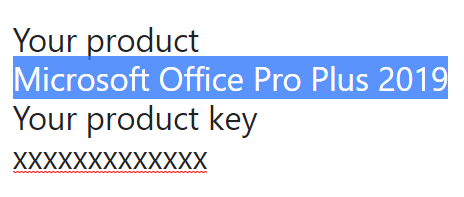
All lines have heading applied
image

  1. OK. so try clearing formatting of all text.
    image

Expected behavior
all text is defaulted to paragraph. Each line is a separate paragraph.

Actual behavior
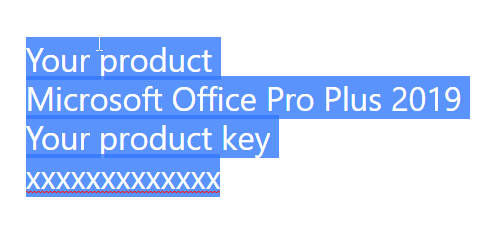
same source. Nothing cleared. All lines are still 1 line in the source. Will be impossible to set per-line formatting.
image

Your Configuration (please complete the following information):

  • Exact BookStack Version (Found in settings): BookStack v0.29.3
  • PHP Version: PHP 7.3.14-1~deb10u1 (cli) (built: Feb 16 2020 15:07:23) ( NTS )
  • Hosting Method (Nginx/Apache/Docker): Apache

Additional context

So, after looking at some existing requests that exist from 2016 (spoiler tags) - I do not expect the bookstack formatting to be fixed anytime soon. That is why I will find some other option.
Nevertheless, I think that it is important that all bugs are reported.

I would like just to make 1 comment about how the BookStack should be looked at. When a regular non-tech user starts editing - he/she does not need to know what happens under the hood. Imagine the user being your grand-mom/nephew who has no idea about what the "source" button is.

The user goes and pastes some text from the internet. (then he ends-up in issue 2)
The user goes and pastes some text from Notepad++ (then he ends-up in issue 3)

When the user clicks on "clear formatting" button he expects all the non-default stuff to be cleared. In reality, however, I have proven that the clear formatting has very little effect on the source. In fact, I think that heading clearing is made that way, what you will call "per design". This wouldn't be an issue if the user could still select all text and apply paragraph style to it, but it was also proven that "per line formatting" does not work as intended either.

So, I hope you enjoyed reading my explanations and are viewing the issue the same way as I do.

Originally created by @pavlexander on GitHub (May 24, 2020). # Describe the bug When I use the clear formatting tool in the editor, then either it is not working as intended or not working at all. In fact, I will describe 3 issues with formatting. ***Issue 1: headings are not cleared*** In all applications when you are clearing the formatting you are essentially removing all non-default style values. In BookStack, however, Headings are not cleared. ***Issue 2: fails to format - case 1***, From the non-pro user perspective the text looks OK. In the source, however, we see some HTML tags. This text will not be cleared. ***Issue 3: formats all text instead of 1 line*** From the non-pro user perspective the text looks OK. In the source, however, we see that all text is written in line, wish some line breaks code tags.. Formatting will be applied to the whole text instead of 1 line. ## Steps To Reproduce: all issues are reproduced by creating a new page and then following the guide ### Issue 1 --- 1. Paste the text source: ``` <p id="bkmrk-i-am-writing-some-te">i am writing some test stuff</p> <h2 id="bkmrk-this-is-my-heading">this is my heading</h2> <p id="bkmrk-this-is-a-text-in-bo"><strong>this is a text in bold</strong></p> <p id="bkmrk-some-more-text">some more text</p> <p id="bkmrk-%C2%A0">&nbsp;</p> <p id="bkmrk-%C2%A0-0">&nbsp;</p> ``` 2. Verify result: ![image](https://user-images.githubusercontent.com/20644772/82750897-35c90380-9dbc-11ea-8cd3-7d288e19f04b.png) 3. Select all text in user-friendly mode and clean clean formatting button. ***Expected behavior*** all text is defaulted to paragraph, bolds cleared etc. ***Actual behavior*** Heading formatting is not cleared ![image](https://user-images.githubusercontent.com/20644772/82751038-27c7b280-9dbd-11ea-8ee7-887fc512aac4.png) ### Issue 2 --- 1. Paste the text source: ``` <div> <div>Your product</div> <div>Microsoft Office Pro Plus 2019</div> <div>Your product key</div> <div>xxxxxxxxxxxxx</div> </div> ``` 2. Verify result: ![image](https://user-images.githubusercontent.com/20644772/82751081-7bd29700-9dbd-11ea-834a-4a1eae063c57.png) 3. Select all text in user-friendly mode and clean clean formatting button. ***Expected behavior*** all text is defaulted to paragraph. Each line is a separate paragraph. ***Actual behavior*** nothing changed. Check the source ![image](https://user-images.githubusercontent.com/20644772/82751097-a15fa080-9dbd-11ea-8f19-83102ad23fb8.png) 4. select line 1 or line 2 and apply Paragraph/heading ![image](https://user-images.githubusercontent.com/20644772/82751180-3793c680-9dbe-11ea-8741-0d54465a6051.png) ***Expected behavior*** selected line changed to the target style ***Actual behavior*** nothing changed. Check the source. You can not apply the Paragraph to any line that has html tags. Nor you can apply the Heading. Nor you can clear the formatting (default line to paragraph). ![image](https://user-images.githubusercontent.com/20644772/82751184-3ebad480-9dbe-11ea-8a42-47f2e936f528.png) ### Issue 3 --- 1. Paste the text source: ``` <p id="bkmrk-your-productmicrosof">Your product<br />Microsoft Office Pro Plus 2019<br />Your product key<br />xxxxxxxxxxxxx</p> ``` 2. Verify result: ![image](https://user-images.githubusercontent.com/20644772/82751225-7a559e80-9dbe-11ea-8c0a-f52b50231121.png) 3. Select second line and apply heading. ![image](https://user-images.githubusercontent.com/20644772/82751252-a2450200-9dbe-11ea-9e00-fde3dc8dec20.png) ***Expected behavior*** only second line has heading applied ***Actual behavior*** All lines have heading applied ![image](https://user-images.githubusercontent.com/20644772/82751257-a96c1000-9dbe-11ea-8313-128175bce8bf.png) 4. OK. so try clearing formatting of all text. ![image](https://user-images.githubusercontent.com/20644772/82751260-bb4db300-9dbe-11ea-879c-4f19ba08495c.png) ***Expected behavior*** all text is defaulted to paragraph. Each line is a separate paragraph. ***Actual behavior*** same source. Nothing cleared. All lines are still 1 line in the source. Will be impossible to set per-line formatting. ![image](https://user-images.githubusercontent.com/20644772/82751295-e59f7080-9dbe-11ea-84bd-61ece48e36a0.png) ## Your Configuration (please complete the following information): - Exact BookStack Version (Found in settings): BookStack v0.29.3 - PHP Version: PHP 7.3.14-1~deb10u1 (cli) (built: Feb 16 2020 15:07:23) ( NTS ) - Hosting Method (Nginx/Apache/Docker): Apache # Additional context So, after looking at some existing requests that exist from 2016 (spoiler tags) - I do not expect the bookstack formatting to be fixed anytime soon. That is why I will find some other option. Nevertheless, I think that it is important that all bugs are reported. I would like just to make 1 comment about how the BookStack should be looked at. When a regular non-tech user starts editing - he/she does not need to know what happens under the hood. Imagine the user being your grand-mom/nephew who has no idea about what the "source" button is. The user goes and pastes some text from the internet. (then he ends-up in issue 2) The user goes and pastes some text from Notepad++ (then he ends-up in issue 3) When the user clicks on "clear formatting" button he expects all the non-default stuff to be cleared. In reality, however, I have proven that the clear formatting has very little effect on the source. In fact, I think that heading clearing is made that way, what you will call "per design". This wouldn't be an issue if the user could still select all text and apply paragraph style to it, but it was also proven that "per line formatting" does not work as intended either. So, I hope you enjoyed reading my explanations and are viewing the issue the same way as I do.
Author
Owner

@ssddanbrown commented on GitHub (Nov 23, 2021):

Thanks for raising @pavlexander. I'm going to close this off though since multi-issue reports such as this are hard to keep track off, and since I think the points here are generally covered off by other issues or activities.

In relation to the 3 issues raised:

  1. This has since been raised in #3015.
  2. Yeah, We should ideally convert this on paste where possible. This is heavily editor dependant so the station will likely change as we move to a new editor as per work initiated in #2738.
  3. I'd consider this expected behaviour. Formats are applied per-block, not per-line. A <br> represents in in-block line break.
@ssddanbrown commented on GitHub (Nov 23, 2021): Thanks for raising @pavlexander. I'm going to close this off though since multi-issue reports such as this are hard to keep track off, and since I think the points here are generally covered off by other issues or activities. In relation to the 3 issues raised: 1. This has since been raised in #3015. 2. Yeah, We should ideally convert this on paste where possible. This is heavily editor dependant so the station will likely change as we move to a new editor as per work initiated in #2738. 3. I'd consider this expected behaviour. Formats are applied per-block, not per-line. A `<br>` represents in in-block line break.
Sign in to join this conversation.
1 Participants
Notifications
Due Date
No due date set.
Dependencies

No dependencies set.

Reference: starred/BookStack#1746