Crawlers crawling pages with custom permissions #1703

Closed
opened 2026-02-05 01:39:54 +03:00 by OVERLORD · 5 comments
Owner

Originally created by @userbradley on GitHub (May 3, 2020).

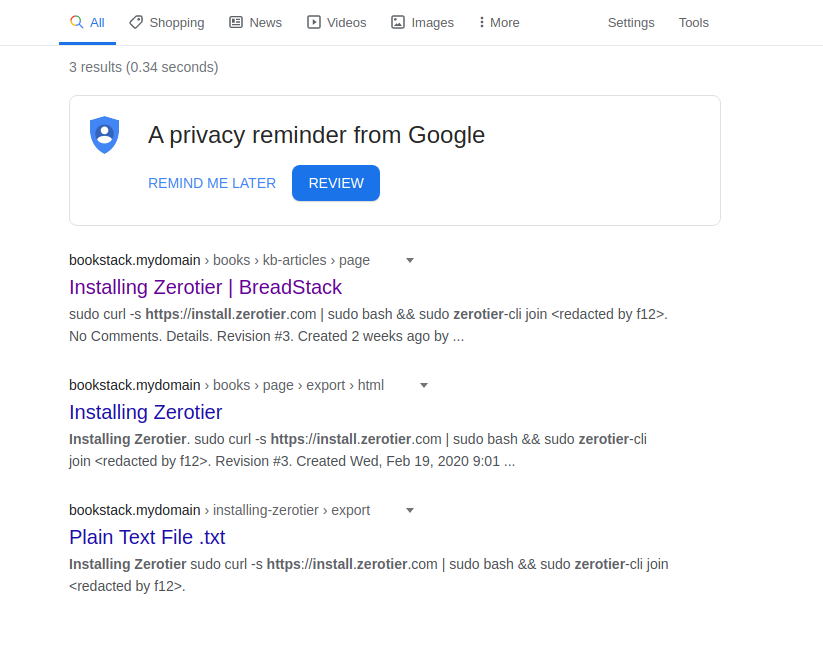
I have some pages on my bookstack that are not accessible by the public login or from public access stand point, but google has indexed these pages and exported them as text documents

Steps To Reproduce
Steps to reproduce the behavior:

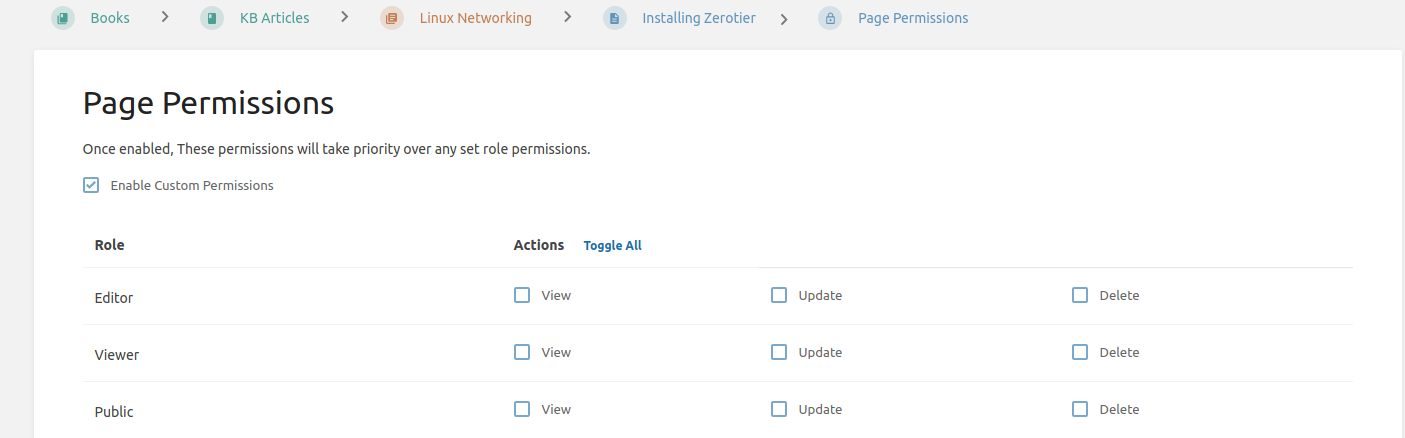
  1. Create a page and set custom permissions so no one can access it other than the admin
  2. Validate this by going incognito and try access the page.
  3. Allow crawling of the site in the .env file

Expected behaviour
Page will not be crawled or show up in search engines

Actual outcome
Pages show up in google
Google exports the page as a pdf and a txt file
66.249.79.119 - - [02/May/2020:02:47:51 +0000] "GET /books/kb-articles/page/cachet/export/pdf HTTP/1.1" 200 702324 "-" "Mozilla/5.0 (Linux; Android 6.0.1; Nexus 5X Build/MMB29P) AppleWebKit/537.36 (KHTML, like Gecko) Chrome/41.0.2272.96 Mobile Safari/537.36 (compatible; Googlebot/2.1; +http://www.google.com/bot.html)"

Screenshots
Google:
image
.
Permisions:
image

Your Configuration (please complete the following information):

  • Exact BookStack Version: BookStack v0.29.2
  • PHP Version: PHP 7.4.5 (cli) (built: Apr 19 2020 07:36:30) ( NTS )
  • Hosting Method: Nginx

Additional context
N/a

Originally created by @userbradley on GitHub (May 3, 2020). I have some pages on my bookstack that are not accessible by the public login or from public access stand point, but google has indexed these pages and exported them as text documents **Steps To Reproduce** Steps to reproduce the behavior: 1. Create a page and set custom permissions so no one can access it other than the admin 2. Validate this by going incognito and try access the page. 3. Allow crawling of the site in the .env file **Expected behaviour** Page will not be crawled or show up in search engines **Actual outcome** Pages show up in google Google exports the page as a pdf and a txt file `66.249.79.119 - - [02/May/2020:02:47:51 +0000] "GET /books/kb-articles/page/cachet/export/pdf HTTP/1.1" 200 702324 "-" "Mozilla/5.0 (Linux; Android 6.0.1; Nexus 5X Build/MMB29P) AppleWebKit/537.36 (KHTML, like Gecko) Chrome/41.0.2272.96 Mobile Safari/537.36 (compatible; Googlebot/2.1; +http://www.google.com/bot.html)"` **Screenshots** Google: ![image](https://user-images.githubusercontent.com/41597815/80917157-14dd3780-8d55-11ea-82b4-22c8beb49ae0.png) . Permisions: ![image](https://user-images.githubusercontent.com/41597815/80917167-245c8080-8d55-11ea-8389-9fd5fc70ab87.png) **Your Configuration (please complete the following information):** - Exact BookStack Version: BookStack v0.29.2 - PHP Version: `PHP 7.4.5 (cli) (built: Apr 19 2020 07:36:30) ( NTS )` - Hosting Method: Nginx **Additional context** N/a
Author
Owner

@ssddanbrown commented on GitHub (May 3, 2020):

Hi @userbradley ,
This is troubling. Just to confirm, has the page ever been public? Do you have a caching/cdn layer in front of BookStack, or some custom caching nginx rules set?

@ssddanbrown commented on GitHub (May 3, 2020): Hi @userbradley , This is troubling. Just to confirm, has the page ever been public? Do you have a caching/cdn layer in front of BookStack, or some custom caching nginx rules set?
Author
Owner

@ssddanbrown commented on GitHub (May 3, 2020):

Looking at the cached version of the page, it's as if page permissions were not active at the time of caching. Since it does not show "Page Permissions Active" under details.

@ssddanbrown commented on GitHub (May 3, 2020): Looking at the cached version of the page, it's as if page permissions were not active at the time of caching. Since it does not show "Page Permissions Active" under details.
Author
Owner

@userbradley commented on GitHub (May 3, 2020):

Hi @ssddanbrown this page has never been public (that I know of). I have got permissions on the page to disallow anyone from viewing it publicly.

try for your self: https://bookstack.breadnet.co.uk/books/kb-articles/page/installing-zerotier

In terms of caching, no. It's a default nginx config.

Based off what you've said and looking at the cached page it seems like this was user error on my behalf as the caching is from 5th of march which I can only assume is when it could have been made public.

Part that confuses me is I've never allowed crawling of my site so I'm going to need to look on google search console to see whats up.

Thanks for your help

@userbradley commented on GitHub (May 3, 2020): Hi @ssddanbrown this page has never been public (that I know of). I have got permissions on the page to disallow anyone from viewing it publicly. try for your self: https://bookstack.breadnet.co.uk/books/kb-articles/page/installing-zerotier In terms of caching, no. It's a default nginx config. Based off what you've said and looking at the cached page it seems like this was user error on my behalf as the caching is from 5th of march which I can only assume is when it could have been made public. Part that confuses me is I've never allowed crawling of my site so I'm going to need to look on google search console to see whats up. Thanks for your help
Author
Owner

@ssddanbrown commented on GitHub (May 4, 2020):

Part that confuses me is I've never allowed crawling of my site so I'm going to need to look on google search console to see whats up.

Here's the available .env option to control this:

d3ec38bee3/.env.example.complete (L262-L266)

If not-set, or null, then BookStack will allow robots or not depending on whether the site is publicly viewable or not.

If you think BookStack is not following that logic then let me know and I can have a look into it.

It is possible to override the robots.txt file completely to set your own rules.

@ssddanbrown commented on GitHub (May 4, 2020): > Part that confuses me is I've never allowed crawling of my site so I'm going to need to look on google search console to see whats up. Here's the available `.env` option to control this: https://github.com/BookStackApp/BookStack/blob/d3ec38bee3eb1749b29726cb837a16efbec589da/.env.example.complete#L262-L266 If not-set, or null, then BookStack will allow robots or not depending on whether the site is publicly viewable or not. If you think BookStack is not following that logic then let me know and I can have a look into it. It is possible to override the robots.txt file completely to set your own rules.
Author
Owner

@userbradley commented on GitHub (May 9, 2020):

Thanks! It seems like it was purely down to user error :/

I will close this one! Ty

@userbradley commented on GitHub (May 9, 2020): Thanks! It seems like it was purely down to user error :/ I will close this one! Ty
Sign in to join this conversation.
1 Participants
Notifications
Due Date
No due date set.
Dependencies

No dependencies set.

Reference: starred/BookStack#1703