Formatting Affected by Some Table Pasting from Browser #1676

Closed
opened 2026-02-05 01:34:59 +03:00 by OVERLORD · 3 comments
Owner

Originally created by @nosbig on GitHub (Apr 23, 2020).

Describe the bug
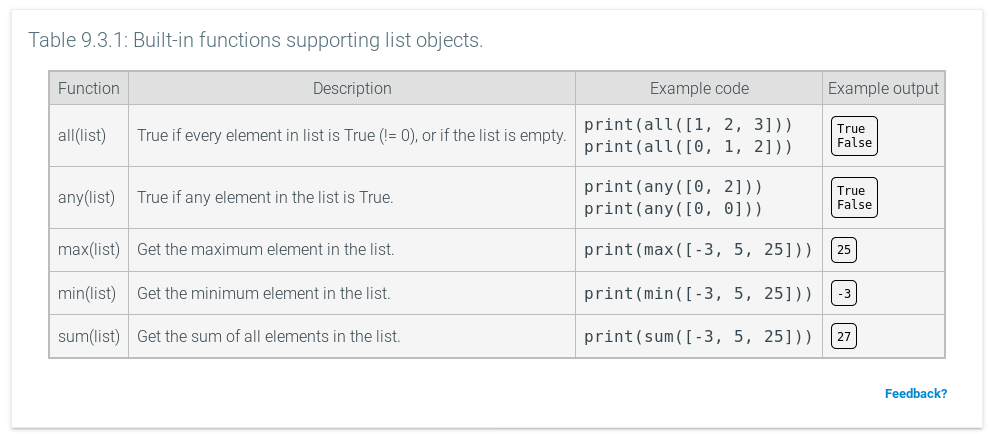
Using Firefox and logged into the ZyBooks textbook website, there are some tables from the material which will cause the remainder of the page to not be able to change formatting (such as headings and codeblocks). This doesn't happen with most tables; I've tested with a random table from Wikipedia and one from W3Schools. However, more than 50% of the tables I was pasting, using Bookstack to collect notes from a Python programming class, would generate this issue.

Steps To Reproduce
Steps to reproduce the behavior:

  1. Edit a page.
  2. Paste a table
  3. Click to the right of the table to escape any cells
  4. Press enter to start a new paragraph
  5. Type a string for a headline
  6. Select any Header format or the Callout styles
  7. Selected text does not change

Expected behavior
Selected text should change to the desired format.

Your Configuration (please complete the following information):

  • Exact BookStack Version (Found in settings): 0.29.0 (also occurred in 0.28.3 for my initial install)
  • PHP Version: 7.3
  • Hosting Method (Nginx/Apache/Docker): Apache on Debian 10 stable

Additional context
image

The code view for the pasted HTML when added to Bookstack looks like this:
https://pastebin.com/3eyXaYs6

Originally created by @nosbig on GitHub (Apr 23, 2020). **Describe the bug** Using Firefox and logged into the ZyBooks textbook website, there are some tables from the material which will cause the remainder of the page to not be able to change formatting (such as headings and codeblocks). This doesn't happen with most tables; I've tested with a random table from Wikipedia and one from W3Schools. However, more than 50% of the tables I was pasting, using Bookstack to collect notes from a Python programming class, would generate this issue. **Steps To Reproduce** Steps to reproduce the behavior: 1. Edit a page. 2. Paste a table 3. Click to the right of the table to escape any cells 4. Press enter to start a new paragraph 5. Type a string for a headline 6. Select any Header format or the Callout styles 7. Selected text does not change **Expected behavior** Selected text should change to the desired format. **Your Configuration (please complete the following information):** - Exact BookStack Version (Found in settings): 0.29.0 (also occurred in 0.28.3 for my initial install) - PHP Version: 7.3 - Hosting Method (Nginx/Apache/Docker): Apache on Debian 10 stable **Additional context** ![image](https://user-images.githubusercontent.com/3867106/80042472-0da06900-84cd-11ea-84bb-f37141c057fe.png) The code view for the pasted HTML when added to Bookstack looks like this: https://pastebin.com/3eyXaYs6
Author
Owner

@nosbig commented on GitHub (Apr 23, 2020):

During a review of the pasted code on the pastebin, I saw numerous opening div tags with no closing tag, due to a copy and paste of a part of a page. Removing the extra div tags from above the table tag resolved the formatting problem from within Bookstack. With the fact that Github does resolve the HTML properly, I don't know if there needs to be further error handling of odd situations like that or just close the issue as unneeded.

@nosbig commented on GitHub (Apr 23, 2020): During a review of the pasted code on the pastebin, I saw numerous opening div tags with no closing tag, due to a copy and paste of a part of a page. Removing the extra div tags from above the table tag resolved the formatting problem from within Bookstack. With the fact that Github does resolve the HTML properly, I don't know if there needs to be further error handling of odd situations like that or just close the issue as unneeded.
Author
Owner

@ssddanbrown commented on GitHub (Apr 25, 2020):

Hi @nosbig,
Sorry to hear you were having issues. It can be tricky to account for various content being pasted in as there can be countless side-affects. Not sure if you gave it a go, but sometimes selecting everything in the editor and clicking the "Clear Formatting" button can sort things out.

I don't know if there needs to be further error handling of odd situations like that or just close the issue as unneeded.

I'd need easy access to a reliable source where this occurs to be able to look into this further. That said, I don't think it would be worth it at this time since a review of the editors is upcoming on the road-map, Therefore I'll probably go ahead and close this if that's okay?

P.S, Thanks for the detailed account and effort in testing, in addition to providing further updates with your findings.

@ssddanbrown commented on GitHub (Apr 25, 2020): Hi @nosbig, Sorry to hear you were having issues. It can be tricky to account for various content being pasted in as there can be countless side-affects. Not sure if you gave it a go, but sometimes selecting everything in the editor and clicking the "Clear Formatting" button can sort things out. > I don't know if there needs to be further error handling of odd situations like that or just close the issue as unneeded. I'd need easy access to a reliable source where this occurs to be able to look into this further. That said, I don't think it would be worth it at this time since a review of the editors is upcoming on the road-map, Therefore I'll probably go ahead and close this if that's okay? P.S, Thanks for the detailed account and effort in testing, in addition to providing further updates with your findings.
Author
Owner

@nosbig commented on GitHub (Apr 26, 2020):

I tried clear formatting during my original troubleshooting to no avail... It's only the removal of the extra div tags that fixed it. I would say it would be very difficult and unreasonable to expect Bookstack to handle that incredibly ugly HTML fragment with any sense of sanity...

Thanks for a great product, and I look forward to what the roadmap has to offer.

@nosbig commented on GitHub (Apr 26, 2020): I tried clear formatting during my original troubleshooting to no avail... It's only the removal of the extra div tags that fixed it. I would say it would be very difficult and unreasonable to expect Bookstack to handle that incredibly ugly HTML fragment with any sense of sanity... Thanks for a great product, and I look forward to what the roadmap has to offer.
Sign in to join this conversation.
1 Participants
Notifications
Due Date
No due date set.
Dependencies

No dependencies set.

Reference: starred/BookStack#1676