mirror of
https://github.com/BookStackApp/BookStack.git
synced 2026-07-16 05:33:49 +03:00
Add a key icon in shelf/book with certain access #1643

Reference in New Issue
Block a user
Delete Branch "%!s()"
Deleting a branch is permanent. Although the deleted branch may continue to exist for a short time before it actually gets removed, it CANNOT be undone in most cases. Continue?
Originally created by @DevMimas on GitHub (Apr 10, 2020).
Describe the feature you'd like
If a shelf or a book is made accessible only to certain persons, it would be useful to mark this with an icon - see the picture in the appendix. Or Additionally with a text, for example: "The shelf/book is allowed for certain users".
Describe the benefits this feature would bring to BookStack users
The user/administrator can see directly which shelves/books are subject to certain breaks.
Screenshot
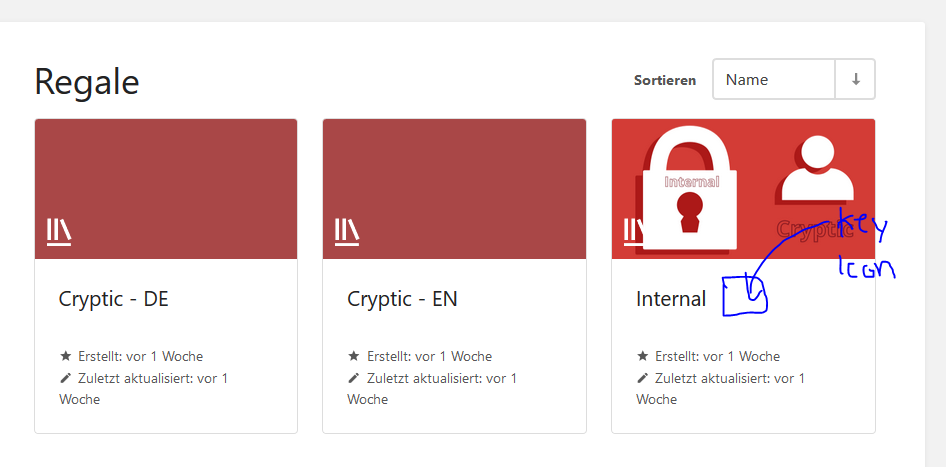
@ssddanbrown commented on GitHub (Apr 10, 2020):
Hi @DevMimas,
Thanks for the suggestion.
I'd prefer not to busy the titles of items with status icons as that can be a slippery slope to having various icons that distract from the content.
Just thinking about your intended benefits:
There is functionality in the search system to help with this. You should see a "Permissions Set" option in the sidebar. Alternatively, you can search for
{is_restricted}in the top search bar to trigger the same search. You can also use this search filter within a particular book.@DevMimas commented on GitHub (Apr 10, 2020):
Hi @ssddanbrown
Thanks for your quick feedback.
Yes, that`s really good. But I think it would be more obvious to place a small icon there, which indicates that this area is protected or subject to permission.
I'm actually only concerned with the visual representation. If you have several shelves that are public or protected, it will be difficult to keep track.