Code Block not displayed correctly in WYSIWIG editor #1586

Closed
opened 2026-02-05 01:19:58 +03:00 by OVERLORD · 4 comments
Owner

Originally created by @miglis on GitHub (Mar 13, 2020).

Describe the bug
I've installed Bookstack with the Ubuntu 18.04 Installation Script.
I then created a book and wanted to add a page with a configuration file with the code block format.
In the editor, this code block isn't displayed well. After saving the page it shows it correctly. Only not in the edit mode.

Expected behavior
The code block should be shown correctly also in the edit mode.

Screenshots
edit mode
editor
page saved
page

Your Configuration (please complete the following information):

  • Exact BookStack Version (Found in settings): BookStack v0.28.2
  • PHP Version: ?
  • Hosting Method (Nginx/Apache/Docker): Apache
Originally created by @miglis on GitHub (Mar 13, 2020). **Describe the bug** I've installed Bookstack with the Ubuntu 18.04 Installation Script. I then created a book and wanted to add a page with a configuration file with the code block format. In the editor, this code block isn't displayed well. After saving the page it shows it correctly. Only not in the edit mode. **Expected behavior** The code block should be shown correctly also in the edit mode. **Screenshots** edit mode ![editor](https://user-images.githubusercontent.com/12274029/76614815-16db0500-6521-11ea-83ab-ba5df0e838f9.PNG) page saved ![page](https://user-images.githubusercontent.com/12274029/76614841-1f334000-6521-11ea-93fa-5774f25288b3.PNG) **Your Configuration (please complete the following information):** - Exact BookStack Version (Found in settings): BookStack v0.28.2 - PHP Version: ? - Hosting Method (Nginx/Apache/Docker): Apache
OVERLORD added the 🐕 Support label 2026-02-05 01:19:58 +03:00
Author
Owner

@ssddanbrown commented on GitHub (Mar 13, 2020):

Hi @MigliS,

It looks like none of the correct styles are loading within the editor.
This could happen for a number of reasons.
Please could you open the browser development tools and see if any errors are logged when you open the page editor?

If you're not sure on the above, let me know and I'll guide you through it.

@ssddanbrown commented on GitHub (Mar 13, 2020): Hi @MigliS, It looks like none of the correct styles are loading within the editor. This could happen for a number of reasons. Please could you open the browser development tools and see if any errors are logged when you open the page editor? If you're not sure on the above, let me know and I'll guide you through it.
Author
Owner

@miglis commented on GitHub (Mar 14, 2020):

Hi @ssddanbrown

Alright. I've got the following logs. If you need something more tell me.
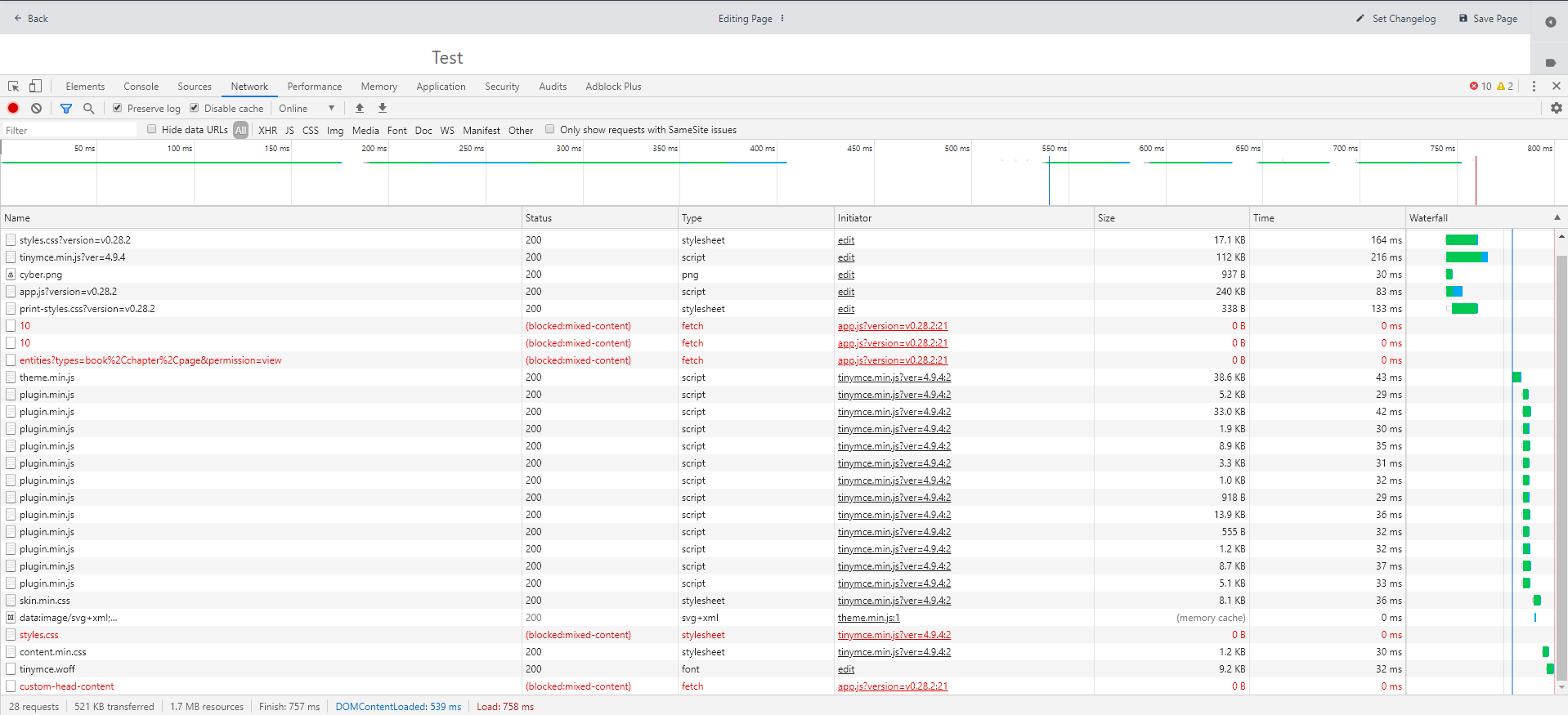
2020-03-14 09_01_19-Window
I think it occures because I'm using Cloudflare and a nginx reverse proxy where the traffic goes trough.

@miglis commented on GitHub (Mar 14, 2020): Hi @ssddanbrown Alright. I've got the following logs. If you need something more tell me. ![2020-03-14 09_01_19-Window](https://user-images.githubusercontent.com/12274029/76677809-cf14b600-65d2-11ea-929a-6fc3cb7e4e23.png) I think it occures because I'm using Cloudflare and a nginx reverse proxy where the traffic goes trough.
Author
Owner

@ssddanbrown commented on GitHub (Mar 14, 2020):

Hi @MigliS,
Can you double check you have set the APP_URL option in your .env file, and that it is not commented out with a #, and that the value of this option is set to the URL you're using to access BookStack (With the right protocol - https/http)

@ssddanbrown commented on GitHub (Mar 14, 2020): Hi @MigliS, Can you double check you have set the `APP_URL` option in your `.env` file, and that it is not commented out with a `#`, and that the value of this option is set to the URL you're using to access BookStack (With the right protocol - https/http)
Author
Owner

@miglis commented on GitHub (Mar 14, 2020):

Hi @ssddanbrown
Thank you, that was the point. I actually had no idea what to do.
Now everything works fine. Or let me say the things I'm using ;)
Thank you for your quick help!

@miglis commented on GitHub (Mar 14, 2020): Hi @ssddanbrown Thank you, that was the point. I actually had no idea what to do. Now everything works fine. Or let me say the things I'm using ;) Thank you for your quick help!
Sign in to join this conversation.
1 Participants
Notifications
Due Date
No due date set.
Dependencies

No dependencies set.

Reference: starred/BookStack#1586