Deleting comment is not working #1452

Closed
opened 2026-02-05 00:56:18 +03:00 by OVERLORD · 4 comments
Owner

Originally created by @MihaTomsic on GitHub (Nov 15, 2019).

Describe the bug
Comment cannot be deleted by pressing trash icon and then trash icon again

Steps To Reproduce
Steps to reproduce the behavior:

  1. Go to page
  2. Add a comment and save it - comment is added
  3. Click trash can in the comment - pop-up appears
  4. Clich trash can (Izbriši = Delete) in the popup
  5. Nothing happens
  6. Comment is still there (also checked in database -> comment is still there)

Expected behavior
After deleting the comment should be gone.
Also in the database.

Screenshots
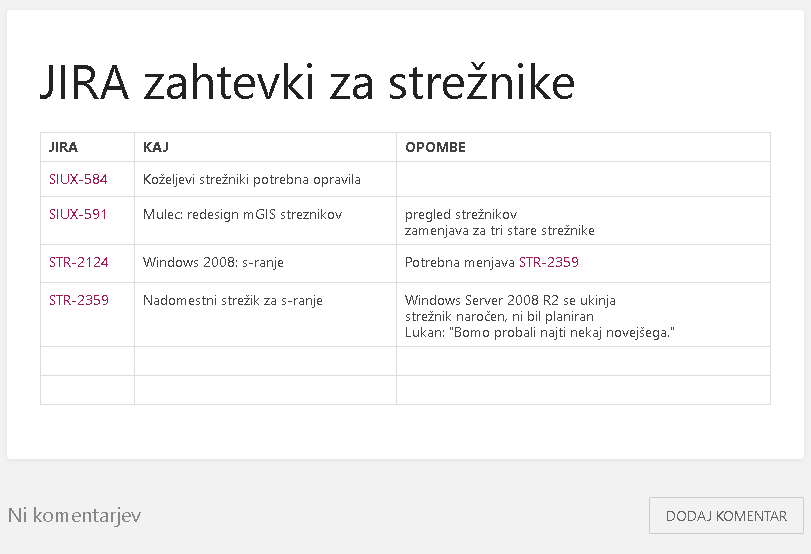
bookstackcomment1

bookstackcomment2

bookstackcomment3

Your Configuration (please complete the following information):

  • Exact BookStack Version (Found in settings): v0.27.4
  • PHP Version: PHP 7.2.19-0ubuntu0.18.04.2 (cli) (built: Aug 12 2019 19:34:28) ( NTS )
  • Hosting Method (Nginx/Apache/Docker): Apache/2.4.29 (Ubuntu)

Additional context
Maybe it has something to do with slovenian version of the site.

Originally created by @MihaTomsic on GitHub (Nov 15, 2019). **Describe the bug** Comment cannot be deleted by pressing trash icon and then trash icon again **Steps To Reproduce** Steps to reproduce the behavior: 1. Go to page 2. Add a comment and save it - comment is added 3. Click trash can in the comment - pop-up appears 4. Clich trash can (Izbriši = Delete) in the popup 5. Nothing happens 6. Comment is still there (also checked in database -> comment is still there) **Expected behavior** After deleting the comment should be gone. Also in the database. **Screenshots** ![bookstackcomment1](https://user-images.githubusercontent.com/5785564/68929736-38073100-078d-11ea-91e3-d6638e760ccb.png) ![bookstackcomment2](https://user-images.githubusercontent.com/5785564/68929770-45bcb680-078d-11ea-92f9-45e82b9afcfe.png) ![bookstackcomment3](https://user-images.githubusercontent.com/5785564/68929778-49e8d400-078d-11ea-9370-6423e33588a5.png) **Your Configuration (please complete the following information):** - Exact BookStack Version (Found in settings): v0.27.4 - PHP Version: PHP 7.2.19-0ubuntu0.18.04.2 (cli) (built: Aug 12 2019 19:34:28) ( NTS ) - Hosting Method (Nginx/Apache/Docker): Apache/2.4.29 (Ubuntu) **Additional context** Maybe it has something to do with slovenian version of the site.
OVERLORD added the 🔍 Pending Validation label 2026-02-05 00:56:18 +03:00
Author
Owner

@ssddanbrown commented on GitHub (Nov 15, 2019):

Hi @MihaTomsic,
BookStack v0.27.5 specifically addressed an issue where comments could not be deleted. Please could you try updating to the latest BookStack version and see if the issue persists?

@ssddanbrown commented on GitHub (Nov 15, 2019): Hi @MihaTomsic, [BookStack v0.27.5](https://github.com/BookStackApp/BookStack/releases/tag/v0.27.5) specifically addressed an issue where comments could not be deleted. Please could you try updating to the latest BookStack version and see if the issue persists?
Author
Owner

@MihaTomsic commented on GitHub (Nov 18, 2019):

Updating to 0.27.5 worked great.
Coments can be deleted and created.
Is it safe to just do git pull on minor releases? Or would it be better to do the composer and artisan steps?
I am new to php/mysql web apps.

@MihaTomsic commented on GitHub (Nov 18, 2019): Updating to 0.27.5 worked great. Coments can be deleted and created. Is it safe to just do git pull on minor releases? Or would it be better to do the composer and artisan steps? I am new to php/mysql web apps.
Author
Owner

@james-geiger commented on GitHub (Nov 19, 2019):

@MihaTomsic In regards to updating, the update command in the BookStack documentation is:

git pull origin release && composer install && php artisan migrate
php artisan cache:clear
php artisan view:clear

The composer and artisan steps are necessary to bring in any changes in packages or dependencies.

These steps essentially say, "Download new code, install any updated packages, update any changed database tables, remove cached files, update the page templates."

I've found that updating php apps is remarkably easy when they follow this method. Always be sure to run the commands as whatever user 'owns' the directory that BookStack lives in on your instance to avoid permissions issues.

@james-geiger commented on GitHub (Nov 19, 2019): @MihaTomsic In regards to updating, the update command in the [BookStack documentation ](https://www.bookstackapp.com/docs/admin/updates/) is: ``` git pull origin release && composer install && php artisan migrate php artisan cache:clear php artisan view:clear ``` The composer and artisan steps are necessary to bring in any changes in packages or dependencies. These steps essentially say, "Download new code, install any updated packages, update any changed database tables, remove cached files, update the page templates." I've found that updating php apps is remarkably easy when they follow this method. Always be sure to run the commands as whatever user 'owns' the directory that BookStack lives in on your instance to avoid permissions issues.
Author
Owner

@MihaTomsic commented on GitHub (Nov 21, 2019):

Thanks for the quick explanation. I am very happy with BookStack!

@MihaTomsic commented on GitHub (Nov 21, 2019): Thanks for the quick explanation. I am very happy with BookStack!
Sign in to join this conversation.
1 Participants
Notifications
Due Date
No due date set.
Dependencies

No dependencies set.

Reference: starred/BookStack#1452