Dotted outline when clicking on a button/link #1418

Closed
opened 2026-02-05 00:50:41 +03:00 by OVERLORD · 8 comments
Owner

Originally created by @clafee on GitHub (Oct 23, 2019).

Originally assigned to: @ssddanbrown on GitHub.

Hello,

First of all thank you for this wonderful application !

Describe the bug
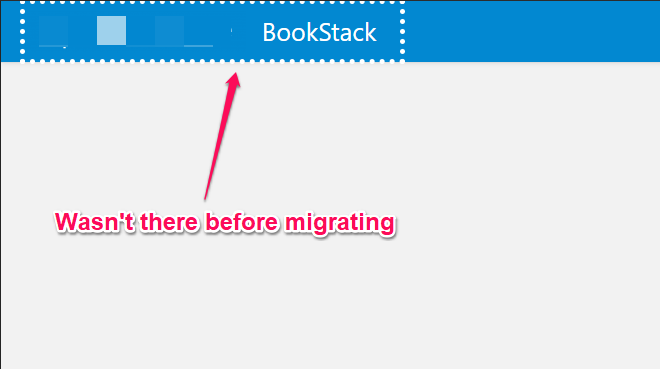
I upgraded from 0.26.4 to 0.27.5, and now I have a dotted outline when I click on anything clickable. The outline disappears after the content has loaded

Steps To Reproduce
Steps to reproduce the behavior:

  1. Click on any clickable button, for example the logo at the top left
  2. When clicking, a dotted outline will appear around the button that's been clicked
  3. After the page is loaded, the outline disappears.

Expected behavior
No outline when clicking on anything.

Screenshots
image

Your Configuration (please complete the following information):

  • Exact BookStack Version (Found in settings): 0.27.5
  • PHP Version: 7.2
  • Hosting Method (Nginx/Apache/Docker): Apache (used pre-made script on Ubuntu 18)

Thanks !

Originally created by @clafee on GitHub (Oct 23, 2019). Originally assigned to: @ssddanbrown on GitHub. Hello, First of all thank you for this wonderful application ! **Describe the bug** I upgraded from 0.26.4 to 0.27.5, and now I have a dotted outline when I click on anything clickable. The outline disappears after the content has loaded **Steps To Reproduce** Steps to reproduce the behavior: 1. Click on any clickable button, for example the logo at the top left 2. When clicking, a dotted outline will appear around the button that's been clicked 3. After the page is loaded, the outline disappears. **Expected behavior** No outline when clicking on anything. **Screenshots** ![image](https://user-images.githubusercontent.com/56917624/67383725-0b963580-f590-11e9-8542-ade859812372.png) **Your Configuration (please complete the following information):** - Exact BookStack Version (Found in settings): 0.27.5 - PHP Version: 7.2 - Hosting Method (Nginx/Apache/Docker): Apache (used pre-made script on Ubuntu 18) Thanks !
OVERLORD added the 🛠️ Enhancement🎨 Design💻 Front-End labels 2026-02-05 00:50:41 +03:00
Author
Owner

@james-geiger commented on GitHub (Oct 23, 2019):

Duplicate of #1678

Hi @clafee --

This was an intentional change made between v 0.26.x and v 0.27.x outlined in the issue I mentioned.

It was done to increase accessibility.

@james-geiger commented on GitHub (Oct 23, 2019): Duplicate of #1678 Hi @clafee -- This was an intentional change made between v 0.26.x and v 0.27.x outlined in the issue I mentioned. It was done to increase accessibility.
Author
Owner

@ssddanbrown commented on GitHub (Oct 23, 2019):

Hi @clafee,
As suggested above there were some intentional changes in v0.27 to increase accessibility of the platform. That said, The sizing of the outline shown in the screenshot is much larger than I'd expect.

Could you confirm the following:

  • Please confirm your exact browser and operating system version.
  • Please confirm if you also see the same focus style on the demo site.
@ssddanbrown commented on GitHub (Oct 23, 2019): Hi @clafee, As suggested above there were some intentional changes in v0.27 to increase accessibility of the platform. That said, The sizing of the outline shown in the screenshot is much larger than I'd expect. Could you confirm the following: - Please confirm your exact browser and operating system version. - Please confirm if you also see the same focus style on the [demo site](https://demo.bookstackapp.com/).
Author
Owner

@clafee commented on GitHub (Oct 24, 2019):

Sorry, I tried to search before posting, guess it wasn't enough.

Here are your answers @ssddanbrown

Please confirm your exact browser and operating system version. I tried on Firefox 69.0.3, Microsoft Edge 42.17134.1.0, Vivaldi 2.2.1388.34 (I haven't updated this one in a while). All of that on Windows 10
What I didn't notice is the outline that is a different size between the first two browsers and Vivaldi.

Please confirm if you also see the same focus style on the demo site.
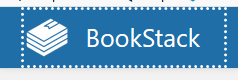
Here's what I have on Firefox 69.0.3 on the demo site:
image

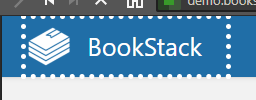
And here's what I have on Vivaldi 2.2.1388.34:
image

Based on what you said, I believe it all looks normal, sorry for wasting you time, and thanks again for this great software !

@clafee commented on GitHub (Oct 24, 2019): Sorry, I tried to search before posting, guess it wasn't enough. Here are your answers @ssddanbrown **Please confirm your exact browser and operating system version.** I tried on Firefox 69.0.3, Microsoft Edge 42.17134.1.0, Vivaldi 2.2.1388.34 (I haven't updated this one in a while). All of that on Windows 10 What I didn't notice is the outline that is a different size between the first two browsers and Vivaldi. **Please confirm if you also see the same focus style on the demo site.** Here's what I have on Firefox 69.0.3 on the demo site: ![image](https://user-images.githubusercontent.com/56917624/67458925-a5fd8400-f637-11e9-95c8-9d7e660725bd.png) And here's what I have on Vivaldi 2.2.1388.34: ![image](https://user-images.githubusercontent.com/56917624/67458866-8a927900-f637-11e9-8613-9f8f5088346b.png) Based on what you said, I believe it all looks normal, sorry for wasting you time, and thanks again for this great software !
Author
Owner

@james-geiger commented on GitHub (Oct 24, 2019):

Could be addressed by setting the outline-width property on the :focus selector, e.g.:

*:focus {
  outline-style: dotted; 
  outline-width: 1px;
}

It appears that when it's not explicitly set the browser uses whatever the base text size is a reference point its base style sheet to determine the size.

@james-geiger commented on GitHub (Oct 24, 2019): Could be addressed by setting the `outline-width` property on the `:focus` selector, e.g.: ``` *:focus { outline-style: dotted; outline-width: 1px; } ``` It appears that when it's not explicitly set the browser uses ~~whatever the base text size is a reference point~~ its base style sheet to determine the size.
Author
Owner

@dannyhanes commented on GitHub (Nov 25, 2019):

Adding on to this, I am all for supporting accessibility, but perhaps there could be a toggle within the settings to enable / disable accessibility features. For me it looks a little silly.

Screen Shot 2019-11-25 at 1 07 26 PM
@dannyhanes commented on GitHub (Nov 25, 2019): Adding on to this, I am all for supporting accessibility, but perhaps there could be a toggle within the settings to enable / disable accessibility features. For me it looks a little silly. <img width="833" alt="Screen Shot 2019-11-25 at 1 07 26 PM" src="https://user-images.githubusercontent.com/3778687/69566215-9b127800-0f84-11ea-8c6a-b8f55c4d7fe3.png">
Author
Owner

@rohithb commented on GitHub (Nov 26, 2019):

If you want to turn it off, just add

<style>
*:focus {
    outline-style: none;
}
</style>

in Custom HTML Head Content under settings.

@rohithb commented on GitHub (Nov 26, 2019): If you want to turn it off, just add ``` <style> *:focus { outline-style: none; } </style> ``` in **Custom HTML Head Content** under settings.
Author
Owner

@dannyhanes commented on GitHub (Nov 26, 2019):

@rohithb Well that was easy enough, thanks!!

@dannyhanes commented on GitHub (Nov 26, 2019): @rohithb Well that was easy enough, thanks!!
Author
Owner

@ssddanbrown commented on GitHub (Dec 16, 2019):

Thanks @james-geiger for the suggestion. I've applied some sensible default values in commit a9634b6b66. These will be part of the next release (v0.28) which is targeted for release at the end of the year.

If anyone would like to disable outlines completely please follow the suggestion from @rohithb above but please keep in mind that outlines may be important for some of your users, both those with visual impairments and also those that like to navigate by keyboard.

@ssddanbrown commented on GitHub (Dec 16, 2019): Thanks @james-geiger for the suggestion. I've applied some sensible default values in commit a9634b6b6625c98448cd1a1927b9b7d6b1609757. These will be part of the next release (v0.28) which is targeted for release at the end of the year. If anyone would like to disable outlines completely please follow the suggestion from @rohithb above but please keep in mind that outlines may be important for some of your users, both those with visual impairments and also those that like to navigate by keyboard.
Sign in to join this conversation.
1 Participants
Notifications
Due Date
No due date set.
Dependencies

No dependencies set.

Reference: starred/BookStack#1418