Update notifications to make dismissal more intuitive #1251

Closed
opened 2026-02-05 00:24:20 +03:00 by OVERLORD · 8 comments
Owner

Originally created by @flonology on GitHub (Jul 5, 2019).

Originally assigned to: @james-geiger on GitHub.

Describe the bug
While editing a draft, the dialogue stays over the "Save Page" button and does not go away

Expected behavior
The dialogue should go away or stay in a place which lets the "Save Page" be visible.

Screenshots
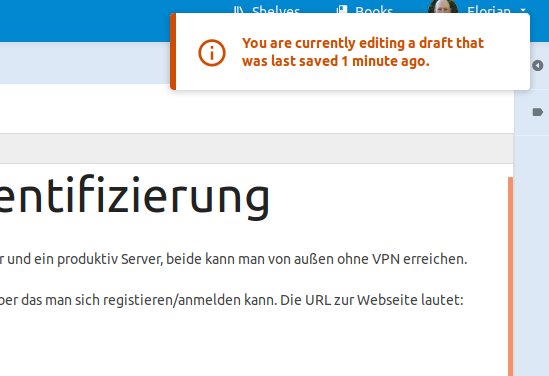
Bild eingefügt am 2019-7-5 11-16

Your Configuration:

  • BookStack Version: 0.26.2
  • PHP Version: ?
  • Hosting Method (Nginx/Apache/Docker): Docker
Originally created by @flonology on GitHub (Jul 5, 2019). Originally assigned to: @james-geiger on GitHub. **Describe the bug** While editing a draft, the dialogue stays over the "Save Page" button and does not go away **Expected behavior** The dialogue should go away or stay in a place which lets the "Save Page" be visible. **Screenshots** ![Bild eingefügt am 2019-7-5 11-16](https://user-images.githubusercontent.com/1073814/60712623-b5857f80-9f17-11e9-93d2-d213e1ef1a38.png) **Your Configuration:** - BookStack Version: 0.26.2 - PHP Version: ? - Hosting Method (Nginx/Apache/Docker): Docker
OVERLORD added the 🎨 Design💆 UX labels 2026-02-05 00:24:20 +03:00
Author
Owner

@ssddanbrown commented on GitHub (Jul 5, 2019):

Hi @flonology,
Does the message not go away if you click on it?

Success messages are made to auto-disappear, Since their purpose is affirmation of an event and does not have any consequences whereas warnings & errors will stay around until dismissed since it's more important that they're read.

@ssddanbrown commented on GitHub (Jul 5, 2019): Hi @flonology, Does the message not go away if you click on it? Success messages are made to auto-disappear, Since their purpose is affirmation of an event and does not have any consequences whereas warnings & errors will stay around until dismissed since it's more important that they're read.
Author
Owner

@flonology commented on GitHub (Sep 6, 2019):

Hi, sorry for the late reply – yes, it disappears when I click it! I just wasn’t aware that I could. After knowing that it seems so obvious (cursor changes to hand etc.). Maybe I was too focused on finding any X (to close) but I do not see any problem anymore ;-)

@flonology commented on GitHub (Sep 6, 2019): Hi, sorry for the late reply – yes, it disappears when I click it! I just wasn’t aware that I could. After knowing that it seems so obvious (cursor changes to hand etc.). Maybe I was too focused on finding any X (to close) but I do not see any problem anymore ;-)
Author
Owner

@ssddanbrown commented on GitHub (Sep 7, 2019):

@flonology Thanks for the response.

It's probably a good idea if we add a close icon to the notification, To make it obvious it can be dismissed. I'll re-open this and mark it for the next feature release.

@ssddanbrown commented on GitHub (Sep 7, 2019): @flonology Thanks for the response. It's probably a good idea if we add a close icon to the notification, To make it obvious it can be dismissed. I'll re-open this and mark it for the next feature release.
Author
Owner

@james-geiger commented on GitHub (Dec 9, 2019):

@ssddanbrown Is this still open? Happy to take it.

@james-geiger commented on GitHub (Dec 9, 2019): @ssddanbrown Is this still open? Happy to take it.
Author
Owner

@ssddanbrown commented on GitHub (Dec 11, 2019):

@james-geiger Yeah, Still open, Go for it, would be a big help. Thanks!

Have assigned to you but no pressure, Just shout if you want to be un-assigned for any reason.

@ssddanbrown commented on GitHub (Dec 11, 2019): @james-geiger Yeah, Still open, Go for it, would be a big help. Thanks! Have assigned to you but no pressure, Just shout if you want to be un-assigned for any reason.
Author
Owner

@james-geiger commented on GitHub (Dec 12, 2019):

I've been playing around with this, and it seems like a dedicated dismiss button would be "just for show" unless we removed the click-to-dismiss feature from the notification and forced users to click the close button.

My thought to keep things looking clean is just to add auto-hide for errors and warnings with a 5-10 second timeout.

Thoughts, @ssddanbrown & @flonology?

@james-geiger commented on GitHub (Dec 12, 2019): I've been playing around with this, and it seems like a dedicated dismiss button would be "just for show" unless we removed the click-to-dismiss feature from the notification and forced users to click the close button. My thought to keep things looking clean is just to add auto-hide for errors and warnings with a 5-10 second timeout. Thoughts, @ssddanbrown & @flonology?
Author
Owner

@ssddanbrown commented on GitHub (Dec 16, 2019):

@james-geiger I'd totally vote for the dismiss button that's "just for show". Although it would not actually function itself, it would still act as an intuitive target for the user to click.

I'm generally adverse to auto-hiding warning and error messages since they should generally be things the user should be aware of, and I personally find it really frustrating when a message zooms off while I'm in the middle to trying to understand what it says.

@ssddanbrown commented on GitHub (Dec 16, 2019): @james-geiger I'd totally vote for the dismiss button that's "just for show". Although it would not actually function itself, it would still act as an intuitive target for the user to click. I'm generally adverse to auto-hiding warning and error messages since they should generally be things the user should be aware of, and I personally find it really frustrating when a message zooms off while I'm in the middle to trying to understand what it says.
Author
Owner

@ssddanbrown commented on GitHub (Jan 19, 2020):

This is now closed as of #1845. Will be in the next release.

@ssddanbrown commented on GitHub (Jan 19, 2020): This is now closed as of #1845. Will be in the next release.
Sign in to join this conversation.
1 Participants
Notifications
Due Date
No due date set.
Dependencies

No dependencies set.

Reference: starred/BookStack#1251