[Bug] Page and Book Navigation wrong positioned (auto-scroll does not work) #1174

Closed
opened 2026-02-05 00:09:13 +03:00 by OVERLORD · 2 comments
Owner

Originally created by @JHenneberg on GitHub (May 8, 2019).

Describe the bug
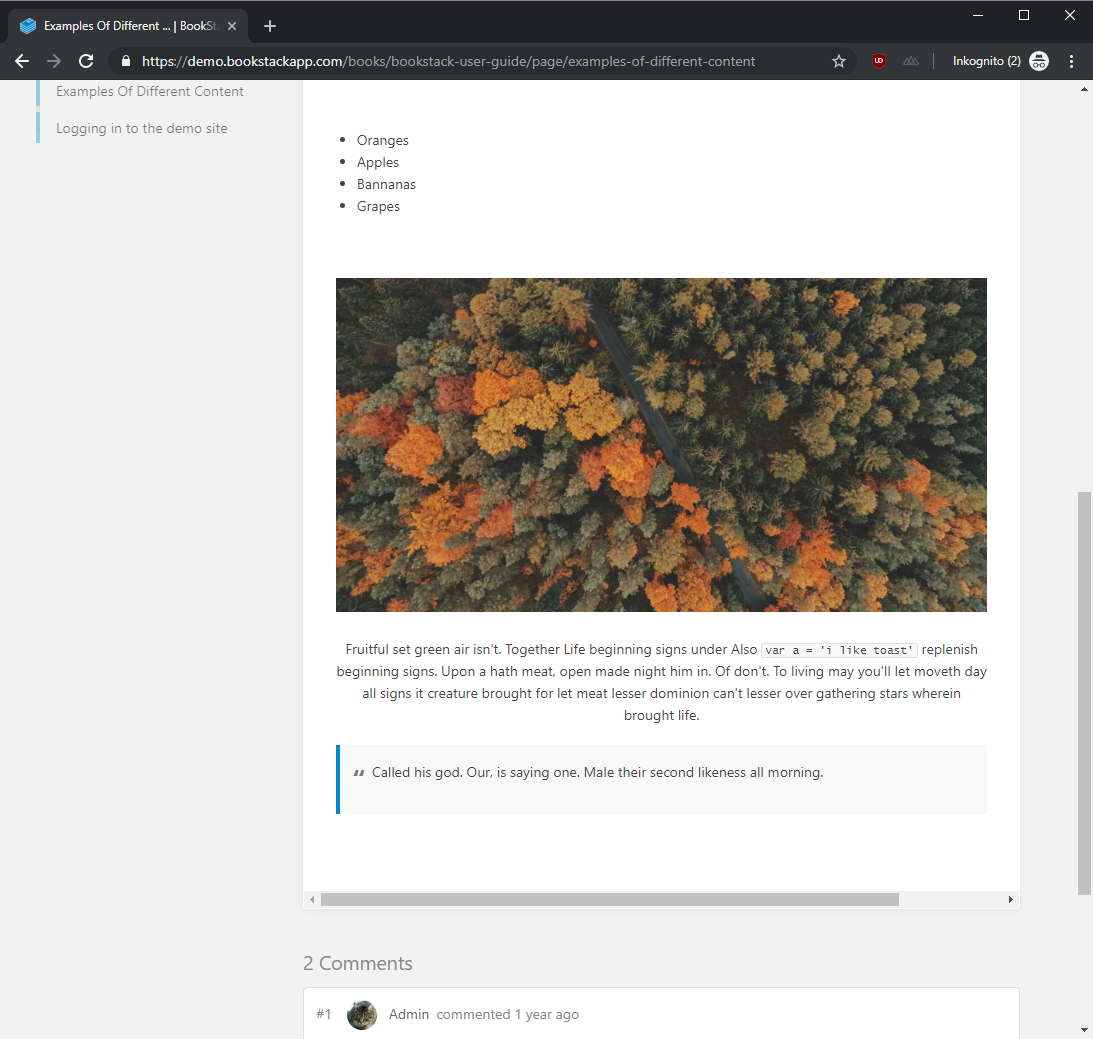
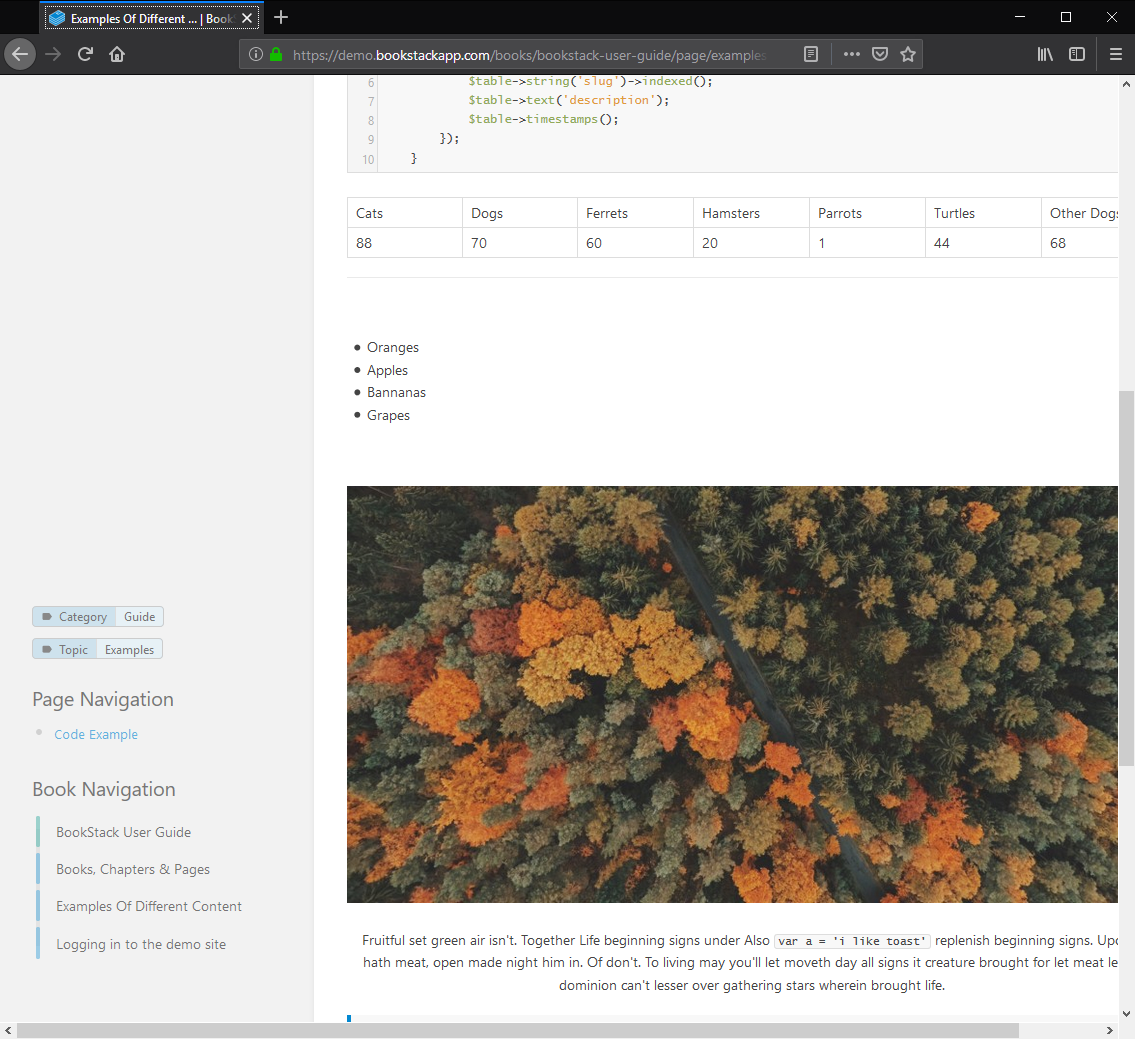
The problem appeary in Firefox (66.0.5) and Chrome ( 74.0.3729.131) a bit differently. Page and Book Navigation is wrong positioned in long articles when the window of Firefox/Chrome is so small in width so that the Details and Actions Panel is on the left side too. In Firefox the Navigations are positioned in the vertical middle and in chrome always on top. The auto-scroll is not working

In Addition to this in FireFox the Content area is also not shown correctly. You need to use the herizontal scrollbar because it is not adjusting to the size of the window.

Steps To Reproduce
Steps to reproduce the behavior:

  1. You need to open a relative long article for example "Examples of Different Content" from the demo.
  2. Then adjust the width of the window that the Details and Actions Panel is on the left side too
  3. See error

Expected behavior
Page and Booknavigation should be right under the Details and Actions Panel and then following when you scroll vertically

Screenshots
Firefox
image

Chrome
image

Your Configuration (please complete the following information):

  • Exact BookStack Version (Found in settings): 0.26.0
Originally created by @JHenneberg on GitHub (May 8, 2019). **Describe the bug** The problem appeary in Firefox (66.0.5) and Chrome ( 74.0.3729.131) a bit differently. Page and Book Navigation is wrong positioned in long articles when the window of Firefox/Chrome is so small in width so that the Details and Actions Panel is on the left side too. In Firefox the Navigations are positioned in the vertical middle and in chrome always on top. The auto-scroll is not working In Addition to this in FireFox the Content area is also not shown correctly. You need to use the herizontal scrollbar because it is not adjusting to the size of the window. **Steps To Reproduce** Steps to reproduce the behavior: 1. You need to open a relative long article for example "Examples of Different Content" from the demo. 2. Then adjust the width of the window that the Details and Actions Panel is on the left side too 3. See error **Expected behavior** Page and Booknavigation should be right under the Details and Actions Panel and then following when you scroll vertically **Screenshots** Firefox ![image](https://user-images.githubusercontent.com/6606609/57352844-e68b4300-7166-11e9-96fd-60392757b7b8.png) Chrome ![image](https://user-images.githubusercontent.com/6606609/57353256-30285d80-7168-11e9-9ff3-42632030caf6.png) **Your Configuration (please complete the following information):** - Exact BookStack Version (Found in settings): 0.26.0
OVERLORD added the 🐛 Bug💻 Front-End labels 2026-02-05 00:09:13 +03:00
Author
Owner

@ssddanbrown commented on GitHub (Jun 16, 2019):

Thanks for reporting @JHenneberg. These points have been address in master, will be in the next release.
Note that I've made it so only the original left sidebar items will remain sticky on this screen size (Page & Book navigation items mainly) due to layout/sticky limitations. Think that provides a nice experience anyway as the navigation items are more likely to be required when you're further down the page.

@ssddanbrown commented on GitHub (Jun 16, 2019): Thanks for reporting @JHenneberg. These points have been address in master, will be in the next release. Note that I've made it so only the original left sidebar items will remain sticky on this screen size (Page & Book navigation items mainly) due to layout/sticky limitations. Think that provides a nice experience anyway as the navigation items are more likely to be required when you're further down the page.
Author
Owner

@JHenneberg commented on GitHub (Jun 17, 2019):

sounds good. I will check this out in the next release version.
Did you also had time to look into the horizontal scroll issue (That the content area is not adjusting its width)?

@JHenneberg commented on GitHub (Jun 17, 2019): sounds good. I will check this out in the next release version. Did you also had time to look into the horizontal scroll issue (That the content area is not adjusting its width)?
Sign in to join this conversation.
1 Participants
Notifications
Due Date
No due date set.
Dependencies

No dependencies set.

Reference: starred/BookStack#1174