mirror of
https://github.com/immich-app/immich.git
synced 2026-07-25 14:00:45 +03:00
immich-microservices Container pinning CPU at 100% #90
Closed
opened 2026-02-04 17:31:00 +03:00 by OVERLORD
·
23 comments
No Branch/Tag Specified
main
chore/translations
fix/partner-ownership-contention
renovate/machine-learning
renovate/pypi-pillow-vulnerability
renovate/pypi-pydantic-settings-vulnerability
renovate/java-25.x
renovate/mobile
chore/harden-mobile-openapi-gen
renovate/java-21.x
fix/min-faces
refactor/asset-update
feat/merge-people-mobile
chore/face-cluster-abstraction
refactor/search-v3/pr-2a
fcast
fix/android-local-album-date
fix/24545-sync-retry-cx
fix/android-locked-folder-delete
make-sure-memory-widget-render
chore/freezed-example
fix/clamp-local-date-time-to-valid-value
fix/datetime-max-limit
fix/viewer-long-image-aspect
feat/native-core
feat/yucca-integration
refactor/mobile-actions
fix/ws-reconnect-battery
renovate/sharp
renovate/pigeon-27.x
refactor/auto-trash-sync
feat/release-source-branch
refactor/session-repository
fix/library-map-live-bounds-updates
renovate/permission_handler-12.x
renovate/node-24.x
fix/mobile-scroll-velocity-placeholders
fix/library-map-loading-flash
agg23/appbar-experiments
renovate/pep621-lock-file-maintenance-machine-learning
refactor/undo-actions
refactor/actions
feat/restore-action
feat/delete-action
fix/29853-thumbnail-decode-size
bugfix/live-photo-stuck
feature/load-previews
chore/pub-upgrade
custom-app-logo
fix/failed-sync-blocks-resume
feat/ml-hwaccel-testing
feat/workflow-logs
feat/server-chunked-uploads
feat/upload-action
fix-29727
feat/download-tag-action
feat/share-action
feat/album-actions
fix/android-cr3-save
feat/browser-profile-action
feat/cast-slideshow-action
feat/locked-folder-action
fix/unauthorized-memory-creation
feat/context-actions
refactor/action-class
feat/memories-view
refactor/asset-action-filter
feat/archive-action
feat/stack-action
feat/mobile-hls-player
refactor/stack-actions
feat/workflow-asset-tags
fix/timeline-drag-select-stops
fix/featured-photo-thumbnail-cache
fix/album-timeline-date-ordering
chore/album-remove-assets
feat/partner-table-permissions
fix/ocr-after-edit
fix/re-enable-pruning
refactor/delete-restore-actions
apk-build-deployment
edit-photo-stacking
fix/mise-lockfile
feat/web-hls-hover
refactor/store-cleanup
fix/hash-mismatch
refactor/app-metadata
refactor/advanced-settings
refactor/current-user
fix/dedupe-integrity-missing-paths
chore/albums-select
fix/fdroid-meta
refactor/per-asset-backup-flag
fix/av1-threads
fix/pass-secrets
fix/download-progress-stuck
fix/negative-backup-remainder
feat/map-asset-number
test-bump-prerelease
fix/handle-unlinking-motion-photos
fix/date-range-formatting
fix/mobile-album-action-msg
asset-add-to-album-trigger
refactor/face-editor-decoupling
feat/zoom-aware-face-editing
refactor/adaptive-image-dimensions
fix-face-editor-video-preview
fix-stack-face-tag-selection
fix/face-boxes-edit-panel
workflow-webhook-step
feat/hero_view_transitions
fix/map-sidepanel-queries
feat/dart-openapi-generator
claude/share-quality-5d7Gn
drag-drop-ghost-target
refactor/workflow-page
refactor/mobile-upload
fix-scroll-flicker-2
update-mise-lock-file
feat/kysely-0.29
release-candidate-flow-1
fix/mobile-22522-sqlite-2067
fix/job-lock
release-candidate-flow-3
release-candidate-flow-2
show-in-timeline-toggle
fix/mise-windows
plan-local-image-display
fix/remote-thumbnail-fallback
chore/riverpod-update
album-order-per-user
fix/web-timeline-dom-node-retention
chore/svelte-enable-state-referenced-locally
feat/favorite-albums
feat/patch-release-from-branch
fix/oauth-linking
feat/timeline_scroll_buffer
panorama-face-overlay
push-txxyuusptoru
push-zpwsovysllvn
chore/queue-endpoint-migration
fix/remove-from-album
chore/thumbnail-histogram
fix/video-thumbnail-bindthis-regression
fix/scrubber-drag-edge-cases
fix/timeline_layout_row_height
refactor-cancellable-task
uhthomas/fix-mobile-use-timer
uhthomas/fix-mobile-video-controls-key
uhthomas/chore-mobile-search-declarative
owner-role-album-user
feat/livephoto-editing
favorite-albums
uhthomas/fix-mobile-isolate-auth
fix/library-watcher-excludes
chore/library-e2e-to-medium
push-ynllunsvrpxy
fix/dont-delete-offline-library-files
push-zvwwxmvkrspv
push-kywsnvvkwzts
push-xxnxokokzrou
push-voozlrlkxsnu
view-in-timeline-transition
push-uymvmlknxpmx
push-qslzsplnusoz
fix/mobile-video-stall
uhthomas/draft-mobile-image-cache-cancel
push-yquostpqnkxp
feat/vitest-4
claude/offload-icloud-hashing-bI3GZ
midzelis/wip
uhthomas/fix-server-fsync-all
feat/mobile-widget-shared-client
push-lnyuzsutzkqq
push-vqqqxxvkunru
push-wvnmqoswptww
push-nwxlpmyzkyrl
fix/map-webgl-error
fix/mobile-player-fit
feat/panorama-tiles
csp-policy
push-rsywxvptwxuv
refactor/restores-file-interceptor
postgres-socketio
claude/auto-screenshot-web-changes-Y7efI
visual-review/pr-26535
push-lvyturrtwkrq
feat/library-offline-count
fix/mobile-video-aspect-ratio
uhthomas/fix-mobile-search-results
uhthomas/feat-sort-smart-search
uhthomas/chore-mobile-maplibre
uhthomas/mobile-fix-asset-details-album-pop
feat/crawl-wrapper
push-skvzqoozqkpl
feat/edit-filters
feat/pg-queue
refactor/asset-upload
better-project-structure
uhthomas/mobile-feat-asset-viewer-details
fix/ml-rocm-build
feat/asset-file-apis
feature/bottom-buttons-order
sqlite_thumbs
fix-keep-correct-ios-shared-album-asset
push-vpxwmwwxwnvw
fix-migration-width-height
shared-deep-link-handler
feat/thumbnail-native-clients
feat/platform-clients
fix/foreground-cloud-sync
filter-by-person
refactor/sidebar
fix/merged-edited-assets
feat/create-job-with-dto
feat/ios-fastlane-match
match-signing
fix-update-time-update-timeline
feat/modal-routes
feature/mobile-view-asset-owner
feat/system-settings
feature/show-activity-count
feat/location-favorites
feature/rearrange-buttons-2
fix/download-storage-template
chore/originals-in-asset-files
ben/tree-a11y
new-search-filter-ui
refactor/expectSelectedReadonly
refactor/mobile-grdb
feat/mobile-native-local-sync
refactor/timeline_ops
fix/scrubber_end
refactor/virtualsegment
refactor/rename_daymonth_groups
fix-remote-sync-clean-up
debug/cf-chunked-uploads
feat/search-filter-album/web
feat/session-permissions
feat/mobile-dynamic-thumbnails
refactor/extract_photostream
refactor/rename_load_api
refactor/timeline2
refactor/timeline3
feat-no-thumbhash-cache
feat/mobile-hdr-images
feat/beta-background-upload
fix/beta-timeline-memories-setting
fix/failed-uploads-not-removed
feat/groups
drift-map-page
feat/add-to-album-action
track-livephotos
feat/maintenance-worker
refactor/server-side-dedupe
feat/integrity-checks
dev/recognition-eval
lighter_buckets_test
perf/postgres-queue
tmp/demo-snapshot-preview
fix/server-migration-file-extension
rknn-toolkit-lite2
feature/Add-rocm-support-for-machine-learning
chore/async-hash-file
feat/shared-link-view-count
feat/graphql
no-video-player
fix/server-qsv-output-format
chore/server-geodata-tweaks
mobile/native-video-player-no-hero
feat/local-tileserver
feat/ml-armnn-conversion
chore/handle-output_dims
feat/capacitor-mobile-app-poc
feat/server-nvenc-hw-decoding
web/automation-ui
object-storage
ml/tflite
feat/ml-export-cli
v3.0.3
v3.0.2
v3.0.1
v3.0.0
v3.0.0-rc.4
v3.0.0-rc.3
v3.0.0-rc.2
v3.0.0-rc.1
v3.0.0-rc.0
v2.7.5
v2.7.4
v2.7.3
v2.7.2
v2.7.1
v2.7.0
v2.6.3
v2.6.2
v2.6.1
v2.6.0
v2.5.6
v2.5.5
v2.5.4
v2.5.3
v2.5.2
v2.5.1
v2.5.0
v2.4.1
v2.4.0
v2.3.1
v2.3.0
v2.2.3
v2.2.2
v2.2.1
v2.2.0
v2.1.0
v2.0.1
v2.0.0
v1.144.1
v1.144.0
v1.143.1
v1.143.0
v1.142.1
v1.142.0
v1.141.1
v1.141.0
v1.140.1
v1.140.0
v1.139.4
v1.139.3
v1.139.2
v1.139.1
v1.139.0
v1.138.1
v1.138.0
v1.137.3
v1.137.2
v1.137.1
v1.137.0
v1.136.0
v1.135.3
v1.135.2
v1.135.1
v1.135.0
v1.134.0
v1.133.1
v1.133.0
v1.132.3
v1.132.2
v1.132.1
v1.132.0
v1.131.3
v1.131.2
v1.131.1
v1.131.0
v1.130.3
v1.130.2
v1.130.1
v1.130.0
v1.129.0
v1.128.0
v1.127.0
v1.126.1
v1.126.0
v1.125.7
v1.125.6
v1.125.5
v1.125.4
v1.125.3
v1.125.2
v1.125.1
v1.125.0
v1.124.2
v1.124.1
v1.124.0
v1.123.0
v1.122.3
v1.122.2
v1.122.1
v1.122.0
v1.121.0
v1.120.2
v1.120.1
v1.120.0
v1.119.1
v1.119.0
v1.118.2
v1.118.1
v1.118.0
v1.117.0
v1.116.2
v1.116.1
v1.116.0
v1.115.0
v1.114.0
v1.113.1
v1.113.0
v1.112.1
v1.112.0
v1.111.0
v1.110.0
v1.109.2
v1.109.1
v1.109.0
v1.108.0
v1.107.2
v1.107.1
v1.107.0
v1.106.4
v1.106.3
v1.106.2
v1.106.1
v1.106.0
v1.105.1
v1.105.0
v1.104.0
v1.103.1
v1.103.0
v1.102.3
v1.102.2
v1.102.1
v1.102.0
v1.101.0
v1.100.0
v1.99.0
v1.98.2
v1.98.1
v1.98.0
v1.97.0
v1.96.0
v1.95.1
v1.95.0
v1.94.1
v1.94.0
v1.93.3
v1.93.2
v1.93.1
v1.93.0
v1.92.1
v1.92.0
v1.91.4
v1.91.3
v1.91.2
v1.91.1
v1.91.0
v1.90.2
v1.90.1
v1.90.0
v1.89.0
v1.88.2
v1.88.1
v1.88.0
v1.87.0
v1.86.0
v1.85.0
v1.84.0
v1.83.0
v1.82.1
v1.82.0
v1.81.1
v1.81.0
v1.80.0
v1.79.1
v1.79.0
v1.78.1
v1.78.0
v1.77.0
v1.76.1
v1.76.0
v1.75.2
v1.75.1
v1.75.0
v1.74.0
v1.73.0
v1.72.2
v1.72.1
v1.72.0
v1.71.0
v1.70.0
v1.69.0
v1.68.0
v1.67.2
v1.67.1
v1.67.0
v1.66.1
v1.66.0
v1.65.0
v1.64.0
v1.63.2
v1.63.1
v1.63.0
v1.62.1
v1.62.0
v1.61.0
v1.60.0
v1.59.1
v1.59.0
v1.58.0
v1.57.1
v1.57.0
v1.56.2
v1.56.1
v1.56.0
v1.55.1
v1.55.0
v1.54.1
v1.54.0
v1.53.0
v1.52.1
v1.52.0
v1.51.2
v1.51.1
v1.51.0
v1.50.1
v1.50.0
v1.49.0
v1.48.1
v1.48.0
v1.47.3
v1.47.2
v1.47.1
v1.47.0
v1.46.1
v1.46.0
v1.45.0
v1.44.0
v1.43.1
v1.43.0
v1.42.0_65-dev
v1.41.1_64-dev
v1.41.0_64-dev
v1.40.1_63-dev
v1.40.0_63-dev
v1.39.0_61-dev
v1.38.2_60-dev
v1.38.1_60-dev
v1.38.0_60-dev
v1.37.0_58-dev
v1.36.2_56-dev
v1.36.1_55-dev
v1.36.0_55-dev
v1.35.0_54-dev
v1.34.0_53-dev
v1.33.1_52-dev
v1.33.0_52-dev
v1.32.1_51-dev
v1.32.0_50-dev
v1.31.1_49-dev
v1.31.0_49-dev
v1.30.2_48-dev
v1.30.0_46-dev
v1.29.6_45-dev
v1.29.6_44-dev
v1.29.5_44-dev
v1.29.4_44-dev
v1.29.3_43-dev
v1.29.2_43-dev
v1.29.1_43-dev
v1.29.0_42-dev
v1.28.4_41-dev
v1.28.4_42-dev
v1.28.3_41-dev
v1.28.2_40-dev
v1.28.1_39-dev
v1.28.0_38-dev
v1.27.0_37-dev
v1.26.0_36-dev
v1.25.0_35-dev
v1.24.0_34-dev
v1.23.0_33-dev
v1.22.0_32-dev
v1.21.1_31-dev
v1.21.0_31-dev
v1.20.3_30-dev
v1.20.2_30-dev
v1.20.1_30-dev
v1.20.0_30-dev
v1.19.1_29-dev
v1.19.0_29-dev
v1.18.0_27-dev
v1.17.0_25-dev
v1.16.0_23-dev
v1.15.1_21-dev
v1.15.0_21-dev
v1.14.0_21-dev
v1.13.0_20-dev
v1.12.0_18-dev
v1.11.0_17-dev
v1.10.0_15-dev
v1.9.1_14-dev
v1.9.0_13-dev
v1.8.0_12-dev
v1.7.0_11-dev
v1.6.0_10-dev
v1.5.1+9-dev
v1.5.0+8-dev
v1.4.0+7-dev
v1.4.0+6-dev
v1.4.0-dev
v1.3.0-dev
v1.3.1-dev
v0.6-dev
v0.5-dev
v0.4-dev
v0.3-dev
v0.2-dev
first-android-release
Labels
Clear labels
accessibility
changelog:enhancement
changelog:security
changelog:skip
changelog:translation
cli
date-time
dependencies
documentation
external-library
format
good first issue
mobile-beta
mobile-beta
mobile-beta
needs-answer
nice to have
pull-request
sharing
tech-debt
📱mobile
🖥️web
🗄️server
🧠machine-learning
Mirrored from GitHub Pull Request
No Label
Milestone
No items
No Milestone
Projects
Clear projects
No project

Notifications
Due Date
No due date set.
Dependencies
No dependencies set.
Reference: immich-app/immich#90
Reference in New Issue
Block a user
Blocking a user prevents them from interacting with repositories, such as opening or commenting on pull requests or issues. Learn more about blocking a user.
Delete Branch "%!s()"
Deleting a branch is permanent. Although the deleted branch may continue to exist for a short time before it actually gets removed, it CANNOT be undone in most cases. Continue?
Originally created by @darrylgibbs on GitHub (Jun 10, 2022).
Describe the bug
After backing up all photos from my phone, the Microservices container runs at 100% CPU. RAM usage is negligible. The photo library is only 34 images, and the CPU is still pinned 14 hours after initial sync.
Task List
Running in a VM on Proxmox, one of many other docker apps running. Photos are synced to a directory on my NAS (seperate device). CPU is a Interl J4205 (4 cores) and 6GB RAM has been allocated.
To Reproduce
Unknown
Desktop (please complete the following information):
@alextran1502 commented on GitHub (Jun 10, 2022):
Can you try restarting the application to see if it resolves the problem? I haven't experienced this issue yet
@alextran1502 commented on GitHub (Jun 10, 2022):
Can you also provide your phone model and which type of assets did you upload to Immich? might be a special case that I haven't thought out yet?
@darrylgibbs commented on GitHub (Jun 10, 2022):
The CPU usage % jumps rapidly between 100 and 195% constantly, even after restart. I even went as far as deleting the app from my phone, but this continues.
I have a Samsung S8 International model. Photos and H265 video files, directly from the camera folder.
@alextran1502 commented on GitHub (Jun 10, 2022):
@darrylgibbs I was meaning to ask you to restart the server-side, restarting the phone application probably wouldn't do anything.
The increase in CPU usage means that the container is processing the machine learning tasks. But if there is no asset being uploaded, it shouldn't do this. RAM usage should be also moving up and down with the CPU usage as well.
Let's restart the immich containers to see if the issue persists and return in the future.
@darrylgibbs commented on GitHub (Jun 10, 2022):
@alextran1502 I did restart the server, all the containers in fact. The results were the same.
I'll restart them now, and leave them for an hour or so and check in on the CPU usage again. That should be a good enough test?
@alextran1502 commented on GitHub (Jun 10, 2022):
yes, thank you.
When the container running with the spike, I assume you didn't perform any backup, correct?
@darrylgibbs commented on GitHub (Jun 10, 2022):
@alextran1502 correct. I've take no new photos since before first booting up these containers, so there has been nothing new to add.
@alextran1502 commented on GitHub (Jun 10, 2022):
Thank you for the info
@darrylgibbs commented on GitHub (Jun 10, 2022):
An hour later, usage still high across all 4 cores.
@alextran1502 commented on GitHub (Jun 10, 2022):
Can I assume this is only happen in the VM with other dockers container running? And it wouldn't behave this way if you create a new VM and run Immich on that one?
If this issue only persists in the VM with multiple containers, you can limit the CPU usage of that specific container in the docker compose file
https://stackoverflow.com/questions/59657728/set-cpu-limit-in-docker-compose
@darrylgibbs commented on GitHub (Jun 10, 2022):
Yes it's one of my docker containers. I will need to create a new VM and try.
I didn't know that I could limit CPU usage. That's petty cool. Although, I had imagined that the usage would spin down when there is nothing to do. I didn't expect that this would be hitting the CPU continuously. Is that normal behaviour?
@alextran1502 commented on GitHub (Jun 10, 2022):
No that is not normal behavior. CPU should stay at around 1-2% when there is no image being uploaded to the server. I haven't seen this behavior before so it is strange, I guess it might have to do something with the specific VM you are running the containers.
Below is my production setup of Immich, when there is no operating on the server. Up time for this server is 5 days
@alextran1502 commented on GitHub (Jun 12, 2022):
Hello, did you have a chance to test on a different VM?
@Leberkassemml commented on GitHub (Jun 16, 2022):
For me, when i restart my server (Openmediavault) immich_postgres does not start and an service in the stack produces a high CPU load. Once i restart immich_postgres maually, everything works fine.
Maybe that's the same problem OP has?
Note that i don't have the latest docker image yet, i use portainer and have immich-machine-learning deactivated.
@darrylgibbs commented on GitHub (Jun 16, 2022):
Sorry for the massive delay.
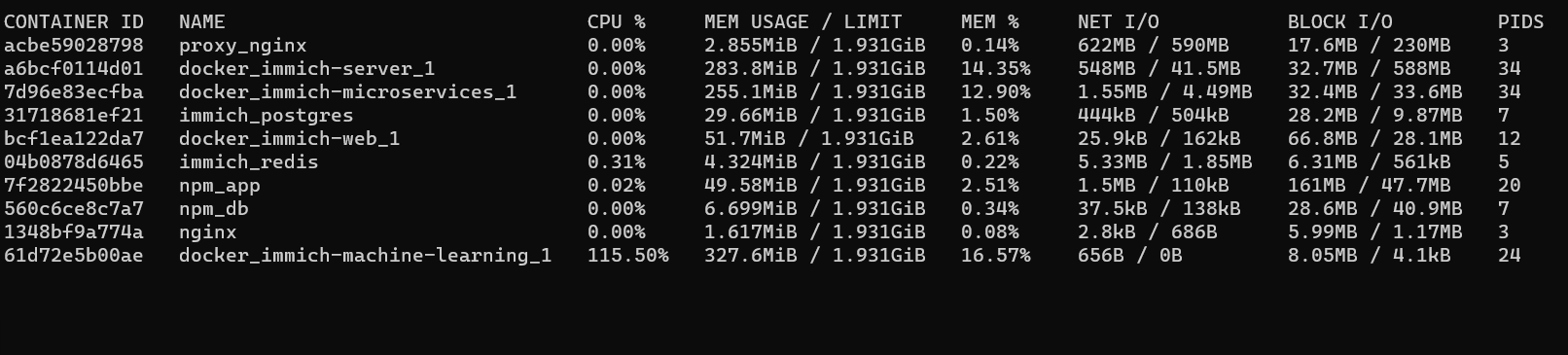
So I fired up a new VM, and install immich (using the new container layout I see) and I still have the same issue, although now it's the MACHINE LEARNING container and not MICROSERVICES. These containers have been up for about an hour at the time of the screenshot, and with about 30 images on the server. The VM has 2cores and 2GB RAM, same host HW if that makes any difference.
@alextran1502 commented on GitHub (Jun 16, 2022):
@darrylgibbs no problem, did you have a chance to run it on a different VM?
@darrylgibbs commented on GitHub (Jun 16, 2022):
@alextran1502 This was a different VM, but on the same Proxmox host. If I recall, you said it would have high usage during the upload period, but would it continue on for longer due to my slow hardware?
The main VM I was using, still has the software running, CPU set to 30%, but it still maxing out that 30% a week later.
@alextran1502 commented on GitHub (Jun 16, 2022):
Thank you, on the new VM instance, after you upload all the photos/videos, when you navigate to the
Searchtab on the mobile app, do you see anything on the rowThings?@darrylgibbs commented on GitHub (Jun 16, 2022):
For both PLACES and THINGS it just says "No object info available."
Some of the images I uploaded are of dining room tables and chairs, so I guess if it were to object scan, those should be fairly easy to pick up.
@alextran1502 commented on GitHub (Jun 17, 2022):
@darrylgibbs so probably somethings with that container cannot run on your machine. Is there anything strange you able to observe from the log of that container?
@darrylgibbs commented on GitHub (Jun 17, 2022):
Other than this, no:
What function will I loose without that container? Object recognition?
@alextran1502 commented on GitHub (Jun 17, 2022):
@darrylgibbs ohhh the container is not event starting up! It keeps restarting so that is why the CPU usage is high. You mentioned that you are using Promox right? Have you tried setting the CPU to host? Refer to the last section in Readme!
@darrylgibbs commented on GitHub (Jun 17, 2022):
Ah man, I forgot about that! Previously I used Immich on my Pi4, and that wasn't a concern for me then, and then I forgot about it.
It seems my CPU doesn't support AVX/AVX2 which is SUCH A BUMMER!!! Sorry for wasting your time instead of RTMF!
Either way, fantastic project you have here, and I'll use it regardless!